

Best picks
Best Thermal Cameras for Home Heat-Loss Checks
Buy, Borrow or Rent?
Choose a thermal camera for home heat-loss checks, or borrow first. Compare three cameras, decode wall and ceiling patterns, and use our reusable room log.
By thisMETER EditorialUpdated November 3, 20269 min read
On this page · Buy, borrow, rent or commission a survey?
For a one-house heat-loss check, try borrowing or renting before buying, and commission an energy assessment when you need measured leakage or a repair plan. If you expect repeat use, our purchase pick is the TOPDON TC001 Max for a supported phone; choose the Klein TI290 for standalone room checks or the FLIR C8 for temperature-data records. This is a document-based shortlist; the inspection workflow below matters as much as the camera.
Buy, borrow, rent or commission a survey?
Borrow
- Our recommendation
- Start here for an initial home walkthrough
- Check before committing
- Eligibility, waiting list, exact camera and phone support, return deadline
Rent
- Our recommendation
- Consider it when borrowing cannot fit suitable scanning weather
- Check before committing
- Model, native detector, included accessories, image export, weather-related rescheduling
Buy
- Our recommendation
- Choose ownership for repeat checks before and after work
- Check before committing
- Host compatibility, standalone controls, saved files and reporting needs
Professional assessment
- Our recommendation
- Choose this before substantial repairs or when findings are ambiguous
- Check before committing
- Certified assessor, infrared scope, calibrated blower door and written recommendations
Full comparison table
Swipe to compare. Row labels stay visible.
| Route | Our recommendation | Check before committing |
|---|---|---|
| Borrow | Start here for an initial home walkthrough | Eligibility, waiting list, exact camera and phone support, return deadline |
| Rent | Consider it when borrowing cannot fit suitable scanning weather | Model, native detector, included accessories, image export, weather-related rescheduling |
| Buy | Choose ownership for repeat checks before and after work | Host compatibility, standalone controls, saved files and reporting needs |
| Professional assessment | Choose this before substantial repairs or when findings are ambiguous | Certified assessor, infrared scope, calibrated blower door and written recommendations |
Scroll horizontally to see every column
| Route | Our recommendation | Check before committing |
|---|---|---|
| Borrow | Start here for an initial home walkthrough | Eligibility, waiting list, exact camera and phone support, return deadline |
| Rent | Consider it when borrowing cannot fit suitable scanning weather | Model, native detector, included accessories, image export, weather-related rescheduling |
| Buy | Choose ownership for repeat checks before and after work | Host compatibility, standalone controls, saved files and reporting needs |
| Professional assessment | Choose this before substantial repairs or when findings are ambiguous | Certified assessor, infrared scope, calibrated blower door and written recommendations |
Borrowing is a real option in some places: Fairfax County's program lets county residents reserve cameras through its public library branches. That verifies this local program, not availability near every reader; check the catalog and eligibility before traveling. PNNL also identifies hardware rental shops as a rental route, without guaranteeing local stock.
For professional help, the DOE consumer guide directs readers to utilities and state or local energy offices for certified assessors. It distinguishes a calibrated blower door's airflow measurement from infrared images that locate patterns, and says the assessor should provide findings and improvement ideas. Ask for both if you need a quantified leakage assessment.
Quick picks and comparison
Compare specifications and all conditions
TOPDON TC001 Max
- Our pick for
- Compatible phone users
- Native IR detector
- 256 × 192
- Thermal field of view
- 56° × 42°
All specifications
- Specified sensitivity
- ≤40 mK NETD
- Saved-record route
- TopInfrared mobile app; TopView on Windows
Klein TI290, current revision
- Our pick for
- Standalone room checks
- Native IR detector
- 320 × 240
- Thermal field of view
- 56° horizontal
All specifications
- Specified sensitivity
- 30 mK typical; <35 mK maximum; see conditions below
- Saved-record route
- JPG; USB or Klein Tools App over Wi-Fi
FLIR C8
- Our pick for
- Records to revisit
- Native IR detector
- 320 × 240
- Thermal field of view
- 35° × 27°
All specifications
- Specified sensitivity
- <50 mK NETD
- Saved-record route
- JPEG with 14-bit measurement data; Ignite connectivity
Full comparison table
Swipe to compare. Row labels stay visible.
| Camera | Our pick for | Native IR detector | Thermal field of view | Specified sensitivity | Saved-record route |
|---|---|---|---|---|---|
| TOPDON TC001 Max | Compatible phone users | 256 × 192 | 56° × 42° | ≤40 mK NETD | TopInfrared mobile app; TopView on Windows |
| Klein TI290, current revision | Standalone room checks | 320 × 240 | 56° horizontal | 30 mK typical; <35 mK maximum; see conditions below | JPG; USB or Klein Tools App over Wi-Fi |
| FLIR C8 | Records to revisit | 320 × 240 | 35° × 27° | <50 mK NETD | JPEG with 14-bit measurement data; Ignite connectivity |
Scroll horizontally to see every column
| Camera | Our pick for | Native IR detector | Thermal field of view | Specified sensitivity | Saved-record route |
|---|---|---|---|---|---|
| TOPDON TC001 Max | Compatible phone users | 256 × 192 | 56° × 42° | ≤40 mK NETD | TopInfrared mobile app; TopView on Windows |
| Klein TI290, current revision | Standalone room checks | 320 × 240 | 56° horizontal | 30 mK typical; <35 mK maximum; see conditions below | JPG; USB or Klein Tools App over Wi-Fi |
| FLIR C8 | Records to revisit | 320 × 240 | 35° × 27° | <50 mK NETD | JPEG with 14-bit measurement data; Ignite connectivity |
Figures come from the TC001 Max manual, current TI290 manual and C8 datasheet. Native detector dimensions, enhanced-image dimensions and screen pixels describe different things.
Best purchase for phone users: TOPDON TC001 Max
Choose the Max if a supported phone is already part of your inspection kit. Its sell sheet specifies a 256 × 192 infrared sensor, a visible-light camera for fusion, and 512 × 384 TISR-enhanced output. Compare the native figure when shopping; enhancement is a separate specification.
The lens is fixed-focus, and the manual specifies 56° × 42° coverage, ≤40 mK NETD and 25 Hz imaging. We favor that wide view for walls in cramped rooms; it does not remove the need for closer detail images.
Buy the exact Max package: the sell sheet lists the camera, USB-A-to-USB-C cable, USB-C-to-USB-C and USB-C-to-Lightning adapters, cloth, bag and manual. The manual documents TopInfrared on mobile devices and TopView on Windows, and flags a separate Android 10 app download. Check your actual phone and current app requirements before ordering; a connector match alone should not decide the purchase. Our recommendation concerns the TC001 Max, not every similarly named TC001 product.
See TOPDON's Max product and reporting guidance.
Best standalone for room checks: Klein Tools TI290
The TI290 suits readers who want a separate LCD and physical capture controls. Its current manual, 1390506 Rev 08/26 J, specifies 320 × 240 sensor pixels. Klein's product page lists 480 × 320 display pixels; those are not additional thermal detail.
Confirm the supplied revision. Klein's older manual describes a 256 × 192 detector under the same TI290 model name. Ask for the detector specification and matching manual, rather than accepting the model name alone.
The product page lists <50 mK, while the current manual gives 30 mK typical, <35 mK maximum at 300 K, F1.0, 25 Hz. The manual gives a tighter bound and explicit test conditions; the two upper limits are compatible. That last figure is a sensitivity test condition; the manual separately specifies <9 Hz frame rate. We would not rank it above the others on sensitivity alone.
The current manual specifies JPG capture and USB or Wi-Fi transfer. Its wireless workflow uses the Klein Tools App, the camera's Wi-Fi network, then Transfer Photos and Save To Phone. It restricts the camera to indoor use without moisture, rain or snow. Choose it for straightforward image records; choose the C8 when documented measurement-data stills matter.
Best for records to revisit: FLIR C8
The C8's advantage is its file workflow: the datasheet specifies 320 × 240 thermal pixels, 35° × 27° coverage, <50 mK NETD, and standard JPEG with 14-bit measurement data. It has a touchscreen, rechargeable battery and Wi-Fi connectivity to Ignite.
The Cx-series manual says thermal and visual information is saved in its thermal modes for later editing; Digital camera mode saves no thermal information. Keep the original temperature-data files when handing findings to someone else. Its USB video stream is explicitly non-radiometric, so do not assume the still-image data specification also covers video.
Minimum focus distance is 0.4 m. Check framing before close window-trim shots. For a US purchase, match C8 ordering code 18801-0101; the datasheet lists the camera, documentation, wrist strap, USB cable and pouch. It lists reporting software subscriptions separately, so confirm current entitlements rather than assuming every report feature is included.
Match the camera to walls, windows and ceilings
Use this task matrix to decide what to borrow or buy. The observation targets follow PNNL's building walkthrough; the camera priorities are our recommendations.
Exterior walls and wall/ceiling seams
- What to record
- Whole-wall view, then irregular patches and streaks
- Camera requirement to prioritize
- Wide field of view in tight rooms; native detail for follow-up shots
- Interpretation trap
- A surface pattern alone does not identify the construction fault
Windows and doors
- What to record
- Frame, sill, meeting rail and threshold, with a normal photo
- Camera requirement to prioritize
- Check focus distance and target size; preserve visible context
- Interpretation trap
- Some temperature difference at glass and edges is expected; reflections can mislead
Ceilings and attic hatch
- What to record
- Overview plus light, vent and hatch locations
- Camera requirement to prioritize
- Wide overview, then overlapping detail images with clear filenames
- Interpretation trap
- PNNL shows both displaced insulation and duct-related ceiling patterns
Full comparison table
Swipe to compare. Row labels stay visible.
| Task | What to record | Camera requirement to prioritize | Interpretation trap |
|---|---|---|---|
| Exterior walls and wall/ceiling seams | Whole-wall view, then irregular patches and streaks | Wide field of view in tight rooms; native detail for follow-up shots | A surface pattern alone does not identify the construction fault |
| Windows and doors | Frame, sill, meeting rail and threshold, with a normal photo | Check focus distance and target size; preserve visible context | Some temperature difference at glass and edges is expected; reflections can mislead |
| Ceilings and attic hatch | Overview plus light, vent and hatch locations | Wide overview, then overlapping detail images with clear filenames | PNNL shows both displaced insulation and duct-related ceiling patterns |
Scroll horizontally to see every column
| Task | What to record | Camera requirement to prioritize | Interpretation trap |
|---|---|---|---|
| Exterior walls and wall/ceiling seams | Whole-wall view, then irregular patches and streaks | Wide field of view in tight rooms; native detail for follow-up shots | A surface pattern alone does not identify the construction fault |
| Windows and doors | Frame, sill, meeting rail and threshold, with a normal photo | Check focus distance and target size; preserve visible context | Some temperature difference at glass and edges is expected; reflections can mislead |
| Ceilings and attic hatch | Overview plus light, vent and hatch locations | Wide overview, then overlapping detail images with clear filenames | PNNL shows both displaced insulation and duct-related ceiling patterns |
Sensitivity is not accuracy. FLIR's detector explainer describes NETD as the smallest resolvable temperature difference; lower values help reveal subtle differences. Its radiometry explanation separately discusses the corrections needed for temperature measurements. Check test conditions before treating unlike NETD claims as a ranking.
Focus and framing matter. FLIR's manual says useful resolution depends on detector, lens and distance. Move closer when safe if the feature is too small; keep the target within the camera's focus limits. For this shortlist, we prioritize these factors and useful saved images over maximum industrial temperature range.
Prepare the scan and avoid misleading patterns
PNNL recommends a significant indoor/outdoor temperature difference and suggests early morning or evening in winter. FLIR advises avoiding direct sunlight and checking reflections, especially on low-emissivity surfaces. Plan the weather window before collecting a loan or rental.
- Yes: Record indoor and outdoor conditions, location and the inspected surface
- Yes: Keep a normal photo and the thermal image with its temperature scale
- Partly: Recheck glass and reflective trim from another angle
- No: Compare colors across images without checking their scales
- No: Treat a cold patch as a confirmed cause or a measured leakage rate
FLIR explains that automatic scaling changes the displayed temperature span; manual or locked scales help compare similar targets. Save the scale with each observation. Its manual also warns that different construction faults can produce the same pattern, so use a suspect patch to direct follow-up.
Annotated example: a ceiling light and nearby register
This is PNNL's published Figure 8, not an image made with one of our picks. PNNL identifies heat loss around the light, air leakage in its radiating streaks, and likely missing insulation near the register. Our annotations below explain what to record.
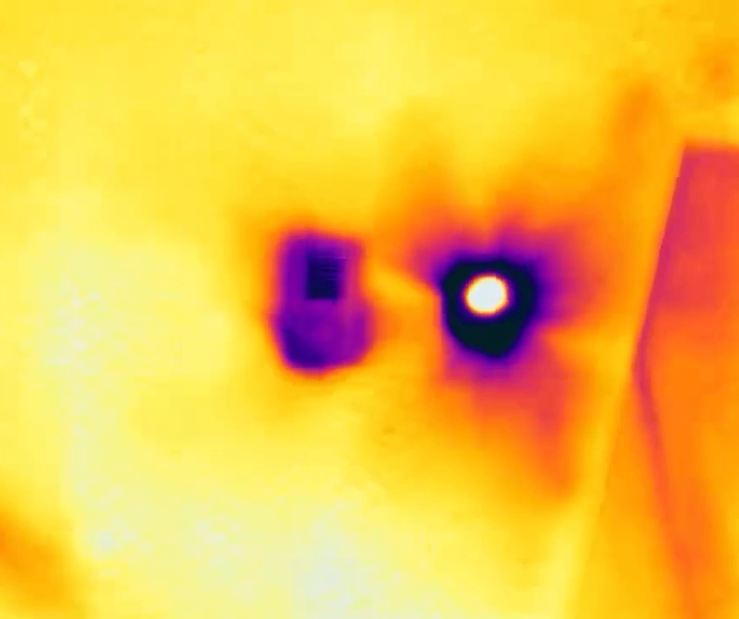
Source: PNNL, Look for Missing Insulation Using Thermal Imaging, Figure 8.
Dark region around the light
PNNL identifies significant heat loss here. Record its location and shape.
Streaks radiating from the light
PNNL identifies these as air leakage. Record the streaking separately from the dark region.
Patch beside the register
PNNL says likely missing insulation, with less streaking. Preserve that uncertainty in the record.
For your own house, write “suspected air leakage near ceiling light; assessor to confirm” rather than “insulation failure confirmed.” FLIR's warning about similar-looking faults still applies. The image is an interpretation lesson, not a comparison of camera performance.
Blank room log: save something another person can interpret
Copy this for each area. PNNL recommends recording locations and taking reference photos; DOE recommends collecting comfort complaints before an assessment. The extra fields below are our suggested record format, informed by FLIR's guidance on scales and measurement settings.
Room, wall direction and exact feature
- Your record
- __________
Date/time; camera model and revision
- Your record
- __________
Indoor/outdoor temperatures; sunlight and weather
- Your record
- __________
Heating status; normal conditions or assessor's pressure test
- Your record
- __________
Distance, surface material and emissivity setting
- Your record
- __________
Palette, temperature scale and displayed readings
- Your record
- __________
Thermal filename and matching ordinary-photo filename
- Your record
- __________
Observed shape; suspected cause; alternative explanation
- Your record
- __________
Confirmation needed; responsible person; repeat-scan conditions
- Your record
- __________
Full comparison table
Swipe to compare. Row labels stay visible.
| Field | Your record |
|---|---|
| Room, wall direction and exact feature | __________ |
| Date/time; camera model and revision | __________ |
| Indoor/outdoor temperatures; sunlight and weather | __________ |
| Heating status; normal conditions or assessor's pressure test | __________ |
| Distance, surface material and emissivity setting | __________ |
| Palette, temperature scale and displayed readings | __________ |
| Thermal filename and matching ordinary-photo filename | __________ |
| Observed shape; suspected cause; alternative explanation | __________ |
| Confirmation needed; responsible person; repeat-scan conditions | __________ |
Scroll horizontally to see every column
| Field | Your record |
|---|---|
| Room, wall direction and exact feature | __________ |
| Date/time; camera model and revision | __________ |
| Indoor/outdoor temperatures; sunlight and weather | __________ |
| Heating status; normal conditions or assessor's pressure test | __________ |
| Distance, surface material and emissivity setting | __________ |
| Palette, temperature scale and displayed readings | __________ |
| Thermal filename and matching ordinary-photo filename | __________ |
| Observed shape; suspected cause; alternative explanation | __________ |
| Confirmation needed; responsible person; repeat-scan conditions | __________ |
Keep observation, hypothesis and confirmation separate. Before returning a borrowed camera, open the exported files on the device you will actually use and check that they match the log. For the C8, retain the original thermal-mode files for later editing.
How we choose
We compared manufacturer manuals, datasheets and government building guidance, checked November 2, 2026. Selection favors task coverage, native detector detail, focus, sensitivity conditions, host dependence and records that remain interpretable. The TI290 revision differences and sensitivity test conditions remain visible because they can change a purchase. No independent performance measurements are claimed.
For a broader shortlist, see our general thermal-camera guide. For electrical consumption tracking, continue to home energy monitors. Our measurement policy explains the distinction between manufacturer specifications and site readings.
Verdict
Start with a loan or rental for an exploratory scan of one home. Buy the TC001 Max for a compatible phone workflow, the current TI290 for standalone spot checks, or the C8 for documented temperature-data records. If you need a repair specification or quantified air leakage, make the next purchase a professional assessment.
Frequently asked questions
Can a thermal camera show where my house is losing heat?
It can reveal surface-temperature patterns associated with insulation gaps and air leakage. PNNL illustrates both in its home-inspection guidance. Treat those patterns as locations to investigate: FLIR cautions that different building faults can look alike. For measured air leakage and a prioritized improvement report, ask a certified energy assessor about a calibrated blower-door test with infrared imaging.
Can a thermal camera see through walls or windows?
No. TOPDON's TC001 Max manual says it measures surface temperatures and cannot detect heat through glass or opaque objects. A wall pattern can suggest something behind the surface, but it does not expose the wall cavity. Around windows, record the frame, sill and meeting rail; reflections can mislead, so check the view from another angle.
What resolution thermal camera do I need for home heat loss?
Our buying shortlist starts at the TC001 Max's native 256 × 192 detector; the current TI290 and C8 offer 320 × 240. These are our selection choices, not a building-inspection standard. FLIR explains that useful detail also depends on the lens, distance and target size. Check native detector dimensions before comparing enhanced image sizes or LCD resolutions.
When should I scan my house with a thermal camera?
PNNL recommends a significant indoor-to-outdoor temperature difference, with early morning or evening useful in winter. FLIR advises avoiding direct sunlight on the inspected surface. Choose a suitable weather window before booking a rental, and record the conditions with your images. Use a professional for pressure-assisted testing and for interpreting findings that will drive substantial repairs.
Related guides
Comparison · Home Energy Monitors
BLACK+DECKER TLD100 vs a Thermal Camera: Which Should You Buy?
Choose a BLACK+DECKER TLD100 or thermal camera for heat-leak checks. Compare spot alerts, saved images, working distance, phone support and complete kits.
Comparison · Home Energy Monitors
Thermal Master P1 vs P2: Which Phone Thermal Camera to Buy?
Choose Thermal Master P1 or the original P2 for your phone. Compare native resolution, app support, focus limits, packages and the P2 regional buying trap.
Comparison · Home Energy Monitors
FLIR C5 vs C8: Which Compact Thermal Camera Should You Buy?
Choose between FLIR C5 and C8 with native thermal detail, close-focus limits, temperature-data files, reporting requirements and exact package checks explained.