

Comparison
Emporia Vue 2 vs Vue 3
Should You Upgrade?
Keep a working Emporia Vue 2 or upgrade to Vue 3? Compare Ethernet, sensors, cloud access and kit contents, with clear advice for replacement versus expansion.
By thisMETER EditorialUpdated November 3, 20268 min read1 pick
On this page · Our picks at a glance
Our picks at a glance
- 1
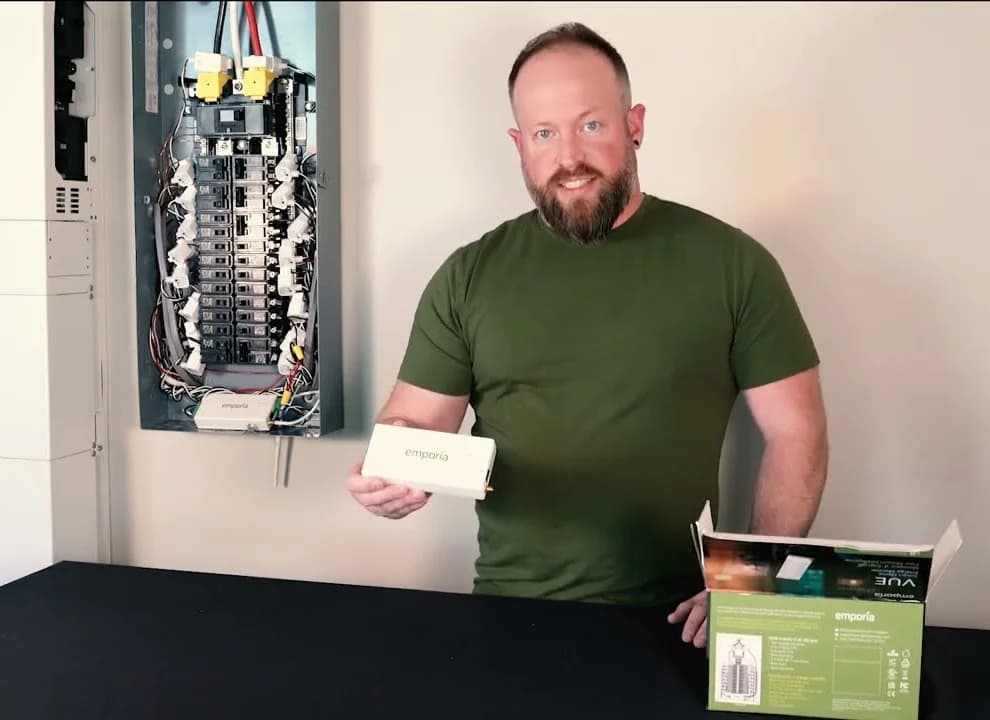
Emporia Vue 3 Home Energy Monitor
Choose for: New installation
Check before buying: Cloud-only: Emporia says it needs internet and stores no data locally
Keep a working Emporia Vue 2 unless you need a specific Vue 3 hardware change: Emporia says Gen 2 remains fully supported on the same app and cloud. Buy Vue 3 for a new installation or a replacement that needs wired Ethernet; if you only need more circuits, consider adding it alongside your existing monitor. Neither generation offers local device access, so upgrading does not solve a requirement for a local API. Emporia generation guidance, Vue 3 specifications, mixed-generation support.
Official documents checked November 2, 2026. thisMETER is reader-supported: when you buy through our links, we may earn a commission at no extra cost to you. As an Amazon Associate, thisMETER earns from qualifying purchases.
Quick picks: keep, replace or expand?
Compare specifications and all conditions
Vue 2 works and covers what you need
- Our pick
- Keep Vue 2
- Reason
- Still supported; same app and cloud
New installation
- Our pick
- Vue 3
- Reason
- Current generation; Wi-Fi or Ethernet
You specifically want a wired connection
- Our pick
- Replace with Vue 3
- Reason
- Adds Ethernet; plan a professional hardware change
You need additional circuit coverage
- Our pick
- Consider adding Vue 3
- Reason
- Mixed generations can be combined or nested
You require local access without Emporia's cloud
- Our pick
- Choose a different platform
- Reason
- Neither Vue generation provides a local API
Full comparison table
Swipe to compare. Row labels stay visible.
| Your situation | Our pick | Reason |
|---|---|---|
| Vue 2 works and covers what you need | Keep Vue 2 | Still supported; same app and cloud |
| New installation | Vue 3 | Current generation; Wi-Fi or Ethernet |
| You specifically want a wired connection | Replace with Vue 3 | Adds Ethernet; plan a professional hardware change |
| You need additional circuit coverage | Consider adding Vue 3 | Mixed generations can be combined or nested |
| You require local access without Emporia's cloud | Choose a different platform | Neither Vue generation provides a local API |
Scroll horizontally to see every column
| Your situation | Our pick | Reason |
|---|---|---|
| Vue 2 works and covers what you need | Keep Vue 2 | Still supported; same app and cloud |
| New installation | Vue 3 | Current generation; Wi-Fi or Ethernet |
| You specifically want a wired connection | Replace with Vue 3 | Adds Ethernet; plan a professional hardware change |
| You need additional circuit coverage | Consider adding Vue 3 | Mixed generations can be combined or nested |
| You require local access without Emporia's cloud | Choose a different platform | Neither Vue generation provides a local API |
These are our recommendations from Emporia's generation statement, connection specifications and multi-monitor guidance. For a broader shortlist, use our home energy monitor guide.
Emporia Vue 2 vs Vue 3: what actually changes
Vue 2
- Sales and support
- No longer sold; fully supported
- Network
- 2.4 GHz Wi-Fi, 802.11b/g/n
- Branch inputs per monitor
- Up to 16
All specifications
- Standard mains / branch CT ratings
- 200A / 50A
- Mains sensor plugs
- 3.5mm audio-style
- Branch sensor plugs
- 2.5mm audio-style
- Standard rigid mains CT opening
- 26mm
- App and cloud
- Shared Emporia platform
- Local device access / local API
- Unavailable
Vue 3
- Sales and support
- Current product line
- Network
- 2.4 GHz Wi-Fi, 802.11b/g/n, plus 10/100 Ethernet
- Branch inputs per monitor
- Up to 16
All specifications
- Standard mains / branch CT ratings
- 200A / 50A
- Mains sensor plugs
- 5mm screw-terminal
- Branch sensor plugs
- 3.8mm screw-terminal
- Standard rigid mains CT opening
- 22mm
- App and cloud
- Shared Emporia platform
- Local device access / local API
- Unavailable
Buying consequence
- Sales and support
- Keep installed hardware if it meets your needs
- Network
- Ethernet is a concrete upgrade reason
- Branch inputs per monitor
- Replacement alone does not add circuit capacity
All specifications
- Standard mains / branch CT ratings
- Same headline current ratings
- Mains sensor plugs
- Different connections
- Branch sensor plugs
- Different connections
- Standard rigid mains CT opening
- Recheck conductor fit before replacing
- App and cloud
- Keep-versus-replace is primarily a hardware decision
- Local device access / local API
- Ethernet does not change this
Full comparison table
Swipe to compare. Row labels stay visible.
| Feature | Vue 2 | Vue 3 | Buying consequence |
|---|---|---|---|
| Sales and support | No longer sold; fully supported | Current product line | Keep installed hardware if it meets your needs |
| Network | 2.4 GHz Wi-Fi, 802.11b/g/n | 2.4 GHz Wi-Fi, 802.11b/g/n, plus 10/100 Ethernet | Ethernet is a concrete upgrade reason |
| Branch inputs per monitor | Up to 16 | Up to 16 | Replacement alone does not add circuit capacity |
| Standard mains / branch CT ratings | 200A / 50A | 200A / 50A | Same headline current ratings |
| Mains sensor plugs | 3.5mm audio-style | 5mm screw-terminal | Different connections |
| Branch sensor plugs | 2.5mm audio-style | 3.8mm screw-terminal | Different connections |
| Standard rigid mains CT opening | 26mm | 22mm | Recheck conductor fit before replacing |
| App and cloud | Shared Emporia platform | Shared Emporia platform | Keep-versus-replace is primarily a hardware decision |
| Local device access / local API | Unavailable | Unavailable | Ethernet does not change this |
Scroll horizontally to see every column
| Feature | Vue 2 | Vue 3 | Buying consequence |
|---|---|---|---|
| Sales and support | No longer sold; fully supported | Current product line | Keep installed hardware if it meets your needs |
| Network | 2.4 GHz Wi-Fi, 802.11b/g/n | 2.4 GHz Wi-Fi, 802.11b/g/n, plus 10/100 Ethernet | Ethernet is a concrete upgrade reason |
| Branch inputs per monitor | Up to 16 | Up to 16 | Replacement alone does not add circuit capacity |
| Standard mains / branch CT ratings | 200A / 50A | 200A / 50A | Same headline current ratings |
| Mains sensor plugs | 3.5mm audio-style | 5mm screw-terminal | Different connections |
| Branch sensor plugs | 2.5mm audio-style | 3.8mm screw-terminal | Different connections |
| Standard rigid mains CT opening | 26mm | 22mm | Recheck conductor fit before replacing |
| App and cloud | Shared Emporia platform | Shared Emporia platform | Keep-versus-replace is primarily a hardware decision |
| Local device access / local API | Unavailable | Unavailable | Ethernet does not change this |
Hardware figures come from the Vue 2 installation guide and Vue 3 installation guide; support and platform statements come from How Your Vue Works.
Do not assume better accuracy just because the generation number increased. The Vue 3 manual specifies CT accuracy of ±2% above 4°F / −20°C. Emporia's more detailed CT accuracy article applies to Gen 3 standard rigid sensors and explains that power error varies with load power factor. It does not establish a like-for-like accuracy improvement over Vue 2. These are manufacturer specifications and findings, not thisMETER measurements.
Best for existing owners: keep a supported Vue 2
Our default is to keep a correctly working installation. Emporia expressly says Gen 2 shares the same app, cloud and offline behavior as Gen 3, despite no longer being sold. That is a stronger reason to keep it than a vague promise of newer hardware being better. Current support statement.
First name the problem you want to fix: an unreliable connection, missing circuit coverage or a sensor-fit issue. Then compare a targeted repair or expansion with replacement. Ask Emporia about a suspected faulty sensor before budgeting for an entire system; its accuracy guidance directs owners with unreasonable readings to support.
We treat Vue 2 as a reference for installed owners, not a new-purchase pick. Current support is not a promise of a particular future support period.
Best for a new installation: Emporia Vue 3
Vue 3 is the current model and our purchase pick here. Its useful differences are wired Ethernet alongside Wi-Fi and screw-terminal sensor connections, documented in the installation guide. Choose it when those features address an actual installation need, rather than replacing an otherwise satisfactory Vue 2 automatically.
Emporia
Emporia Vue 3 Home Energy Monitor
A panel-installed home energy monitor with two 200 A mains sensors and up to 16 circuit-level 50 A sensors that reports whole-home and per-circuit use, solar generation and net metering in the Emporia app.
Treat this as a Vue 3 range card: confirm the included sensor package before checkout. Emporia's page offers several kits but supplies a page-level Amazon button; that does not establish which kit the linked listing contains. The exact package attached to that listing remains unconfirmed in our official-source research. Choose a kit directly at Emporia.
Identify the generation and choose the package
An electrician can identify the sensor connections using the manuals: Vue 2 uses audio-style plugs, whereas Vue 3 uses screw-terminal plugs and has an RJ45 LAN port. Ask the electrician to confirm this during inspection; do not open a panel just to identify the generation. Vue 2 connections, Vue 3 connections.
Emporia's standard shop packages each include two 200A mains CTs. The package name counts the additional 50A branch CTs, not all the sensors in the box. Official package descriptions.
Monitor Only
- Maker SKU
- EMV3A-2P-WH
- Included branch CTs
- None
- Choose it when…
- You want total usage without individual branch readings
8 Sensors
- Maker SKU
- EMV3A-2P-8
- Included branch CTs
- Eight 50A sensors
- Choose it when…
- You have selected a smaller set of circuits
16 Sensors
- Maker SKU
- EMV3A-2P-16
- Included branch CTs
- Sixteen 50A sensors
- Choose it when…
- You need the monitor's full branch coverage
Full comparison table
Swipe to compare. Row labels stay visible.
| Standard package | Maker SKU | Included branch CTs | Choose it when… |
|---|---|---|---|
| Monitor Only | EMV3A-2P-WH | None | You want total usage without individual branch readings |
| 8 Sensors | EMV3A-2P-8 | Eight 50A sensors | You have selected a smaller set of circuits |
| 16 Sensors | EMV3A-2P-16 | Sixteen 50A sensors | You need the monitor's full branch coverage |
Scroll horizontally to see every column
| Standard package | Maker SKU | Included branch CTs | Choose it when… |
|---|---|---|---|
| Monitor Only | EMV3A-2P-WH | None | You want total usage without individual branch readings |
| 8 Sensors | EMV3A-2P-8 | Eight 50A sensors | You have selected a smaller set of circuits |
| 16 Sensors | EMV3A-2P-16 | Sixteen 50A sensors | You need the monitor's full branch coverage |
Package contents are on Emporia's shop page; its page data identifies the SKUs. All packages retain the same 16 branch-input ceiling. Three-phase installations need three mains sensors, so have the electrician check the mains count and system compatibility instead of assuming the standard package is complete. System and kit requirements.
Count monitored conductors, not just breaker labels. For multi-pole breakers, the Gen 3 manual recommends measuring each leg for best accuracy; using one leg and an app multiplier is less accurate. Solar monitoring also needs branch CTs allocated to inverter leads. Include those demands before choosing the smaller package. Multi-pole and solar guidance.
Sensors and accessories: what can you reuse?
Budget for generation-matched sensors and a harness. The different plugs in the manuals rule out a simple plug-in swap. Emporia also explicitly says its Vue 3 branch sensors do not work with Gen 2. Mixed-generation app compatibility does not establish physical accessory compatibility.
- Yes: Keep an installed Vue 2 online alongside Vue 3 using the supported app features
- No: Assume old sensor plugs will connect directly to Vue 3
- Partly: Reuse a specific extension, flexible sensor, antenna or mount only after checking its exact generation and compatibility
Have the electrician check the 26mm versus 22mm standard mains-clamp opening before committing to replacement. If rigid clamps will not fit, Emporia offers Vue 3 flexible sensors that require their own integrator and power supply. Legacy flexible sensors, extension leads and mounting parts need individual confirmation. Vue 2 dimensions, Vue 3 sensor types.
The wire-length guidance also treats the generations differently: Vue 2 uses audio extension cables, while Vue 3 uses wire retermination at terminal blocks. This is a planning distinction for the electrician, not authorization to convert old sensors.
Ethernet, cloud dependence and outages
Vue 3 Ethernet changes the network connection, not where your data is accessed. Emporia says no Vue generation has a local API or local server. The app and cloud storage are included without a subscription, but an active internet connection remains necessary for normal reporting. Cloud architecture, Vue 3 connectivity.
There is a wording difference in Emporia's documentation: the shop says the device does not support local data storage, while its offline-behavior article describes temporary buffering. Our reading is that buffering should not be confused with a user-accessible local archive.
If local access is essential, compare platforms in our home energy monitor guide before buying. Our Sense energy monitor guide covers a separate platform decision.
Add a monitor instead of replacing one
Emporia explicitly supports mixing Vue 2 and Vue 3 with Combined Vues or Nesting. Both require devices in the same Home, or all Unassigned. Mixed-generation requirements.
- Same panel, additional branch coverage: use Combined Vues. Emporia specifies mains sensors on the primary monitor only to avoid counting the mains twice.
- Independent parallel panels: use Combined Vues to aggregate their readings.
- A sub-panel fed through the main panel: use Nesting so its consumption is attributed within the upstream total rather than counted twice.
These are the scenarios in Emporia's Combined Vues versus Nesting guide. Each monitor still needs its own power/voltage harness and network connection. The multi-monitor article's blanket Wi-Fi wording omits Vue 3 Ethernet, which its product specifications and manual explicitly support; plan the connection appropriate to each generation.
Buying guide: scope a professional upgrade
Use a licensed electrician for panel installation or replacement. Emporia's manuals warn that service mains remain energized and dangerous even with the main breaker off. Vue 3 safety guidance.
Define the outcome
Keep, repair, replace for Ethernet, or expand for additional monitored circuits.
Inventory the installation
Have the electrician record the generation, sensor assignments, conductor fit and any special accessories.
Specify the complete kit
Confirm mains and branch sensors, the matching harness, panel space and the network route.
Plan the handover
Ask Emporia about existing history before retiring a device; have the electrician document the installation and confirm app configuration.
Ask for an itemized scope covering hardware, any accessory replacements, installation and configuration. Do not budget around assumed sensor reuse. The new-generation purchase should solve the problem you identified at the start.
How we choose
This is document-based research using Emporia's current shop, both installation manuals and its generation-specific help pages, checked November 2, 2026. We prioritize supported hardware, connection requirements, sensor compatibility and expansion options. Manufacturer accuracy claims are attributed; we publish no independent measurements here. Unconfirmed package identity and differences between official documents are stated above. See How we choose and How we measure.
Verdict
Keep Vue 2 when it works and covers your circuits. Choose Vue 3 for a new installation or a justified hardware replacement, especially for Ethernet. Add Vue 3 when more coverage is the real goal. Check the exact kit and generation-matched accessories with your electrician; neither generation meets a requirement for local device access.
Frequently asked questions
Is it worth upgrading an Emporia Vue 2 to Vue 3?
Keep a working Vue 2 if its connection and circuit coverage meet your needs: Emporia still fully supports it on the same app and cloud. Vue 3 is worth considering for wired Ethernet or its different sensor connections. For additional circuits, Emporia supports using Vue 2 and Vue 3 together, so replacement is not the only option.
Do Vue 2 sensors work with Vue 3?
Do not assume plug-in reuse. Vue 2 uses audio-style sensor plugs, while Vue 3 uses screw-terminal plugs. Emporia explicitly says its Vue 3 branch sensors do not work with Gen 2. Budget for generation-matched sensors and a new harness; ask Emporia to confirm any proposed accessory reuse rather than assuming an adapter or cutting off an old plug is approved.
Does Emporia Vue 3 Ethernet provide local data or a local API?
No. Ethernet gives Vue 3 a wired route to the internet. Emporia says no Vue generation has local device access, a local API or a local server; the app reads from its cloud. The offline buffer described in its support documentation does not let the app read directly from the device during an internet outage.
What is the difference between Vue 3 Monitor Only, 8 Sensors and 16 Sensors?
The standard shop packages all include the Vue monitor and two 200A mains sensors. Monitor Only adds no branch sensors; the other packages add eight or sixteen 50A branch sensors. All use the same branch-input limit, so buying fewer sensors does not mean buying a different-capacity monitor. Have an electrician count the conductors you want monitored before choosing a kit.
Is Emporia Vue 2 discontinued or unsupported?
Emporia says Vue Gen 2 is no longer sold but remains fully supported. Its current generation is Vue Gen 3. That distinction supports keeping an installed Gen 2; it does not make legacy stock our recommendation for a new installation. The statement describes current support, without promising how long future support will continue.
Related guides
Buying guide · Home Energy Monitors
FLIR ONE for iPhone and Android: Compatibility, Models and Kits
Choose FLIR ONE for iPhone or Android by exact model, app, chipset and connector. Compare part numbers, kit contents, inspection files and recording limits.
Buying guide · Home Energy Monitors
Sense Energy Monitor: Sales Ended, Support and Alternatives
Sense monitor sales have ended. Check existing-owner support, utility eligibility, and how Emporia Vue 3 compares with Shelly before buying a new monitor.
Best picks · Home Energy Monitors
Best Thermal Cameras for Home Inspection, iPhone and Android
Find a thermal camera for home inspection, iPhone or Android. Compare phone fit, native resolution, complete kits, saved temperature data and recording limits.