

Best picks
Best Ethernet Cable Testers: Wiremap, Length and PoE (Plus How to Check an HDMI Cable)
Ethernet cable testers explained: what a wiremap tester proves, when you need length and PoE testing, why none certify Cat 6, and how to check an HDMI cable.
By thisMETER EditorialUpdated November 2, 202610 min read2 picks
Our picks at a glance
- See on Amazon
- See on Amazon2
Best for installers
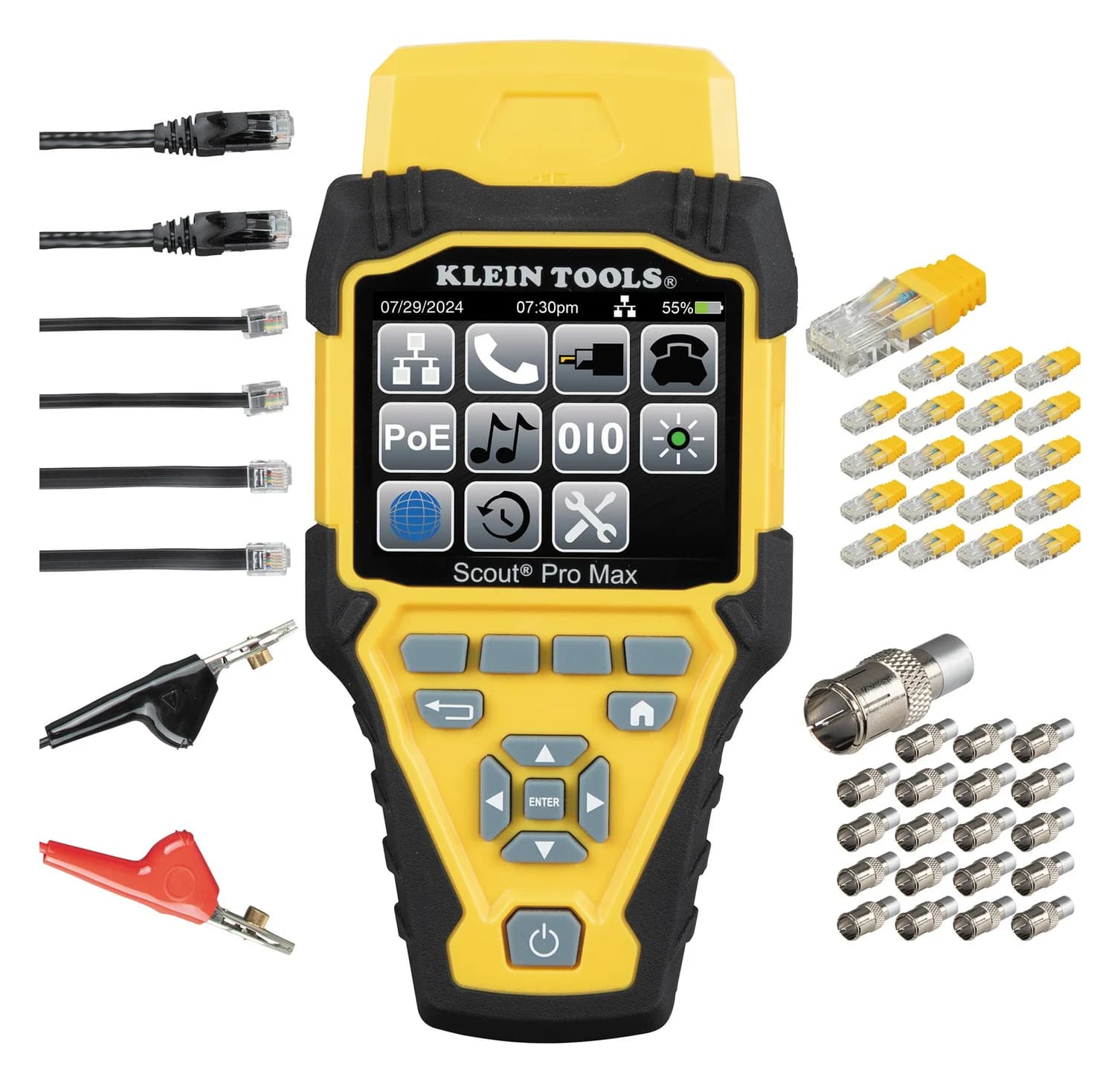
Klein Tools Scout Pro Max Network Cable Tester with Remote Set (VDV501-770)IEEE 802.3af/at/bt PoE (Types 1-4); 10/100/1G/10GBASE-T link speeds
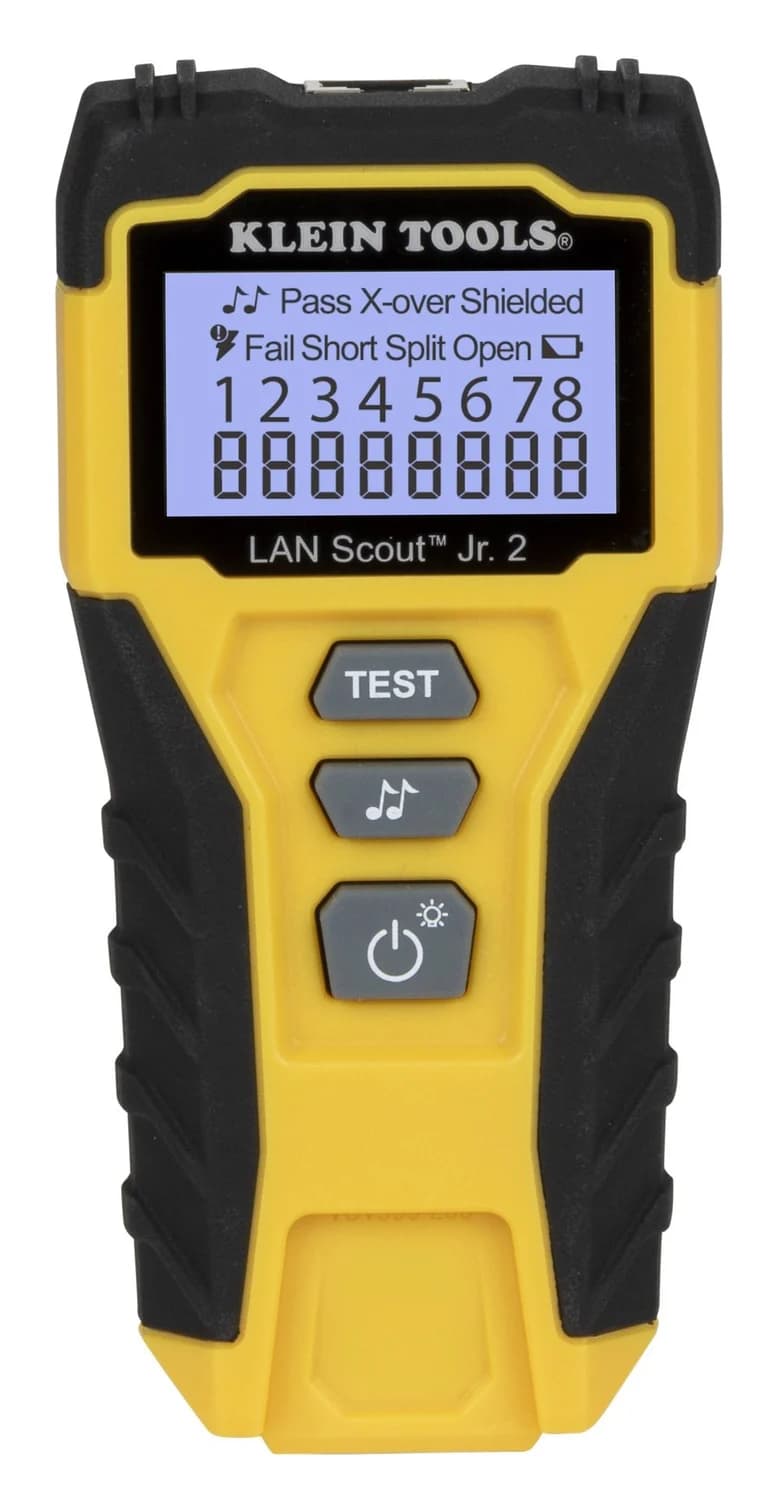
For most homes and homelabs, the Klein Tools LAN Scout Jr. 2 is the Ethernet cable tester to get: it maps all eight wires pin to pin on a backlit screen and finds opens, shorts, miswires and split pairs, the fault a simple continuity check misses. If you need to know how long a run is, how far away the break is, or whether a port supplies PoE, step up to Klein's Scout Pro Max, which measures length by TDR, tests PoE through 802.3bt and shows the speed a switch port advertises. Specs and manuals checked on Klein's site, November 1, 2026.
Neither tester can tell you a cable "is Cat 6." That takes a different class of tool, and knowing the difference saves you from buying the wrong one.
- 3Tiers of cable tester, per Fluke Networks: verification, qualification, certification
- 1.5 ftShortest cable the LAN Scout Jr. 2 checks for split pairs
- ±(2% + 3 ft)Scout Pro Max length accuracy, with the cable's VoP entered
Quick picks
| Pick | Best for | Finds | Length | PoE | Cables |
|---|---|---|---|---|---|
| Klein LAN Scout Jr. 2 | Homes, homelabs, patch cords | Opens, shorts, miswires, split pairs, shield; recognizes crossovers | No | No | RJ45 |
| Klein Scout Pro Max | Installers, long runs, PoE | Wiremap faults, with the distance to opens and shorts | By TDR: up to 2,000 ft on Klein's page, 3,000 ft for data cable in the manual | 802.3af/at/bt (Types 1 to 4), passive to 60 V | RJ45, RJ11/RJ12, coax |
Verify, qualify or certify: which tester do you need?
Fluke Networks sorts cable testers into three tiers, and "each group answers a unique question":
| Tier | The question it answers | What it involves |
|---|---|---|
| Verification | Is the cable connected correctly? | Wiremap and toning, sometimes a TDR for length to the end or to a fault |
| Qualification | Will this cabling support 100BASE-TX, VoIP or Gigabit Ethernet? | Testing what the existing cabling can carry |
| Certification | Does it comply with standards such as TIA-568-B.1 Category 6 or ISO 11801 Class E? | Needed for a warranty backed by the cable manufacturer, with a tool that manufacturer approves |
Both Klein picks are verification tools by that definition, and neither claims to certify Cat 6. For patch cords and wall jacks at home, verification answers the usual question: is it wired correctly? The Scout Pro Max's link-speed reading is useful, but it reports what the switch port advertises, not what the cable can carry.
Tap a label to explore. You can also hover or use your keyboard.
Scroll across to see every column
| Option | Question | Result |
|---|---|---|
VerificationIs the cable connected correctly?Wiremap checks continuity. Some verification tools also measure cable length or distance to a fault. Sources: 1: Fluke Networks defines verification as checking whether the cable is properly connected., 2: Verification tools perform continuity functions such as wiremap and may add TDR length or distance-to-fault measurements. | Connected correctly? | Wiremap; sometimes length or fault distance |
QualificationWill it support the network technology?Qualification checks whether existing cabling supports a technology such as Gigabit Ethernet. Sources: 3: Qualification determines whether existing cabling supports network technologies such as Gigabit Ethernet. | Supports the required technology? | Suitability for that network technology |
CertificationDoes the cabling meet a standard?Certification checks compliance with cabling standards. Only certification tools provide cabling pass or fail results to TIA or ISO standards. Sources: 4: Certification tests compliance with cabling standards, with Category 6 and ISO Class E among Fluke Networks’ examples., 5: Fluke Networks says only certification tools provide cabling pass/fail information according to TIA or ISO standards. | Meets a cabling standard? | Standards-based cable pass or fail |
Scout Pro MaxAdvertised port speedIts active-network result reports advertised speeds. This result does not certify the cable to a cabling standard. Sources: 5: Fluke Networks says only certification tools provide cabling pass/fail information according to TIA or ISO standards., 6: The Scout Pro Max manual describes its active-network speed results as advertised speeds. | What does the port advertise? | Advertised speed; no cable certification |
Bars start at zero and share a scale within each column.
A good wiremap or port-speed advertisement does not prove cable bandwidth or standards compliance.
Source notes6 references
Fluke Networks defines verification as checking whether the cable is properly connected.
www.flukenetworks.com — source for Fluke Networks defines verification as checking whether the cable is properly connected.Verification test tools allow you to see if the cable is properly connected.
Verification tools perform continuity functions such as wiremap and may add TDR length or distance-to-fault measurements.
www.flukenetworks.com — source for Verification tools perform continuity functions such as wiremap and may add TDR length or distance-to-fault measurements.Verification test tools perform basic continuity functions (for example., wiremap, toning). These verification test tools sometimes include additional features such as a Time Domain Reflectometer (TDR) for determining length to the end of a cable or to a trouble spot.
Qualification determines whether existing cabling supports network technologies such as Gigabit Ethernet.
www.flukenetworks.com — source for Qualification determines whether existing cabling supports network technologies such as Gigabit Ethernet.Qualification test tools give you the information you need to decide if existing cabling will support your technology requirements like 100BASE-TX, VoIP, Gigabit Ethernet, etc.
Certification tests compliance with cabling standards, with Category 6 and ISO Class E among Fluke Networks’ examples.
www.flukenetworks.com — source for Certification tests compliance with cabling standards, with Category 6 and ISO Class E among Fluke Networks’ examples.Certification test tools answer the question, “Does this cable comply with cabling standards? (e.g. TIA-568-B.1 Category 6 or ISO 11801 2nd Edition Class E)”
Fluke Networks says only certification tools provide cabling pass/fail information according to TIA or ISO standards.
www.flukenetworks.com — source for Fluke Networks says only certification tools provide cabling pass/fail information according to TIA or ISO standards.Certification tools are the only tools that provide Pass or Fail information on the cabling, in accordance with TIA or ISO standards.
The Scout Pro Max manual describes its active-network speed results as advertised speeds.
data.kleintools.com — source for The Scout Pro Max manual describes its active-network speed results as advertised speeds.Active Network: Indicates advertised speeds of 10/100/1G/10Gbase-t. Half or Full duplex
Best for most homes: Klein Tools LAN Scout Jr. 2
The LAN Scout Jr. 2 does the job most people need a cable tester for: plug in both ends, read the map. Klein's LAN Scout Jr. 2 page describes a large backlit LCD with pin-to-pin wiremap results and tests for open, short, miswire and split-pair faults, crossover and shield. Its manual covers shielded or unshielded Cat 7, Cat 6/6A, Cat 5e and Cat 3 cable, up to 2,000 ft long.
Klein Tools
Klein Tools LAN Scout Jr. 2 Ethernet Cable Tester (VDV526-200)
A pocket tester for unenergized RJ45 cabling with a backlit LCD wiremap and a self-storing remote that finds opens, shorts, miswires, split pairs and shield faults, with a tone generator for tracing.
Comes in 2 versions: see which to buy
- Split pairs: its Split icon lights when "the designated wire pairs are not terminated" correctly, on cables of 1.5 ft (0.5 m) or longer
- Voltage warning: it checks for voltage before each test and won't run one if it finds any, showing a "Voltage!" icon. Klein specifies unenergized cabling only: live AC may damage it and pose a safety hazard.
- Intermittent faults: Loop Mode, on by default, retests every 2 seconds
- Tone: on one wire, a pair or all eight, with Klein's VDV500-123 probe, sold separately
- Two AAA batteries included, rated for about 80 hours active and 3 years standby; the remote stores on the tester
The trade-offs: RJ45 only, and no length, PoE or link-speed readings. Its 2,000 ft figure is the longest cable it can test, not a length measurement.
Best for installers: Klein Tools Scout Pro Max
The Scout Pro Max answers the questions a wiremap can't: how long is this run, and where is it broken? Klein's Scout Pro Max page lists TDR length and distance-to-fault, 20 location remotes, active and passive PoE measurement and detection of connection speeds up to 10 Gbps, on a full-color backlit screen that stores up to 200 test results.
Klein Tools
Klein Tools Scout Pro Max Network Cable Tester with Remote Set (VDV501-770)
A color-screen voice, data and video cable tester that maps RJ45, RJ11/12 and coax wiring, measures cable length with TDR, identifies up to 20 locations, tests PoE and reports advertised link speed.
Comes in 2 versions: see which to buy
- IEEE 802.3af/at/bt PoE (Types 1-4); 10/100/1G/10GBASE-T link speeds
- Length and faults: for a short or an open, the manual says it shows the fault on the wiremap and the approximate distance to it; with more than one fault it shows MULTI and the distance to the first one, so fix that and test again
- PoE: tests IEEE 802.3af, 802.3at and 802.3bt (Types 1 to 4), plus passive PoE up to 60 V
- Link speed: shows the advertised speed of an active port: 10/100/1G/10GBASE-T
- More than Ethernet: RJ11/RJ12 phone cable, coax (F connector) and POTS line tests
- Records: saved results export over USB-C as a CSV file that shows up in a folder on your computer
- 20 RJ45 and 20 coax location remotes in the kit; three AA batteries, about 15 hours active; 2 m (6.6 ft) drop protection
The trade-offs start with length accuracy, which Klein gives as ±(2% + 3 ft or 1 m) only "with known VoP and consistent cable parameters": cable length is worked out from the cable's velocity of propagation, so enter the right VoP or the distance will be off. Klein's page headline says length up to 2,000 ft while the manual gives 3,000 ft for data cable (2,000 ft for coax). Digital toning needs the separate VDV500-223 probe. Searching for the Scout Pro 3? Klein still lists two Scout Pro 3 kits among the Scout Pro Max's related items; we cover the Pro Max.
How to test an Ethernet cable
Test unpowered cables
The LAN Scout Jr. 2 won't test a cable with voltage on it. On the Scout Pro Max, only the RJ45 jack is designed for PoE-powered cables, and Klein warns that AC-energized cables can damage any port.
Check the plugs first
Klein says improperly terminated RJ plugs can damage the tester's jacks, so look at each plug before you insert it.
Connect the tester and the remote
One end of the cable to the tester, the other to the remote. For a wall jack, run a known good patch cable from the wall plate to each unit.
Run the test and read the map
A pass, or the fault: open, short, miswire or split pair, with the pins involved.
For length, set the VoP
On the Scout Pro Max, enter the cable's velocity of propagation for an accurate distance.
How to check an HDMI cable
A pin tester can tell you whether an HDMI cable's wires connect, but not whether it carries 48 or 96 Gbps: that's the verification-versus-certification gap again. For the fastest HDMI cables, the HDMI Licensing Administrator runs a mandatory program instead. Its cable page says the Ultra96 HDMI Cable supports up to 96 Gbps and the Ultra High Speed HDMI Cable up to 48 Gbps, and every model of both must pass certification testing at an HDMI Forum Authorized Testing Center.
- Yes: A certification label on the package: HDMI LA requires one on each package or unit of sale
- Yes: The cable's name printed on its jacket, which HDMI LA also requires
- Yes: A scan of the label with a standard QR code app, which confirms the model is certified
- No: A cable sold under either name without the label: HDMI LA warns that some cables are counterfeits
And USB-C cables? A USB-C cable's capabilities live in its e-marker chip. Testers that read it, like the ones in our USB-C power meter guide, show what the cable reports it's rated for, not a measured speed. Our How we measure page explains the difference.
How we choose
We haven't tested these testers. Every pick comes from research:
- Maker documents. Fault types, cable types, length ranges and accuracy, PoE standards and battery life come from Klein's product pages and manuals, read November 1, 2026.
- Standards and definitions. Fluke Networks' verification, qualification and certification tiers, and HDMI LA's certification program.
- Fit. What each tester can't do (length, PoE, certification) counts as much as what it can.
- Safety record. The CPSC recall database, checked for both models.
Our full method is on How we choose.
Buying guide
Wiremap is the baseline. Every cable tester worth having shows the map pin by pin and flags split pairs. A box of lights that only says "pass" tells you less.
Length and distance-to-fault matter once cable is inside walls: the Scout Pro Max tells you how far along the run to look. Remember the VoP setting.
PoE matters for cameras and access points. If you install powered devices, the Scout Pro Max's 802.3bt testing tells you what a port is delivering. Plug PoE cables into its RJ45 jack only.
Certification is a different purchase. If a client or a cable manufacturer's warranty requires certified Cat 6 or Cat 6A, you need a certification tester approved by that manufacturer, not either of these.
Buying for an installer? The Scout Pro Max is in our gifts for electricians and engineers.
Verdict
The Klein Tools LAN Scout Jr. 2 is the Ethernet cable tester for most homes and homelabs: a pin-by-pin wiremap with split-pair detection, a warning that blocks testing if voltage is detected, and Loop Mode for intermittent faults. Installers and anyone running long or powered cables should get the Klein Scout Pro Max for TDR length and distance-to-fault, 802.3bt PoE testing, link speed and exportable results. Neither certifies Cat 6, and for HDMI, trust the certification label and its QR scan over any pin tester.
Frequently asked questions
Can a cable tester tell me if my cable is Cat 6 or supports 10 Gbps?
Not the wiremap testers here. Fluke Networks sorts cable testers into three tiers: verification tools check that a cable is connected correctly, qualification tools tell you whether cabling will support something like Gigabit Ethernet, and certification tools test compliance with standards such as TIA-568 Category 6. The Scout Pro Max shows the speeds a switch port advertises, which isn't the same as proving the cable can carry them.
What is a split pair?
A wiring fault where every wire reaches the right pin at the far end but the twisted pairs aren't kept together, so the cable passes a simple pin-to-pin continuity check. Klein calls it an AC signal fault. Klein's LAN Scout Jr. 2 detects split pairs on cables of 1.5 ft (0.5 m) or longer and shows a Split icon.
How do I check an HDMI cable for 4K or 8K?
Look for the certification label. HDMI Licensing Administrator says every Ultra High Speed (48 Gbps) and Ultra96 (96 Gbps) cable must carry a certification label on its package, and the label can be scanned with any standard QR code app to confirm the model is certified. The cable's name should also be printed on the jacket. HDMI LA warns that some cables are counterfeits.