

Best picks
USB-C Power Meters and Cable Testers: See What Your Charger Really Negotiates
USB-C power meters compared on voltage range, PD readout and e-marker reading: the ChargerLAB KM003C, Plugable VAMETER3, Klein ET920 and FNIRSI FNB58.
By thisMETER EditorialUpdated November 2, 202612 min read1 picks
Our picks at a glance
If you want to see what a USB-C charger actually negotiates, get the ChargerLAB POWER-Z KM003C: it reads up to 50 V and 6 A (240 W in USB PD), lists the power profiles a charger offers, reads a cable's e-marker chip and analyzes the PD conversation with its PC software. If you only want a live readout of volts, amps and watts, the flash-drive-size Plugable USBC-VAMETER3 passes 240 W charging, 10 Gbps data and video while it measures. Specs checked on each maker's site and manual, November 1, 2026.
The single most important number on any of these is the top voltage. USB-C's highest power levels run at 28, 36 and 48 V, and two popular meters stop well short of that.
Quick picks
| Pick | Best for | Max voltage | Max current | PD profiles and e-marker | Accuracy published |
|---|---|---|---|---|---|
| ChargerLAB KM003C | Seeing the negotiation | 50 V | 6 A | Yes: PDO list and e-marker reading | Gain error 0.05% / 0.25% (manual) |
| Plugable USBC-VAMETER3 | A simple inline readout at any wattage | 50 V | 6.5 A | Not listed | Within ±3% at 20 V, per Plugable |
| Klein Tools ET920 | USB-A and USB-C ports, 20 V and below | 20 V | 5 A (USB-C), 3 A (USB-A) | Not listed | ±1%, plus a "±2 Bytes" term (manual) |
| FNIRSI FNB58 | Fast-charge protocols, USB-A and Micro-USB too | 28 V | 7 A | E-marker reading; protocol detection | Not on FNIRSI's page |
| Plugable USBC-METER3-1MF | Leaving a meter on the cable | Not published | Not published | Not listed | Not published |
Source: each maker's spec page or manual; USB-IF, USB Power Delivery
Tap a label to explore. You can also hover or use your keyboard.
Shared scale: 0–50 V
USB PD referenceUp to 100W; voltage reference
USB PD previously used 20V for up to 100W. Each device takes only the power it requires, so this is not a live power reading.
Sources: 1: Before the USB PD 3.1 update, USB PD was limited to 100 W based on 20 V and 5 A cables., 7: USB PD lets each device take only the power it requires., 10: The USB-IF port-controller specification lists 20, 28, 36 and 48 Volts as nominal VBUS voltage support levels.USB PD referenceUp to 140W; voltage reference
USB PD introduced a fixed 28V level for up to 140W. This is a reference level, not a measured charging result.
Sources: 2: USB PD introduced fixed levels of 28 V, 36 V and 48 V for up to 140 W, 180 W and 240 W respectively., 10: The USB-IF port-controller specification lists 20, 28, 36 and 48 Volts as nominal VBUS voltage support levels.USB PD referenceUp to 180W; voltage reference
USB PD introduced a fixed 36V level for up to 180W. This is a reference level, not a measured charging result.
Sources: 2: USB PD introduced fixed levels of 28 V, 36 V and 48 V for up to 140 W, 180 W and 240 W respectively., 10: The USB-IF port-controller specification lists 20, 28, 36 and 48 Volts as nominal VBUS voltage support levels.USB PD referenceUp to 240W; voltage reference
USB PD introduced a fixed 48V level for up to 240W. This is a reference level, not a measured charging result.
Sources: 2: USB PD introduced fixed levels of 28 V, 36 V and 48 V for up to 140 W, 180 W and 240 W respectively., 10: The USB-IF port-controller specification lists 20, 28, 36 and 48 Volts as nominal VBUS voltage support levels.Klein ET920Maximum measurement voltage
Klein specifies a measurement range of 3 to 20V DC. The bar ends at its upper voltage limit.
Sources: 3: Klein specifies a 3–20 V DC measurement range for the ET920.FNIRSI FNB58Maximum measurement voltage
FNIRSI lists its monitored voltage range as 4~28V. The bar shows the upper end of that range.
Sources: 4: FNIRSI specifies a monitored voltage range of 4–28 V for the FNB58.ChargerLAB POWER-Z KM003CMaximum supported voltage
ChargerLAB specifies support up to 50V for the POWER-Z KM003C. Check the other requirements for the intended charging setup as well.
Sources: 5: ChargerLAB specifies support up to 50 V for the KM003C; the stated USB PD power capability is 240 W., 8: The official product page identifies the meter as ChargerLAB POWER-Z KM003C., 11: The manufacturer's manual lists the continuous VBUS input voltage range as 0 to 50V.Plugable USBC-VAMETER3Maximum operating voltage
Plugable lists a 4.5-50V operating range for the USBC-VAMETER3. The bar shows its maximum operating voltage.
Sources: 6: Plugable specifies an operating voltage range up to 50 V for the USBC-VAMETER3., 9: Plugable identifies the meter as USBC-VAMETER3.Reference rows show USB PD voltage levels; product rows show voltage ceilings, not full measurement ranges or protocol compatibility. Wattages are up-to reference levels; devices take only the power they require.
Source notes11 references
Before the USB PD 3.1 update, USB PD was limited to 100 W based on 20 V and 5 A cables.
www.usb.org — source for Before the USB PD 3.1 update, USB PD was limited to 100 W based on 20 V and 5 A cables.Prior to this update, USB PD was limited to 100W using a solution based on 20V using USB Type-C cables rated at 5A.
USB PD introduced fixed levels of 28 V, 36 V and 48 V for up to 140 W, 180 W and 240 W respectively.
www.usb.org — source for USB PD introduced fixed levels of 28 V, 36 V and 48 V for up to 140 W, 180 W and 240 W respectively.New 28V, 36V, and 48V fixed voltages enable up to 140W, 180W and 240W power levels, respectively.
Klein specifies a 3–20 V DC measurement range for the ET920.
www.kleintools.com — source for Klein specifies a 3–20 V DC measurement range for the ET920.ET920 USB Digital Meter, USB-A and USB-C 3 to 20V DC; Current: 0.05 to 3A (USB-A); 3 to 20V DC; Current: 0.05 to 5A (USB-C)
FNIRSI specifies a monitored voltage range of 4–28 V for the FNB58.
www.fnirsi.com — source for FNIRSI specifies a monitored voltage range of 4–28 V for the FNB58.Model FNB58 Monitor Voltage 4~28V
ChargerLAB specifies support up to 50 V for the KM003C; the stated USB PD power capability is 240 W.
www.power-z.com — source for ChargerLAB specifies support up to 50 V for the KM003C; the stated USB PD power capability is 240 W.It can support up to 50V 6A (240W in PD) and USB PD protocol analyzer.
Plugable specifies an operating voltage range up to 50 V for the USBC-VAMETER3.
plugable.com — source for Plugable specifies an operating voltage range up to 50 V for the USBC-VAMETER3.Supports 4.5-50V, 50mA-6.5A operating range
USB PD lets each device take only the power it requires.
www.usb.org — source for USB PD lets each device take only the power it requires.Optimize power management across multiple peripherals by allowing each device to take only the power it requires, and to get more power when required for a given application.
The official product page identifies the meter as ChargerLAB POWER-Z KM003C.
www.power-z.com — source for The official product page identifies the meter as ChargerLAB POWER-Z KM003C.ChargerLAB POWER-Z KM003C
Plugable identifies the meter as USBC-VAMETER3.
plugable.com — source for Plugable identifies the meter as USBC-VAMETER3.SKU: USBC-VAMETER3
The USB-IF port-controller specification lists 20, 28, 36 and 48 Volts as nominal VBUS voltage support levels.
www.usb.org — source for The USB-IF port-controller specification lists 20, 28, 36 and 48 Volts as nominal VBUS voltage support levels.011b: 20 Volts 100b: 28 Volts 101b: 36 Volts 110b: 48 Volts
The manufacturer's manual lists the continuous VBUS input voltage range as 0 to 50V.
docs.google.com — source for The manufacturer's manual lists the continuous VBUS input voltage range as 0 to 50V.VBUS Input Voltage (Vstd) 0 to 50 V
What a USB-C meter shows, and what it can't
An inline meter sits between the charger and the device and reports the voltage and current on the power line, and the watts that makes. That tells you what is flowing, which is not always what the charger can do. USB PD lets each device "take only the power it requires," as the USB-IF puts it, so a nearly full laptop or a phone at its own limit can draw less than the charger offers.
The USB-IF's USB Power Delivery page explains why the voltage ceiling matters. USB PD 3.1 delivers "up to 240W"; before it, USB PD "was limited to 100W using a solution based on 20V using USB Type-C cables rated at 5A." Power above that comes from new "28V, 36V, and 48V fixed voltages," for 140, 180 and 240 W, plus an adjustable mode between 15 V and the charger's maximum. So a meter that tops out at 20 V can't sit in a 140 W or 240 W charging connection.
- Yes: Any inline meter here: live voltage, current and watts on the cable it's plugged into
- Yes: KM003C and FNB58: the cable's e-marker data, and which fast-charge protocols a charger supports
- Yes: KM003C: the charger's power profiles (PDOs) and a PD protocol analyzer with its PC software
- Partly: An e-marker reading shows what a cable says it's rated for, not a measured speed or wattage
- No: No meter here certifies a cable: a readout shows one charger, one cable and one device, right now
Two more limits come from the makers. Plugable says the VAMETER3 "only taps into the power (VBUS) and ground connections" and leaves the data lines alone, which is why it passes data and video, but it also means it reads power, not the protocol. And Plugable calls it "not meant to replace professional USB-C test equipment." An inline meter also adds itself, and any extra cable, to the circuit you're measuring; our How we measure page explains why short, correctly rated cables keep readings honest.
Best for seeing the negotiation: ChargerLAB POWER-Z KM003C
The KM003C is a USB PD analyzer as well as a meter. ChargerLAB's KM003C page lists support "up to 50V 6A (240W in PD)," PD 3.2, and tests for voltage and current, capacity and energy, the e-marker, the charger's PDOs and fast-charge protocols. With the PC software it becomes a USB PD protocol analyzer, and ChargerLAB says the software can obtain 10 million data points at a time.
- 20-bit acquisition and an ARM Cortex-M4 processor; a 1.54 in screen that rotates with the meter
- Triggers PD 2.0 to 3.1 with PPS, Qualcomm QC 2.0 to QC5, FCP, SCP, AFC and UFCS, per the manual
- USB-C plug and receptacle that each support USB4 Gen 3 (bidirectional), plus a separate HID USB-C port for a PC; ChargerLAB says installing the PC software generally downloads a driver automatically
- The online manual gives a measurement gain error of 0.05% and 0.25% (two unlabelled columns), and its pins withstand 50 V
The trade-offs: the manual says plainly that "The USB tester has no reverse voltage protection." There's no USB-A port. Protocol analysis, long captures and firmware updates need the PC software, which the manual lists for Windows, with macOS "in development." And read the manual before you use it to trigger a fast-charge protocol: it warns against connecting USB power supply devices while triggering, because "The applied high voltage may burn your device or even catch fire."
Simplest inline meter: Plugable USBC-VAMETER3
The VAMETER3 is the one to leave in a bag. Plugable's VAMETER3 page gives a 4.5 to 50 V, 50 mA to 6.5 A operating range and support for USB PD 3.1 Extended Power Range (101 to 240 W), so it can sit in any USB-C charging connection up to 240 W.
- An OLED display of flow direction, amperage, voltage and approximate watts; a button flips it 180°
- Passes USB data from USB 1.1 through 3.1 Gen 2 (10 Gbps), Alt Mode video and charging; works in either direction
- 10.9 g, about the size of a flash drive; 2-year warranty
- A handy check: Plugable says that if the meter turns on with only one end connected, the attached device is "VBUS hot," which is against USB-C specifications
The trade-offs: Plugable lists no energy totals, PD profile readout or e-marker reading, and it is "Not compatible with Intel Thunderbolt 3 devices." On accuracy, Plugable says its own comparison with a professional multimeter put the VAMETER3 within ±3% of the true value at 20 V.
Best for USB-A and USB-C ports: Klein Tools ET920
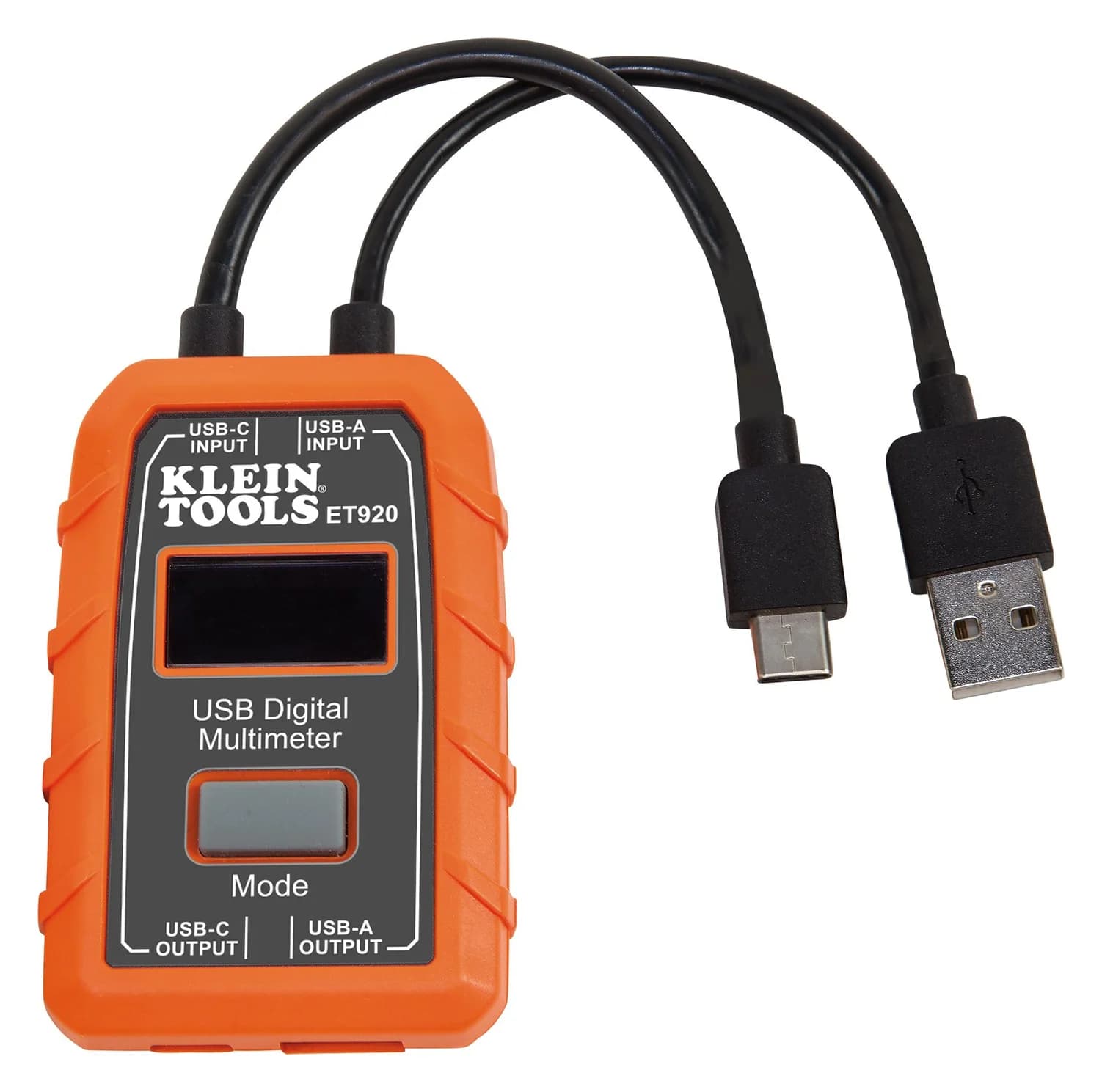
The ET920 is the tradesperson's USB meter, with USB-A and USB-C sides in one body. Klein's ET920 page lists 3 to 20 V DC, 0.05 to 3 A on USB-A and 0.05 to 5 A on USB-C, and says it works with "any USB-A and most USB-C ports, including Qualcomm Quick Charge ports." Its manual gives the accuracy as ±1% for both voltage and current, plus a second term it prints as "±2 Bytes," and says the meter has been independently tested by Intertek to applicable published standards.
Klein Tools
Klein Tools ET920 USB Digital Meter (USB-A and USB-C)
An inline USB meter with USB-A and USB-C pass-through that shows voltage, current, charge, energy and calculated resistance, powered by the port it measures.
Comes in 2 versions: see which to buy
- 20V max
- 5A max
- Counts charge delivered (to 99,999 mAh) and energy (to 999 Wh) over up to 999 hours, enough to log a full power-bank discharge
- Stores 10 readings; draws power from the port, so no batteries
- 2 m (6.6 ft) drop protection
The trade-offs: the ceiling is 20 V, and the manual warns that "Voltage above 24V DC will damage product," so keep it out of any 140 W or 240 W connection. Klein lists no PD profile or e-marker readout. The USB-A and USB-C sides "CANNOT be used simultaneously," and it "does not function as a USB-C to USB-A adapter." Currents under 50 mA read as zero, so standby draw won't show.
Best for fast-charge protocols: FNIRSI FNB58
The FNB58 covers the most connectors and protocols. FNIRSI's FNB58 page lists 4 to 28 V, 0 to 7 A and 0 to 140 W, USB-C, USB-A and Micro-USB inputs, e-marker reading, cable-resistance measurement and ripple capture at up to 4 million samples per second. It detects and triggers QC 2.0/3.0, FCP/SCP, AFC, PD 2.0/3.0, VOOC/WARP and Super VOOC protocols, which helps when a phone uses its maker's own fast-charge scheme.
The trade-offs: at 28 V it tops out at the first EPR level, so it can't carry 36 V or 48 V charging. FNIRSI's product page gives no accuracy figure in its text or its gallery images, the meter comes without a paper manual (it's a download), and FNIRSI's 2-year warranty applies only to orders from fnirsi.com. It's sold as "FNB58 Std." and "FNB58 BT" versions, so check which one you're buying.
Best always-inline meter: Plugable USBC-METER3-1MF
If you'd rather never think about a meter again, the METER3-1MF is a 1 m (3.3 ft) male-to-female USB-C extension cable with the power readout built in. Plugable's METER3-1MF page rates it for up to 240 W, 10 Gbps data and DisplayPort Alt Mode video up to 4K 60 Hz, with a braided cord and an aluminum housing.
The trade-offs: Plugable publishes no voltage or current range or accuracy for the meter, and it extends a cable rather than testing one. Plugable notes the power, data and video capabilities "are dependent on the capabilities of the USB-C cable and other devices connected to this extension cable." Data tops out at 10 Gbps, and Plugable says it is "Not compatible with Intel Thunderbolt 3, 4, or USB4 devices."
How we choose
We haven't lab-tested these meters, and we don't publish our own readings yet. Every pick comes from research:
- Maker documents. Voltage and current ranges, protocol lists, accuracy where published, and limits come from ChargerLAB's, Plugable's, Klein's and FNIRSI's product pages and manuals, read November 1, 2026.
- Standards. USB PD power levels as the USB-IF defines them.
- Fit. The top voltage decides which charging connections a meter can sit in, so it counts more than the screen.
- Safety record. The CPSC recall database, checked for every brand.
Our full method is on How we choose.
Buying guide
Match the voltage to your chargers. Up to 100 W, USB PD runs at 20 V or less, which every pick handles. Above 100 W, USB PD 3.1 uses 28, 36 or 48 V: for those connections use the KM003C or VAMETER3 (50 V), since the FNB58 stops at 28 V and the ET920 at 20 V.
Readout or analyzer? If you want to watch watts while something charges, the VAMETER3 or ET920 is enough. If you want to know why something charges slowly, you need the KM003C's PDO list and protocol view, or the FNB58's protocol detection.
USB-A matters for older gear. Only the ET920 and FNB58 test USB-A ports, and only the FNB58 has Micro-USB.
For checking network cables instead, see our Ethernet cable tester guide, and for the AC side of chargers and appliances, our plug-in watt meter guide. A USB-C meter also makes a good small present: see gifts for electricians and engineers.
Verdict
Get the ChargerLAB POWER-Z KM003C if you want to see the whole negotiation: PDOs, protocols, e-markers and a 50 V, 6 A rating. Get the Plugable USBC-VAMETER3 for a simple inline readout that works at every USB-C power level up to 240 W. The Klein ET920 suits USB-A and USB-C ports up to 20 V and logs watt-hours over a full power-bank discharge, the FNIRSI FNB58 covers the most connectors and fast-charge protocols up to 28 V, and the Plugable METER3-1MF keeps a meter on the cable permanently.
Frequently asked questions
Can a USB-C power meter tell me if my cable supports 240 W?
Only a meter that reads the cable's e-marker chip, such as the ChargerLAB KM003C or FNIRSI FNB58, and even then it shows what the cable reports it is rated for, not a measured capability. A simple inline meter like the Plugable VAMETER3 or Klein ET920 shows the power actually flowing, which tells you whether a 240 W charge is happening right now with that cable and device, not what the cable could do.
Why does my USB-C meter show less than my charger's rating?
USB Power Delivery lets each device take only the power it requires, so a laptop that's nearly full or a phone at its own limit can draw less than the charger offers. A PD analyzer like the ChargerLAB KM003C lists the power profiles the charger offers, which separates "the charger can't" from "the device didn't ask." Also check the meter's own limits: the Klein ET920 reads up to 20 V, the FNIRSI FNB58 up to 28 V.
Do I need a USB-C meter?
Not to charge things. It's for answering questions: whether a charger and cable really deliver their rated watts, how much energy a power bank actually gives, or why a laptop charges slowly. If you just want to know what to buy, a charger's and device's spec sheets answer most of it; a meter confirms it on your desk.