

Best picks
Kill A Watt and Other Plug-In Watt Meters: Measure What Anything Really Uses
Measure what an appliance really uses with a Kill A Watt or an energy-monitoring smart plug: which to buy, how to read watts vs VA, and the 0.2% fine print.
By thisMETER EditorialUpdated November 2, 202611 min read3 picks
Our picks at a glance
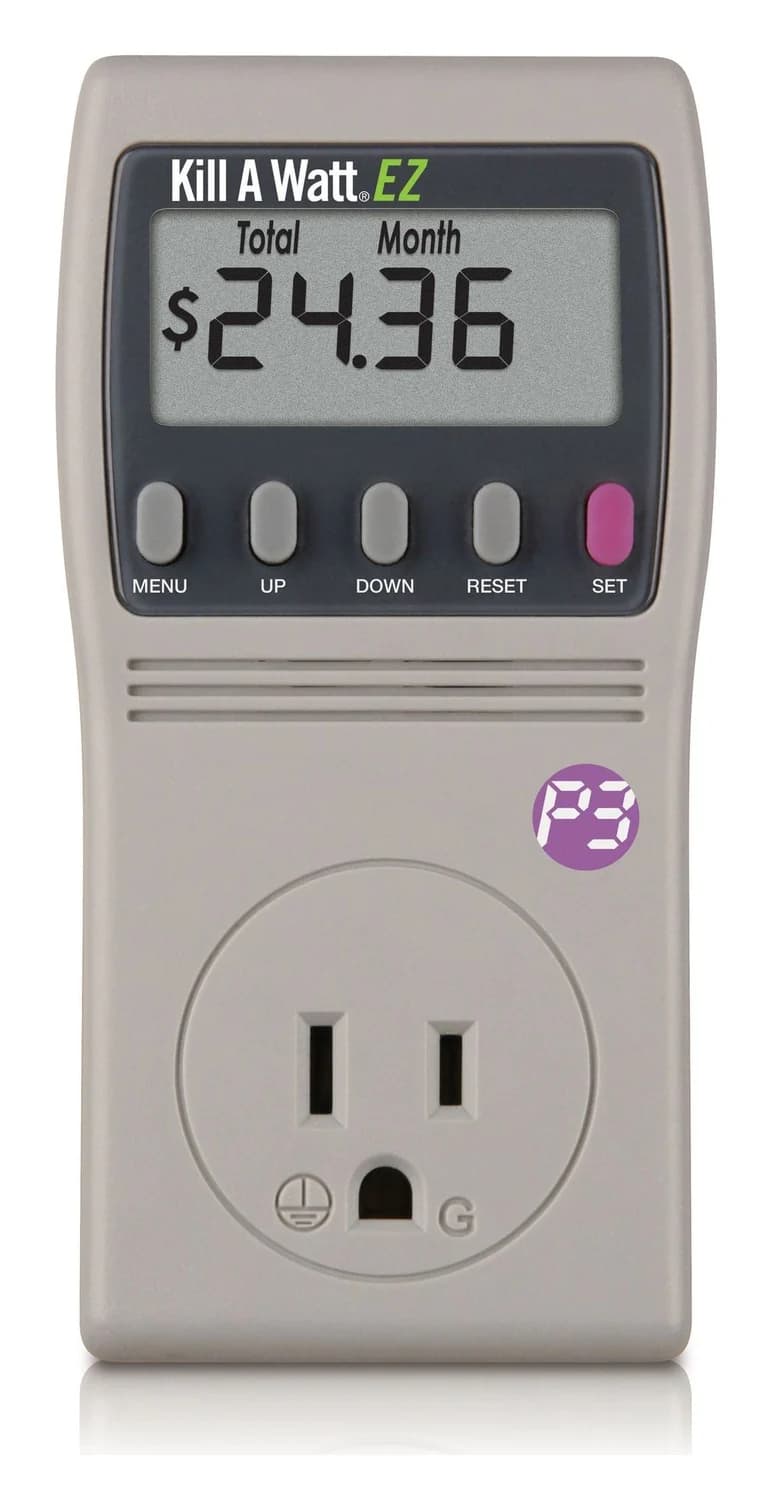
For most people, the P3 Kill A Watt EZ (P4460) is the plug-in watt meter to get: it shows watts, kilowatt-hours and power factor for anything on a 120 V plug, works out the running cost at the rate you enter, and keeps its totals when you unplug it to read it somewhere easier. The classic Kill A Watt P4400 shows the same electrical readings without the cost display, and if you'd rather log a device's use over weeks from your phone, the Emporia Energy Monitoring Smart Plug does that in an app. Specs and manuals checked on P3's and Emporia's sites, November 1, 2026.
The meter is the easy part. What makes the number useful is measuring long enough to catch a full cycle, and reading the accuracy as the manual states it rather than as the box does.
- 1875 VAThe most either Kill A Watt is rated for: 15 A at 125 V
- 0.5% / 2%Typical and maximum accuracy for watts and kWh, per the P4460 manual
- 10 AThe Emporia plug's maximum continuous load
Quick picks
| Pick | Best for | Shows | Keeps totals when unplugged | Rated load |
|---|---|---|---|---|
| Kill A Watt EZ (P4460) | Most people; running cost | Volts, amps, watts, VA, Hz, power factor, kWh, time and cost at your rate | Yes | 15 A, 1875 VA |
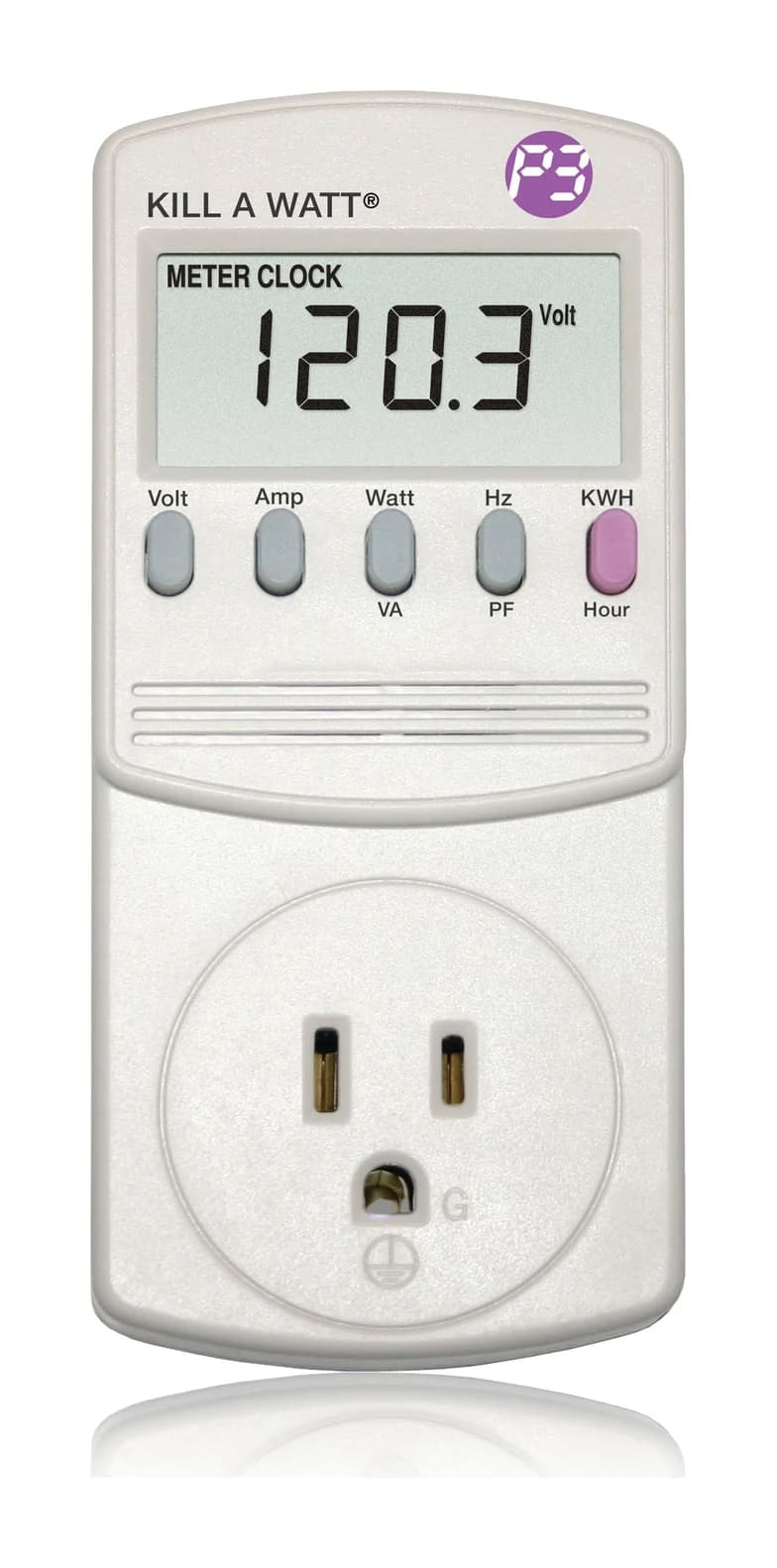
| Kill A Watt (P4400) | The simplest check | Volts, amps, watts, VA, Hz, power factor, kWh and hours | No: unplugging resets it | 15 A, 1875 VA |
| Emporia Energy Monitoring Smart Plug | Logging over weeks, schedules | Energy use in the Emporia app | Logged in the app | 10 A continuous (15 A for 1 hour a day), 1800 W at 120 V |
How to measure what something really uses
Plug the meter in, then the appliance into it
If the outlet is awkward to reach, P3 says to first connect a quality extension cord rated for the application.
Reset the totals
On the P4460, hold RESET until "rESt" appears. The P4400 resets whenever it loses power.
Leave it through full cycles
P3 says projections can't be accurate until the meter has measured some full on and off cycles, and that the off hours count too: for a TV used 4 hours a day, measure the 20 hours it's off.
Read kilowatt-hours and elapsed time
That's the energy used over the time you measured.
Multiply by your rate
Your utility's rate per kWh is on your bill. The P4460 does the sum once you enter the rate; with two or more rates, P3 suggests the one closest to your use, or an average.
The cycle point matters most for anything with a thermostat or a standby mode. P3 names refrigerators and televisions as examples: a short reading catches one state, not the average.
Watts, VA and power factor: reading the screen
Both Kill A Watts show watts and VA, and they're not the same thing. P3's P4400 manual defines watts as the active power and VA as the apparent power (volts × amps, both true RMS), and the power factor as watts divided by that product. The kilowatt-hours you're billed for build up from watts: P3 says the meter counts consumption by the kilowatt-hour, "same as your local utility."
That's why P3 rates both meters at 1875 VA, not 1,875 W: it's 15 A at 125 V. Watts equal VA only when the power factor is 1, so whenever the power factor is below 1, the watt reading sits below VA. Our How we measure page explains power factor in more detail.
Tap a label to explore. You can also hover or use your keyboard.
P4400 Kill A WattDisplay modes shown separately
The P4400 has modes for watts, VA and power factor. Its KWH/Hour key toggles cumulative energy and elapsed time.
Sources: 1: The manual is for the P4400 Kill A Watt., 2: The P4400 displays watts, VA and power factor among its measurement modes., 5: The kWh and hour modes show cumulative energy and cumulative time since power was applied.WattsW: active power
The watt reading shows active power. It is a power reading rather than an accumulated energy total.
Sources: 3: Watts are active power and VA is apparent power, calculated as RMS voltage times RMS current., 5: The kWh and hour modes show cumulative energy and cumulative time since power was applied.Volt-amperesVA: apparent power = Vrms × Arms
Apparent power is RMS voltage multiplied by RMS current. The manual labels this quantity VA.
Sources: 3: Watts are active power and VA is apparent power, calculated as RMS voltage times RMS current.Power factorPF = W / (VA)
Power factor divides active power in watts by apparent power in VA. VA is the Vrms × Arms product used in the manual's formula.
Sources: 3: Watts are active power and VA is apparent power, calculated as RMS voltage times RMS current., 4: Power factor is W divided by the product Vrms × Arms, equivalently W divided by VA.Energy totalKilowatt-Hours: cumulative since power applied
This mode shows energy used since power was applied to the unit. It accumulates over the powered period.
Sources: 5: The kWh and hour modes show cumulative energy and cumulative time since power was applied., 6: Consumption is displayed in kilowatt-hours.Elapsed timeCumulative time since power applied
The KWH/Hour key also shows cumulative powered time. Toggle the key to switch between energy and time.
Sources: 5: The kWh and hour modes show cumulative energy and cumulative time since power was applied.Read before unpluggingP4400: removing power resets counters
Removing power momentarily resets the P4400 counters. Record energy and elapsed time before unplugging.
Sources: 1: The manual is for the P4400 Kill A Watt., 5: The kWh and hour modes show cumulative energy and cumulative time since power was applied., 7: Removing power momentarily resets the P4400 counters.These are separate display modes. The reset reminder applies to the P4400.
Source notes7 references
The manual is for the P4400 Kill A Watt.
www.p3international.com — source for The manual is for the P4400 Kill A Watt.P4400 Kill A Watt TM Operation Manual
The P4400 displays watts, VA and power factor among its measurement modes.
www.p3international.com — source for The P4400 displays watts, VA and power factor among its measurement modes.The LCD shows all meter readings: Volts, Current, Watts, Frequency, Power Factor, and VA.
Watts are active power and VA is apparent power, calculated as RMS voltage times RMS current.
www.p3international.com — source for Watts are active power and VA is apparent power, calculated as RMS voltage times RMS current.The LCD will display Watts as the active power, where VA is the apparent Power. (VA=Vrms Arms)
Power factor is W divided by the product Vrms × Arms, equivalently W divided by VA.
www.p3international.com — source for Power factor is W divided by the product Vrms × Arms, equivalently W divided by VA.Factor (PF=W/Vrms Arms).
The kWh and hour modes show cumulative energy and cumulative time since power was applied.
www.p3international.com — source for The kWh and hour modes show cumulative energy and cumulative time since power was applied.The KWH/Hour is a toggle function key. Press the KWH/Hour key once to show the cumulative energy consumption since power was applied to the unit. Then press key to display the cumulative time since power was applied to the unit.
Consumption is displayed in kilowatt-hours.
www.p3international.com — source for Consumption is displayed in kilowatt-hours.Consumption will be displayed in Kilowatt-Hours
Removing power momentarily resets the P4400 counters.
www.p3international.com — source for Removing power momentarily resets the P4400 counters.To reset, remove power from unit momentarily.
Best overall: P3 Kill A Watt EZ (P4460)
The EZ adds the two things most people want from a plug-in meter: cost and memory. P3's P4460 page lists cost forecasts by week, month and year and a built-in battery backup, and its manual explains both. Cost is "calculated based on the total consumed power in KWH and the utility rate that you have set," projected per hour, day, week, month and year. When power is interrupted, the display goes blank but the totals for kWh, elapsed time and cost are kept, so you can unplug it from behind the fridge and read it at the counter. Read it straight away, though: the manual says the elapsed-time counter restarts when it's plugged back in.
P3 International
P3 International Kill A Watt EZ P4460 Electricity Usage Monitor
A plug-in meter for 120 V appliances that adds the running cost at your utility rate, with projections by hour, day, week, month and year, to the Kill A Watt's electrical readings, and keeps its totals on a backup battery.
Comes in 2 versions: see which to buy
- 15A max
- True RMS voltage and current; ETL listed, with over-current protection, per the manual
- Rated 115 V AC operating, 125 V AC maximum, 15 A and 1875 VA
- Six-month limited warranty
The 0.2% fine print. P3's page says "Accurate to within 0.2%." The manual's specification table is more specific: 0.2% is the typical figure for voltage, current is 0.3% typical, and watts and kilowatt-hours are 0.5% typical and 2% maximum. The typical figures carry a condition, "V=90V125V, A=0.2A15A," so a phone charger or a TV on standby drawing under 0.2 A is outside them. Use the meter to compare and to find the big users; don't treat a tiny standby reading as exact.
The classic: P3 Kill A Watt P4400
The P4400 is the original, and it does the electrical part as well as the EZ: P3's P4400 page lists volts, amps, watts, Hz and VA, with kilowatt-hours counted up to 9999 kWh, plus power factor on its Hz/PF key. Its manual says voltage and current are true RMS.
P3 International
P3 International Kill A Watt P4400 Electricity Usage Monitor
A plug-in meter for 120 V appliances that shows volts, amps, watts, VA, frequency, power factor and cumulative kWh for loads up to 15 A.
Comes in 2 versions: see which to buy
- 15A max
The trade-offs are in the manual. The totals reset when power is removed, so you can't unplug it to read it elsewhere. And despite the "Forecast Your Costs" line on P3's page, the P4400's keys show volts, amps, watts/VA, Hz/power factor and kWh/hours, with no cost display: you multiply kWh by your rate yourself. P3 states "0.2% Accuracy" on the page, but the P4400 manual has no accuracy table. It carries the same six-month warranty and the same 15 A, 1875 VA rating as the EZ.
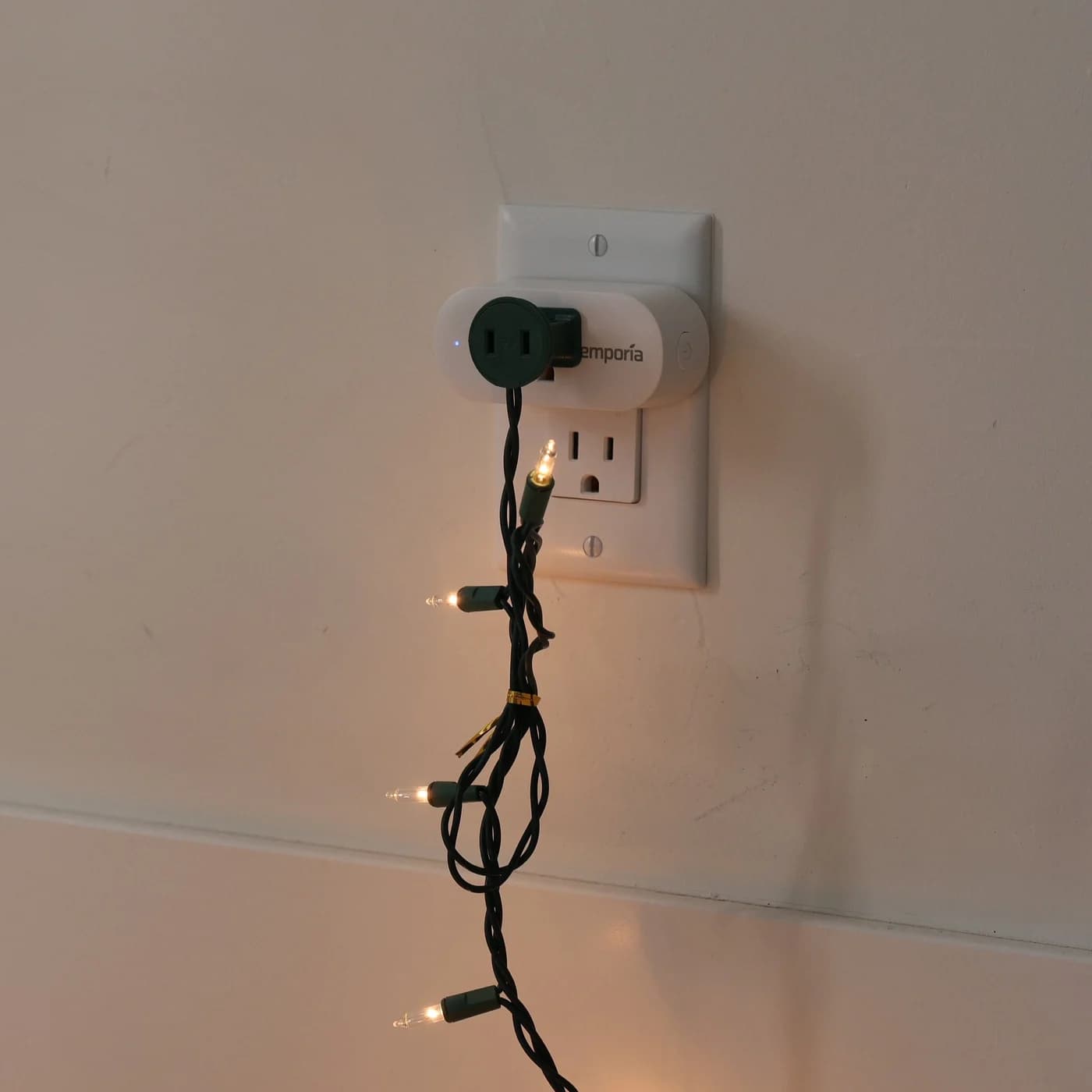
Best for logging: Emporia Energy Monitoring Smart Plug
Emporia
Emporia Energy Monitoring Smart Plug
A Wi-Fi smart plug for 120 V outlets that reports the energy use of the device plugged into it in the Emporia app, with on/off schedules, remote control and Alexa and Google Home support.
- 1800W max
- 10A max
A smart plug trades the screen for an app and a history. Emporia's smart plug page says it tracks appliance energy "down to the minute" in the Emporia app, runs on/off schedules, works with Alexa and Google voice control, and can pair with an Emporia Vue to add appliance-level data to whole-home monitoring.
- 10 A maximum continuous load, 15 A peak for up to 1 hour a day, 1800 W at 120 V
- 2.4 GHz Wi-Fi; uses 1 W itself; ETL certified by Intertek
- 1-year warranty
The trade-offs: there's no display, and Emporia publishes no metering accuracy for the plug. Emporia also recommends not using its smart plugs on refrigerators or freezers, medical equipment, pet equipment such as heat lamps and pumps, or electronics where a power failure causes problems, such as routers: for the fridge, use a Kill A Watt. The 10 A continuous limit matters too: a heater rated 1,500 W draws 12.5 A at 120 V, which is over it. Finally, Emporia recalled North American smart plugs in 2023; its recall page says only 120 V plugs purchased from Amazon or Emporia's shop between July 1, 2022 and August 1, 2023 are affected, and plugs purchased outside those dates aren't.
Kill A Watt or smart plug?
| Kill A Watt EZ (P4460) | Kill A Watt (P4400) | Emporia smart plug | |
|---|---|---|---|
| Where you read it | On its screen | On its screen | In the Emporia app |
| History | Running totals, kept through a power cut | Running totals, reset when unplugged | Logged in the app |
| Cost | Shown, at the rate you enter | Multiply kWh yourself | Not listed on the plug's page |
| Switching and schedules | No | No | Yes |
| Refrigerators and freezers | Yes | Yes | Not recommended by Emporia |
| Published accuracy | Table in the manual | "0.2%" on P3's page only | None |
| Load limit | 15 A, 1875 VA | 15 A, 1875 VA | 10 A continuous, 1800 W |
What a plug-in meter can't measure
- Anything over its rating. 15 A and 1875 VA for the Kill A Watts; 10 A continuous for the Emporia plug.
- 240 V and hardwired appliances. P3 rates both Kill A Watts for 115 V operation and 125 V maximum. For circuits you can't plug in, you need a whole-home monitor inside the panel, which Emporia, for one, says should be installed by "a skilled person such as a licensed electrician or other qualified professional": see our home energy monitor guide.
- A cord, with a clamp meter. Fluke notes that clamping around both the line and neutral conductors of a cord at the same time cancels the reading, which is why a plug-in meter is the easier tool for a single appliance. Our clamp meter guide covers what clamps are good for.
- What reaches a USB-C device. A plug-in meter reads what the outlet supplies, charger included. To see the watts on the USB-C cable itself, use a USB-C power meter.
This guide covers household watt meters for 120 V appliances, not the RF wattmeters radio operators use.
How we choose
We haven't tested these meters. Every pick comes from research:
- Maker documents. Ratings, readings, accuracy tables, warranties and limits come from P3's and Emporia's product pages and manuals, read November 1, 2026.
- Accuracy as written. We read the specification table, not the box: typical and maximum figures, and the conditions attached to them.
- Fit. What each meter can and can't be plugged into, including the maker's own exclusions.
- Safety record. The CPSC recall database and the makers' recall pages.
Our full method is on How we choose.
Buying guide
Want the cost on the screen? Only the P4460 shows it. With the P4400, multiply kWh by your rate.
Measuring something hard to reach? The P4460 keeps its totals when you unplug it, so you can read it somewhere comfortable. The P4400 forgets them.
Want a history and control? The Emporia plug logs use in its app and can switch things on schedule, but keep it off refrigerators, freezers and network gear, as Emporia advises, and under 10 A continuous.
Buying for someone who'd enjoy this? A Kill A Watt is in our gifts for electricians and engineers.
Verdict
The P3 Kill A Watt EZ (P4460) is the plug-in watt meter to get: watts, kilowatt-hours and power factor, the running cost at your rate, and totals that survive being unplugged. The Kill A Watt P4400 does the same electrical readings with less on screen, and the Emporia Energy Monitoring Smart Plug is the choice when you want a history in an app, as long as it isn't feeding a fridge or a heavy heater. Whatever you use, measure full cycles and read accuracy from the manual, not the box.
Frequently asked questions
How accurate is a Kill A Watt?
P3 advertises 0.2%, but the Kill A Watt EZ (P4460) manual shows that's the typical figure for voltage. Its specification table gives watts and kilowatt-hours as 0.5% typical and 2% maximum, and ties the typical figures to 90 to 125 V and 0.2 to 15 A, so very small loads, such as standby power, fall outside them. The P4400's manual publishes no accuracy table at all.
Can a Kill A Watt measure a 240 V appliance?
No. P3 rates both the P4400 and the P4460 for 115 V operation with a 125 V maximum, so they're for appliances that plug into a standard 120 V outlet. Anything on a 240 V circuit or hardwired into the panel needs a whole-home energy monitor, installed in the panel by a licensed electrician.
How do I work out what an appliance costs to run?
Measure its energy in kilowatt-hours over full cycles, then multiply by your utility's rate per kilowatt-hour, which is on your bill. The Kill A Watt EZ does the multiplication once you enter the rate, and P3 suggests averaging if your utility charges two or more rates. For anything that cycles, like a refrigerator, leave the meter in place through several on and off cycles first.