

Comparison
POWER-Z KM003C vs FNIRSI FNB58
PD, EPR and Cable Checks
Compare POWER-Z KM003C and FNIRSI FNB58 for EPR and cable checks, with clear picks, voltage limits, connector paths, firmware and Bluetooth variant advice.
By thisMETER EditorialUpdated November 3, 20268 min read1 pick
Our recommendation: ChargerLAB KM003C
Best for USB-C EPR
Limit: No reverse-voltage protection, per ChargerLAB's manual
On this page · Our picks at a glance
Our picks at a glance
- 1
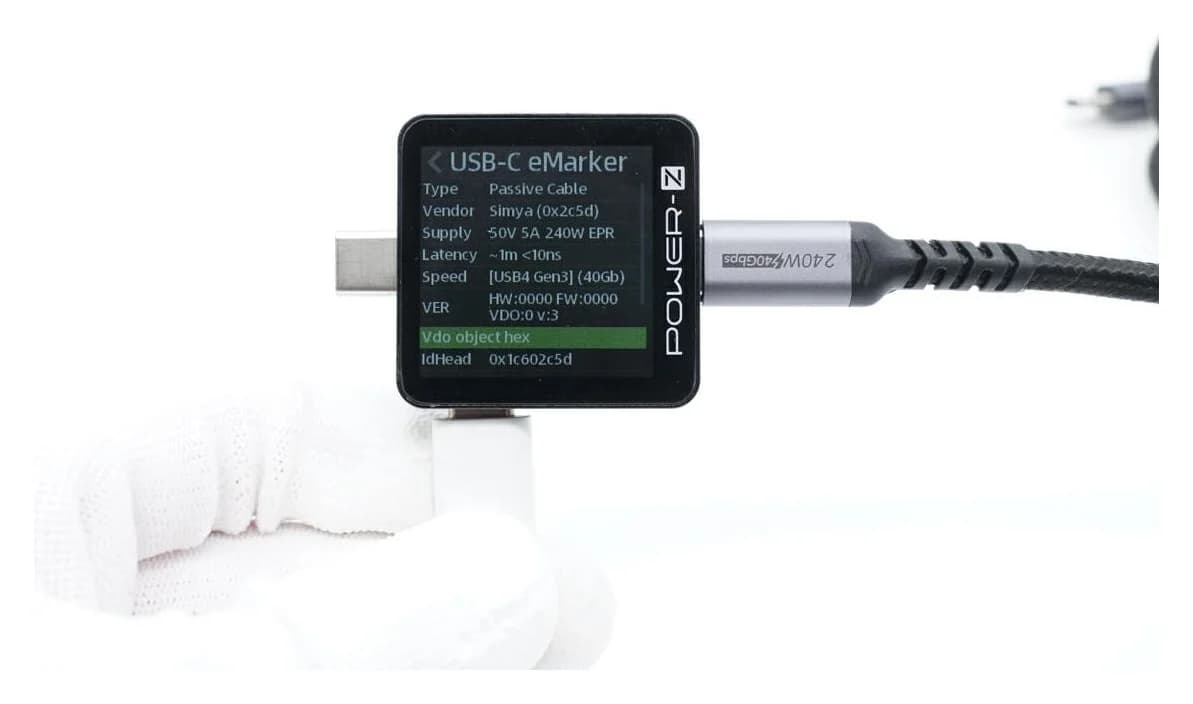
Choose for: Best for USB-C EPR
Check before buying: No reverse-voltage protection, per ChargerLAB's manual
Choose the POWER-Z KM003C for USB-C EPR charging and detailed PD diagnostics: its maker specifies 50 V, 6 A and 240 W in USB PD, plus PC protocol analysis. Choose the FNIRSI FNB58 for mixed USB-A, Micro-USB and USB-C charger work, but read the power-rating conflict below before buying it for EPR. For Bluetooth, select the FNB58 BT option and check its Android software support.
Quick picks
- USB-C laptop chargers, EPR and protocol captures: KM003C is our pick.
- Older phone chargers and mixed connectors: FNB58 is our pick for conventional USB PD work up to 100 W; choose Std. for wired use or BT for Android connectivity.
- Only want to watch charging watts? Start with the simpler options in our USB-C power-meter guide.
Voltage limits: the first buying decision
The USB-IF's PD overview identifies the older 100 W limit with 20 V and 5 A, and the EPR fixed levels as 28 V, 36 V and 48 V for up to 140 W, 180 W and 240 W respectively. The KM003C's 50 V ceiling covers those voltages; the FNB58's 28 V ceiling excludes the higher two.
Voltage range
- POWER-Z KM003C
- 0–50 V, manual
- FNIRSI FNB58
- 4–28 V, product page and manual
Current range
- POWER-Z KM003C
- 0–6 A, manual
- FNIRSI FNB58
- 0–7 A, product page and manual
Power claim
- POWER-Z KM003C
- 240 W in USB PD, product page
- FNIRSI FNB58
- 140 W on product page; 120 W in English manual
Charger profiles and triggering
- POWER-Z KM003C
- PD/PPS/EPR triggering; PDO readout
- FNIRSI FNB58
- PD trigger and profile selection; manual lists PD 2.0/3.0
Observe PD traffic
- POWER-Z KM003C
- PC PD protocol analyzer
- FNIRSI FNB58
- On-device PD Listener
Cable identification
- POWER-Z KM003C
- USB-C e-marker reader
- FNIRSI FNB58
- USB-C e-marker and DASH readers
Cable resistance
- POWER-Z KM003C
- Manual calls it in development
- FNIRSI FNB58
- Differential-voltage method; requires a constant-current load
Computer connection
- POWER-Z KM003C
- Separate USB-C HID port
- FNIRSI FNB58
- Separate Micro-USB PC port
Wireless option
- POWER-Z KM003C
- Documented PC connection is wired HID
- FNIRSI FNB58
- FNB58 BT option; Android app
Full comparison table
Swipe to compare. Row labels stay visible.
| Specification or task | POWER-Z KM003C | FNIRSI FNB58 |
|---|---|---|
| Voltage range | 0–50 V, manual | 4–28 V, product page and manual |
| Current range | 0–6 A, manual | 0–7 A, product page and manual |
| Power claim | 240 W in USB PD, product page | 140 W on product page; 120 W in English manual |
| Charger profiles and triggering | PD/PPS/EPR triggering; PDO readout | PD trigger and profile selection; manual lists PD 2.0/3.0 |
| Observe PD traffic | PC PD protocol analyzer | On-device PD Listener |
| Cable identification | USB-C e-marker reader | USB-C e-marker and DASH readers |
| Cable resistance | Manual calls it in development | Differential-voltage method; requires a constant-current load |
| Computer connection | Separate USB-C HID port | Separate Micro-USB PC port |
| Wireless option | Documented PC connection is wired HID | FNB58 BT option; Android app |
Scroll horizontally to see every column
| Specification or task | POWER-Z KM003C | FNIRSI FNB58 |
|---|---|---|
| Voltage range | 0–50 V, manual | 4–28 V, product page and manual |
| Current range | 0–6 A, manual | 0–7 A, product page and manual |
| Power claim | 240 W in USB PD, product page | 140 W on product page; 120 W in English manual |
| Charger profiles and triggering | PD/PPS/EPR triggering; PDO readout | PD trigger and profile selection; manual lists PD 2.0/3.0 |
| Observe PD traffic | PC PD protocol analyzer | On-device PD Listener |
| Cable identification | USB-C e-marker reader | USB-C e-marker and DASH readers |
| Cable resistance | Manual calls it in development | Differential-voltage method; requires a constant-current load |
| Computer connection | Separate USB-C HID port | Separate Micro-USB PC port |
| Wireless option | Documented PC connection is wired HID | FNB58 BT option; Android app |
Sources: POWER-Z product, its online manual, FNIRSI product and English manual. Range maxima are separate limits, not permission to multiply maximum voltage by maximum current.
Source: the linked manufacturer manuals and USB-IF PD overview; voltage alone does not establish protocol support
The FNB58 documentation conflict matters. Its product page says 0–140 W, while the linked English manual's technical-index table says 0–120 W. The page and manual list PD 2.0/3.0 triggering; neither text establishes full EPR triggering. We recommend the KM003C for a purchase specifically intended for 140 W EPR, and would ask FNIRSI to confirm the applicable hardware, firmware and power rating before choosing the FNB58 for that job.
Best for USB-C EPR: POWER-Z KM003C
ChargerLAB
A USB-C power tester and USB PD protocol analyzer rated to 50 V and 6 A (240 W in PD) that reads cable e-markers, lists a charger's power profiles, detects and triggers fast-charge protocols, and logs to PC software.
Check package and model options
- 240 W max
- 50 V max
- 6 A max
- USB PD 3.2 (EPR, AVS), QC4+, QC5, AFC, FCP, SCP, PE, UFCS and more
The KM003C combines live readings, charger PDO information, e-marker reading and PC PD analysis. It suits someone who needs to distinguish a charger's advertised capabilities from the charging conversation and the power actually flowing.
There is a useful distinction between old and current documentation. The product page now advertises PD 3.2, while the manual's feature list still names PD 3.1. The same manual's version history records SPR AVS support in tester V1.9.2 and PD 3.2 packet capture in PC software V2.5.0. Check installed versions before assuming that an older unit has those functions.
Its drawbacks are practical. The monitoring connectors are USB-C, and long PC captures and packet analysis use the separate HID connection. POWER-Z also acknowledges a hardware issue with some USB 2.0 peripherals, including mice and keyboards, so do not assume the analyzer is transparent in every dock connection. The manual states that it has no reverse-voltage protection. The shared support page also discusses the KM002C: its 10 A note applies to that model, while the KM003C remains specified at 6 A.
Best for mixed phone-charger work: FNIRSI FNB58
The FNB58 gives you USB-A, USB-C and Micro-USB monitoring inputs, with USB-A and USB-C outputs. Its manual lists QC 2.0/3.0, FCP, SCP, AFC, PD 2.0/3.0, VOOC/WARP and SuperVOOC triggering, plus MTK-PE automatic detection. That connector and protocol mix is the reason to choose it.
Buy the right option: FNIRSI labels the standard SKU FNB58 and the Bluetooth SKU FNB58-BT, sold as “FNB58 Std.” and “FNB58 BT.” Its USB Tester Software downloads list Windows UsbMeter and an Android Bluetooth app for this family, explicitly excluding iOS and macOS. The unrelated FNIRSI+ iOS download higher on that page does not establish FNB58 iPhone support.
Choose standard if the display and wired PC workflow cover your needs. Choose BT for the Android connection; confirm that the selected order option actually says BT. For either option, our recommendation remains conventional charging work rather than buying around the unresolved EPR power claim.
Connector paths: monitoring and computer ports are different
Follow the relevant manual's connection diagram; the labels matter more than the connector shape.
USB-C charging observation
- KM003C path
- Source → USB-C plug → meter → USB-C receptacle and cable → device
- FNB58 path
- Source and device connect to Type-C IN and OUT using separate C-to-C cables
USB-A charger work
- KM003C path
- Manual describes a cable into the USB-C receptacle for protocol testing
- FNB58 path
- USB-A input plug and USB-A output socket are provided
PC connection or auxiliary power
- KM003C path
- Separate USB-C HID port
- FNB58 path
- Separate Micro-USB PC port; distinct from the Micro-USB monitoring input
Full comparison table
Swipe to compare. Row labels stay visible.
| Job | KM003C path | FNB58 path |
|---|---|---|
| USB-C charging observation | Source → USB-C plug → meter → USB-C receptacle and cable → device | Source and device connect to Type-C IN and OUT using separate C-to-C cables |
| USB-A charger work | Manual describes a cable into the USB-C receptacle for protocol testing | USB-A input plug and USB-A output socket are provided |
| PC connection or auxiliary power | Separate USB-C HID port | Separate Micro-USB PC port; distinct from the Micro-USB monitoring input |
Scroll horizontally to see every column
| Job | KM003C path | FNB58 path |
|---|---|---|
| USB-C charging observation | Source → USB-C plug → meter → USB-C receptacle and cable → device | Source and device connect to Type-C IN and OUT using separate C-to-C cables |
| USB-A charger work | Manual describes a cable into the USB-C receptacle for protocol testing | USB-A input plug and USB-A output socket are provided |
| PC connection or auxiliary power | Separate USB-C HID port | Separate Micro-USB PC port; distinct from the Micro-USB monitoring input |
The FNB58 manual permits only one monitoring input/output pair at a time. Its PC socket is an exception for auxiliary power, but that socket must not receive more than 16 V; the PD Listener instructions normally use 5 V. For the listener, turn the PD communication switch ON and use the externally powered setup described in the manual; return the switch to OFF after PD functions. If that setup will not power the charger connection, the manual suggests flipping a C-to-C connector because of the CC wiring.
Passive monitoring, active triggering and e-marker reading
Monitoring answers “what happened with this device?” The KM003C dashboard shows live voltage, current and watts, and its PC tool provides PD analysis. FNB58's PD Listener captures the negotiation requested by the connected PD appliance. A low reading alone does not establish a faulty charger: USB PD allows a device to take only the power it requires.
Active detection answers “what can the charger offer?” FNB58's Automatic Detection actually tries protocols in turn. KM003C's charging-protocol function requests profiles and triggers voltages. These operations change the setup; they are different from observing a phone's normal negotiation. A successful trigger also does not establish sustained output at the charger's advertised wattage.
E-marker reading answers “what does this cable declare?” Both meters read the chip's information. The KM003C manual identifies current and EPR cable capabilities; the FNB58 manual describes reading and parsing the cable's messages. That is separate from a loaded charging observation or a compliance test.
Do not confuse a 240 W cable check with carrying that power through the FNB58. Its e-marker function reads cable data while its measurement voltage ceiling remains 28 V. For pin connections and sorting unknown cables, continue to our USB-C cable-tester guide.
Observe the intended setup
Use monitoring to record the device's actual voltage, current and power.
Read the cable declaration
Inspect e-marker current and EPR information separately from the charging reading.
Investigate charger capabilities
Disconnect ordinary downstream devices before an active protocol scan or trigger.
Firmware and software: check both sides
These are the official download entries found on November 2, 2026, not a promise about the firmware shipped in a box.
KM003C tester
- Official entry
- V2.0.7 in the manual's version history
- Buying implication
- Tester firmware and PC software have different version numbers
POWER-Z PC software
- Official entry
- V2.5.1 in the same history
- Buying implication
- Current support FAQ specifies Windows 10 or later
FNB58 firmware
- Official entry
- V1.15 heads the manufacturer's download catalogue
- Buying implication
- Use the FNB58 package from its model entry
FNIRSI USB software
- Official entry
- Windows UsbMeter; Android Bluetooth app
- Buying implication
- Android remote use requires the BT purchase option
Full comparison table
Swipe to compare. Row labels stay visible.
| Device or application | Official entry | Buying implication |
|---|---|---|
| KM003C tester | V2.0.7 in the manual's version history | Tester firmware and PC software have different version numbers |
| POWER-Z PC software | V2.5.1 in the same history | Current support FAQ specifies Windows 10 or later |
| FNB58 firmware | V1.15 heads the manufacturer's download catalogue | Use the FNB58 package from its model entry |
| FNIRSI USB software | Windows UsbMeter; Android Bluetooth app | Android remote use requires the BT purchase option |
Scroll horizontally to see every column
| Device or application | Official entry | Buying implication |
|---|---|---|
| KM003C tester | V2.0.7 in the manual's version history | Tester firmware and PC software have different version numbers |
| POWER-Z PC software | V2.5.1 in the same history | Current support FAQ specifies Windows 10 or later |
| FNB58 firmware | V1.15 heads the manufacturer's download catalogue | Use the FNB58 package from its model entry |
| FNIRSI USB software | Windows UsbMeter; Android Bluetooth app | Android remote use requires the BT purchase option |
Use POWER-Z technical support for the manual, download route and HID troubleshooting. Its manual calls HID driver-free, while its current FAQ says installation generally downloads a driver and offers a manual fallback. The FAQ's current Windows requirement also differs from older Windows 7 release notes. Plan around the current support requirement.
Use FNIRSI's downloads, select FNB58 and follow the update instructions with a data-capable cable connected to the PC socket. FNIRSI currently specifies Windows 10/11 for firmware updates and warns against using macOS. Do not infer new EPR abilities merely from a newer firmware filename.
Accuracy and logging: what is actually documented
The KM003C manual prints voltage and current gain-error figures of 0.05% and 0.25%, without labelling those two columns. FNB58's English manual does publish accuracy: voltage ±(0.2‰ + 2) and current ±(0.5‰ + 2). Those are per-mille terms as printed, with an additional digit term. Display resolution and ADC bit count do not establish comparative accuracy; these documents do not support an accuracy winner.
For logs, the KM003C manual describes 40 storage groups, with 10,000 points per record, and PC capture of up to 10 million data points. FNB58's manual describes 10 statistics groups and a separate voltage/current curve of up to 9 hours. Its UsbMeter manual describes saving PC records and importing offline curves. Statistics groups, curve duration and PC captures are different quantities; choose the recording workflow you need.
How we choose
This comparison uses official product pages, the manufacturers' linked manuals, software documentation, firmware catalogues and USB-IF guidance. We have no independent readings or comparative accuracy results to publish. Recommendations prioritize voltage limits, documented functions, connector paths and supported software; disagreements between official documents remain visible. See How we choose and How we measure for the site's research and measurement policies.
Verdict
Buy the KM003C for USB-C EPR and PC PD analysis. Buy the FNB58 for its mixed connectors and phone-charger protocol tools, choosing BT for Android and Std. for wired use. Until FNIRSI resolves the official 120 W versus 140 W discrepancy and confirms the required EPR behavior, the KM003C is our recommendation for that purchase.
Frequently asked questions
Can the FNIRSI FNB58 test 140 W or 240 W charging?
Do not choose it specifically for either job. FNIRSI's product page lists 140 W, but its linked English manual lists 120 W; both give a 28 V ceiling. That excludes the 36 V and 48 V EPR levels. Reading a 240 W cable's e-marker does not mean the tester can carry that power. Choose the KM003C for EPR charging diagnostics.
Does every FNIRSI FNB58 have Bluetooth?
No. FNIRSI offers FNB58 Std. and FNB58 BT, with separate product options. Choose BT if you need the Android Bluetooth connection; choose standard for measurements on the instrument and wired PC work. The USB Tester Software section names FNB58 and lists Windows and Android support, while explicitly excluding iOS and macOS. Check that section rather than the site's other app downloads.
Does POWER-Z KM003C software work on Mac or Linux?
Plan on Windows 10 or later for the supported PC workflow. POWER-Z's current support FAQ specifies that requirement, and its manual still describes macOS software as in development. The support page mentions an enthusiast Linux driver but disclaims responsibility for it. Standalone readings do not require the Windows software; buy for the documented Windows workflow if packet analysis and firmware updates matter.
Can an e-marker reader prove a cable supports fast data and charging?
It reads information supplied by the cable's chip. Both analyzers offer that function, but it is separate from monitoring actual charging and from cable compliance testing. Use the readout to check the declared current and EPR capability, then observe the intended charging setup within the equipment's limits. For pin connections and cable sorting, use the dedicated USB-C cable-tester guide.
ChargerLAB KM003C
Amazon