

Comparison
Auto-Ranging vs Manual Multimeters
Range Hold and Resolution
Choose an auto-ranging multimeter or manual model with a Klein MM420 vs MM325 comparison, range-hold advice, display examples and a range-resolution worksheet.
By thisMETER EditorialUpdated November 3, 20268 min read1 pick
Our recommendation: Klein Tools MM420
Best default
Limit: automatic ranging still requires you to select the right function and AC/DC mode.
On this page · Our picks at a glance
Our picks at a glance
- 1
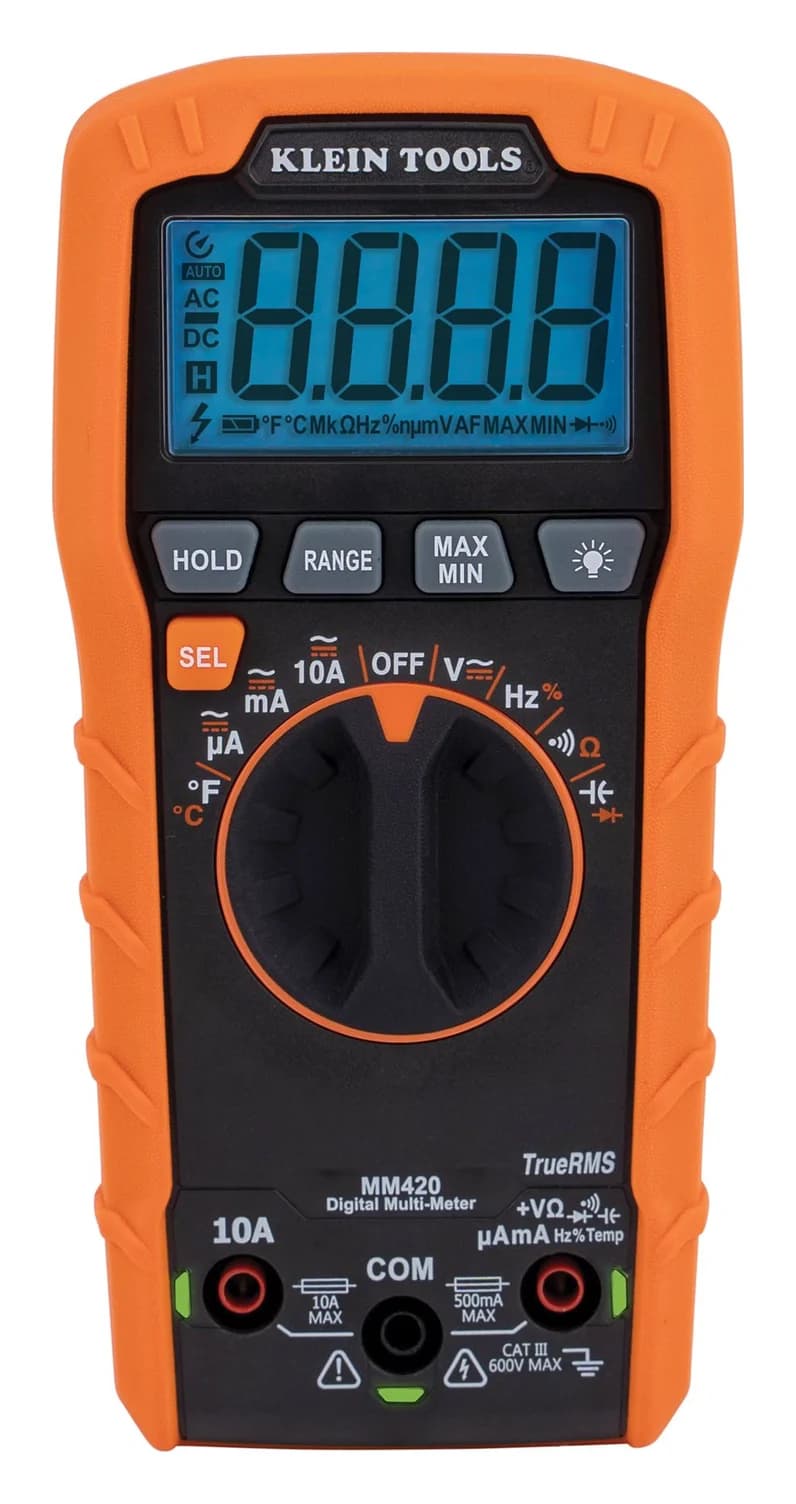
Choose for: Best default
Check before buying: automatic ranging still requires you to select the right function and AC/DC mode.
For a first meter, choose an auto-ranging multimeter with manual range control: the Klein Tools MM420 is our default because its RANGE button gives you both options. Choose the manual-ranging Klein MM325 if you specifically want dial-selected ranges and its voltage, DC-current, resistance and battery-test functions cover your jobs. Neither ranging method establishes accuracy; compare the function, range and accuracy table before buying.
Quick choice
- Want the meter to choose the scale? Get the MM420. It defaults to auto-ranging and allows manual selection when you want a fixed scale.
- Want to learn range selection on a dial? Consider the MM325. Its manual ranges make that choice explicit, but its current measurement is DC only.
- Want fewer moving decimal points? You need range control. You do not need to give up automatic ranging altogether: the MM420's RANGE override addresses that preference.
These recommendations follow Klein's MM420 manual and MM325 manual. For a broader shortlist, start with our best budget multimeters.
Auto range, manual range and AutoVolt mean different things
Auto-ranging chooses the scale within a measurement function. Fluke's range and resolution explainer describes it as selecting a range appropriate to the signal's magnitude. It saves you that selection; it does not select every setting.
Manual ranging lets you choose the scale. The MM325 uses its selector dial. The MM420 offers manual selection through its RANGE button. An auto-ranging meter can therefore offer the same fixed-range convenience without making manual selection compulsory.
Automatic AC/DC selection chooses the kind of voltage. Fluke calls the feature on its 117 AutoVolt. The MM420 instead uses SEL to switch AC/DC. True RMS is another separate specification: Klein identifies the MM420 as True RMS, independently of its range controls.
- Yes: Auto-ranging: chooses the measurement scale
- Partly: Manual range: available on an automatic meter when its controls support it
- No: Auto-ranging alone: does not mean automatic AC/DC selection
Best default: Klein Tools MM420
The MM420 is our recommendation for someone who wants convenient ranging now and room to learn manual control. Its manual says it starts in automatic mode; RANGE cycles through manually selected ranges, and holding that button returns it to automatic mode.
Klein Tools
A 4,000-count auto-ranging True RMS multimeter rated CAT III 600V that measures up to 600 V and 10 A, plus temperature, capacitance, frequency and duty cycle.
Check package and model options
- 600 V max
- 10 A max
- 4,000 counts
- CAT III 600V
Its extra functions matter more than the ranging label alone. Klein specifies True RMS, AC/DC current, capacitance, temperature, frequency and duty cycle. The standard package includes leads, a thermocouple with adapter, batteries and instructions. Lead-Alert LEDs indicate the input jacks for the selected setting.
The trade-off: automatic ranging still requires you to select the right function and AC/DC mode. Choose it for its combination of controls and functions, rather than assuming automation makes every reading more accurate.
Best for learning dial-selected ranges: Klein Tools MM325
The MM325 is a sensible alternative when you want to choose the range yourself. Its voltage instructions tell you to start at the highest voltage setting and select lower ranges to obtain higher resolution. That makes the relationship between range and display detail explicit.
It measures AC/DC voltage, DC current only, resistance, continuity and diodes, and has dedicated battery-test settings. Klein supplies leads, batteries and instructions. Its backlight and Lead-Alert LEDs remain useful conveniences even though the ranges are manual.
The trade-off: its documented functions do not include the MM420's AC current, capacitance, temperature, frequency or duty cycle. It is not simply the same meter with automatic ranging removed.
Also read accuracy carefully. The product page summarizes it as “Voltage +/- 2%”, while the manual specifies ±(0.5% + 3 digits) on the lower DC-voltage ranges. Those descriptions differ in scope; use the manual's function-specific table for a range comparison rather than treating the page's summary as a complete DC specification.
MM325 vs MM420: the differences that affect the purchase
Klein MM325
- Safety rating as marked
- CAT III 600V
- Current measurement
- Up to 10 A DC; no AC current listed
- Range selection
- Manual, using the dial
All specifications
- Display
- 2,000 counts
- DC-voltage ranges
- 200.0 mV, 2000 mV, 20.00 V, 200.0 V, 600 V
- Maximum voltage
- 600 V AC/DC
- Maximum resistance
- 2 MΩ
- Additional functions
- Battery test, diodes, continuity
- Data HOLD
- Yes
Klein MM420
- Safety rating as marked
- CAT III 600V
- Current measurement
- Up to 10 A AC/DC
- Range selection
- Automatic by default; manual RANGE override
All specifications
- Display
- 4,000 counts
- DC-voltage ranges
- 400.0 mV, 4.000 V, 40.00 V, 400.0 V, 600 V
- Maximum voltage
- 600 V AC/DC
- Maximum resistance
- 50 MΩ
- Additional functions
- Temperature, capacitance, frequency, duty cycle, diodes, continuity; True RMS
- Data HOLD
- Yes; also MAX/MIN
Full comparison table
Swipe to compare. Row labels stay visible.
| Specification | Klein MM325 | Klein MM420 |
|---|---|---|
| Range selection | Manual, using the dial | Automatic by default; manual RANGE override |
| Display | 2,000 counts | 4,000 counts |
| DC-voltage ranges | 200.0 mV, 2000 mV, 20.00 V, 200.0 V, 600 V | 400.0 mV, 4.000 V, 40.00 V, 400.0 V, 600 V |
| Maximum voltage | 600 V AC/DC | 600 V AC/DC |
| Current measurement | Up to 10 A DC; no AC current listed | Up to 10 A AC/DC |
| Maximum resistance | 2 MΩ | 50 MΩ |
| Additional functions | Battery test, diodes, continuity | Temperature, capacitance, frequency, duty cycle, diodes, continuity; True RMS |
| Data HOLD | Yes | Yes; also MAX/MIN |
| Safety rating as marked | CAT III 600V | CAT III 600V |
Scroll horizontally to see every column
| Specification | Klein MM325 | Klein MM420 |
|---|---|---|
| Range selection | Manual, using the dial | Automatic by default; manual RANGE override |
| Display | 2,000 counts | 4,000 counts |
| DC-voltage ranges | 200.0 mV, 2000 mV, 20.00 V, 200.0 V, 600 V | 400.0 mV, 4.000 V, 40.00 V, 400.0 V, 600 V |
| Maximum voltage | 600 V AC/DC | 600 V AC/DC |
| Current measurement | Up to 10 A DC; no AC current listed | Up to 10 A AC/DC |
| Maximum resistance | 2 MΩ | 50 MΩ |
| Additional functions | Battery test, diodes, continuity | Temperature, capacitance, frequency, duty cycle, diodes, continuity; True RMS |
| Data HOLD | Yes | Yes; also MAX/MIN |
| Safety rating as marked | CAT III 600V | CAT III 600V |
Sources: the two linked instruction manuals and Klein's MM325 and MM420 product pages. Counts describe display resolution, not a blanket accuracy ranking; the actual range steps are more useful for your intended reading.
The same low-voltage value on two display ranges
Consider a hypothetical steady 10 V DC input. This is an illustration of display formatting, not a reading from our own equipment. The MM420 manual specifies a 10 mV (0.01 V) step on its 40.00 V range and a 1 V step on its 600 V range. Applying those steps gives this deliberately wide comparison:
40.00 V
- Illustrative display for the same input
- 10.00 V
- Smallest displayed step
- 0.01 V
600 V
- Illustrative display for the same input
- 10 V
- Smallest displayed step
- 1 V
Full comparison table
Swipe to compare. Row labels stay visible.
| MM420 DC range | Illustrative display for the same input | Smallest displayed step |
|---|---|---|
| 40.00 V | 10.00 V | 0.01 V |
| 600 V | 10 V | 1 V |
Scroll horizontally to see every column
| MM420 DC range | Illustrative display for the same input | Smallest displayed step |
|---|---|---|
| 40.00 V | 10.00 V | 0.01 V |
| 600 V | 10 V | 1 V |
Both displays express the same voltage. The higher range discards finer detail; extra trailing zeros on the lower range show the available resolution, not proof of exact accuracy. Actual indications can differ within the maker's accuracy allowance. These are calculated display examples using the manual's DC-voltage table.
For ordinary checks, let automatic ranging choose the scale. If you choose manually, follow the meter's instructions and use a range that accommodates the input while retaining the detail you need. Fluke explains that reducing the range improves resolution as long as the signal stays within that range.
Range-resolution worksheet: compare accuracy on the right scale
Copy the function, range, resolution and accuracy from the manual before comparing meters. Resolution is the smallest displayed step. Accuracy is the allowed error under specified conditions. Both Klein manuals express accuracy as ±(percentage of reading + a number of least-significant digits).
Here is a filled worksheet for that hypothetical DC input:
Selected DC range
- MM325
- 20.00 V
- MM420
- 40.00 V
Resolution
- MM325
- 0.01 V
- MM420
- 10 mV = 0.01 V
Stated accuracy on that range
- MM325
- ±(0.5% + 3 digits)
- MM420
- ±(0.5% + 5 digits)
Digits contribution to allowance
- MM325
- 3 × 0.01 V
- MM420
- 5 × 0.01 V
Full comparison table
Swipe to compare. Row labels stay visible.
| Worksheet field | MM325 | MM420 |
|---|---|---|
| Selected DC range | 20.00 V | 40.00 V |
| Resolution | 0.01 V | 10 mV = 0.01 V |
| Stated accuracy on that range | ±(0.5% + 3 digits) | ±(0.5% + 5 digits) |
| Digits contribution to allowance | 3 × 0.01 V | 5 × 0.01 V |
Scroll horizontally to see every column
| Worksheet field | MM325 | MM420 |
|---|---|---|
| Selected DC range | 20.00 V | 40.00 V |
| Resolution | 0.01 V | 10 mV = 0.01 V |
| Stated accuracy on that range | ±(0.5% + 3 digits) | ±(0.5% + 5 digits) |
| Digits contribution to allowance | 3 × 0.01 V | 5 × 0.01 V |
These entries come from the manuals' DC-voltage tables; the last row applies their definition of a digit. The percentage term is the same for both at the same reading, but the digits contribution differs. This is why a manual meter is not automatically less accurate, and why a larger display count alone cannot decide the purchase.
For your own worksheet, multiply the reading by the stated percentage, then add the digits contribution using that range's resolution. Recalculate after changing ranges. Both manuals state their accuracy values at 18°C to 28°C and specify corrections outside that interval. Keep those conditions alongside the result rather than treating the advertised percentage as universal.
When range hold helps with changing readings
If an automatic display keeps changing scale, selecting a fixed range can make successive values easier to compare. Choose enough range for the changing input; if voltage exceeds the selected range, an overload indication can result. A fixed scale does not make an unstable signal steady.
On the MM420, RANGE keeps manual range selection active while measurements continue; HOLD freezes the displayed measurement. MAX/MIN is separate again: the manual says it tracks sampled minimum and maximum values. Use the control that answers your question: consistent scale, a frozen number, or sampled extremes.
For DC voltage, the MM420 manual describes pressing RANGE to enter manual selection, pressing it again to cycle through ranges, and holding it for more than one second to restore auto-ranging.
Enter manual selection
Press RANGE, then cycle to a range suitable for the input.
Keep watching the reading
Leave data HOLD released so the displayed measurement remains live.
Restore automatic selection
Hold RANGE for more than one second.
Check the exact model and starter package
“Klein multimeter kit” is not enough information to choose the ranging method. Compare the model number and included accessories:
- MM325 standard package: the manual-ranging meter, test leads, batteries and instructions. Choose it when those functions cover the intended work.
- MM420 standard package: the auto-ranging True RMS meter, test leads, thermocouple with adapter, batteries and instructions. The thermocouple is a meaningful package difference.
- 69355 electrical tool set: Klein lists an MM320 manual-ranging meter, an NCVT3P non-contact tester with flashlight and an RT250 GFCI receptacle tester. This is a different meter package, not an MM420 bundle.
The 69355 maker page confirms those contents. Choose a bundle because you need its tools, then check the meter itself against the comparison above. Our budget multimeter shortlist helps with that buying decision; use how to use a multimeter for the operating basics.
How we choose
This is a document-based comparison using Klein's official product pages and their linked manuals, plus Fluke's explanations of resolution and AutoVolt. The display example and worksheet are calculations from published specifications; they are not measurements from thisMETER. We judge the purchase by useful functions, range control, per-range specifications, marked safety ratings and package contents. See How we choose for the site's research approach.
Verdict
Choose the MM420 for automatic ranging with manual control available when you need it. Choose the MM325 if you deliberately want dial-selected ranges and its DC-only current measurement and other functions are sufficient. Compare accuracy on the range you will use, and check the exact meter inside any kit.
Frequently asked questions
Does an auto-ranging multimeter automatically select AC or DC?
Auto-ranging selects the measurement range, so check AC/DC selection separately. On the Klein MM420, the SEL button switches between AC and DC; automatic ranging does not make that choice for you. Fluke's AutoVolt, as fitted to the 117, is a separate feature that automatically selects AC or DC voltage.
Can you manually range an auto-ranging multimeter?
Yes, if that model supports it. For DC voltage on the Klein MM420, press RANGE to enter manual selection, then press it repeatedly to cycle through the available ranges. Hold RANGE for more than one second to return to automatic ranging. Data HOLD is different: it freezes the displayed measurement.
Are manual-ranging multimeters more accurate?
Manual ranging alone does not establish accuracy. Compare the specifications for the actual function and range. The MM325's 20.00 V DC range is specified at ±(0.5% + 3 digits), while the MM420's 40.00 V range is ±(0.5% + 5 digits). Both have a 0.01 V step, so the digits allowance differs despite the same percentage.
Does OL mean the multimeter is broken?
In voltage measurement, OL can mean the input exceeds the selected range. Check the function, range and meter limits against the manual rather than assuming a fault. In continuity testing, an open circuit can also show OL, as the MM325 manual explains. Automatic ranging does not increase a meter's maximum permitted input.
Klein Tools MM420
AmazonRelated guides
Best picks · Multimeters
Best Multimeters for Beginners: Choose a First Meter You Can Learn On
Choose a first multimeter by its controls, current ranges, jack reminders and included leads. Compare Klein MM420, MM325 and Fluke 107 for learning and gifts.
Best picks · Multimeters
Best Multimeters for HVAC: Microamps, Temperature and Complete Kits
Choose an HVAC multimeter by job: compare Fluke 116, Fieldpiece SC260 and Klein alternatives for flame sensors, clamp current, probe limits and kit contents.
Comparison · Multimeters
Fluke 101 vs 107: Current Ranges, Backlight and Regional Support
Compare the Fluke 101 and 107 by current inputs, backlight, accuracy and kit contents, with manual references and regional warranty checks before you buy.