

Comparison
Klein RT210 vs RT250
Which Receptacle Tester Should You Buy?
Choose Klein's RT210 or RT250 receptacle tester with a fault-display crosswalk, GFCI timing limits, battery advice and exact bare-tool versus kit contents.
By thisMETER EditorialUpdated November 3, 20267 min read1 pick
On this page · Our picks at a glance
Our picks at a glance
- 1
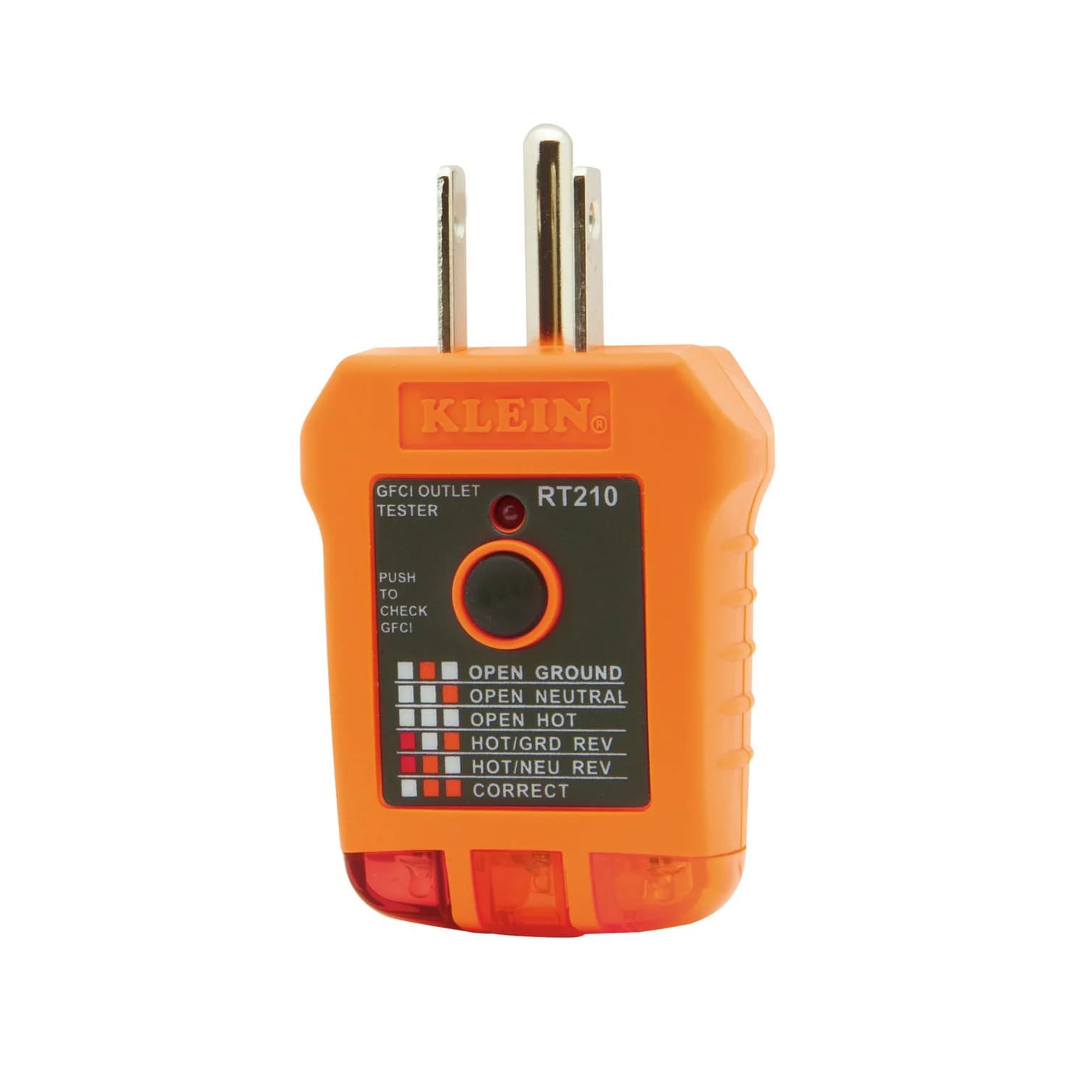
Choose for: Best for basic indication
Check before buying: Can't judge ground quality or catch a reversed neutral and ground (a bootleg ground), per Klein's manual
Choose the Klein RT250 if you want a receptacle tester that displays voltage, names the wiring fault and reports GFCI trip time. Choose—or keep—the RT210 if a light pattern and confirmation that a GFCI trips are enough; Klein confirms it needs no batteries. The RT250 is our pick for recording display information, while neither model certifies an installation.
Quick picks
- Choose RT250 for information you can copy: displayed voltage, a named wiring condition and displayed GFCI trip time. See the standalone RT250 at Klein.
- Choose RT210 for basic indication: match the lights to the case chart and check GFCI operation without maintaining batteries. Check price on Amazon.
- Already own RT210? Upgrade for a missing display function or easier viewing. Do not upgrade expecting a complete wiring diagnosis.
RT210 vs RT250 at a glance
Compare specifications and all conditions
Wiring result
- Klein RT210
- Indicator lights; interpret with the printed chart
- Klein RT250
- Backlit LCD names the condition; red/green LEDs supplement it
Numerical outlet voltage
- Klein RT210
- No numerical readout
- Klein RT250
- Yes
GFCI result
- Klein RT210
- Observe whether the GFCI trips and lights go dark
- Klein RT250
- Displays trip time as well as pre-test voltage
Separate dual-open neutral/ground indication
- Klein RT210
- Not documented
- Klein RT250
- Yes
AFCI test
- Klein RT210
- Not documented in its instructions
- Klein RT250
- No, per Klein's specification
Read after unplugging
- Klein RT210
- No retained display; requires a powered outlet
- Klein RT250
- Auto-Hold for reading wiring information
Batteries
- Klein RT210
- None required
- Klein RT250
- Two AAA alkaline cells, included
Intended supply
- Klein RT210
- Three-wire, nominal 110–125 V AC, 50/60 Hz
- Klein RT250
- Three-wire, North American 120 V outlets only
Safety marking
- Klein RT210
- CAT II 300V
- Klein RT250
- CAT II 135V
Drop protection claimed by Klein
- Klein RT210
- 2 m
- Klein RT250
- 2 m
Full comparison table
Swipe to compare. Row labels stay visible.
| Buying question | Klein RT210 | Klein RT250 |
|---|---|---|
| Wiring result | Indicator lights; interpret with the printed chart | Backlit LCD names the condition; red/green LEDs supplement it |
| Numerical outlet voltage | No numerical readout | Yes |
| GFCI result | Observe whether the GFCI trips and lights go dark | Displays trip time as well as pre-test voltage |
| Separate dual-open neutral/ground indication | Not documented | Yes |
| AFCI test | Not documented in its instructions | No, per Klein's specification |
| Read after unplugging | No retained display; requires a powered outlet | Auto-Hold for reading wiring information |
| Batteries | None required | Two AAA alkaline cells, included |
| Intended supply | Three-wire, nominal 110–125 V AC, 50/60 Hz | Three-wire, North American 120 V outlets only |
| Safety marking | CAT II 300V | CAT II 135V |
| Drop protection claimed by Klein | 2 m | 2 m |
Scroll horizontally to see every column
| Buying question | Klein RT210 | Klein RT250 |
|---|---|---|
| Wiring result | Indicator lights; interpret with the printed chart | Backlit LCD names the condition; red/green LEDs supplement it |
| Numerical outlet voltage | No numerical readout | Yes |
| GFCI result | Observe whether the GFCI trips and lights go dark | Displays trip time as well as pre-test voltage |
| Separate dual-open neutral/ground indication | Not documented | Yes |
| AFCI test | Not documented in its instructions | No, per Klein's specification |
| Read after unplugging | No retained display; requires a powered outlet | Auto-Hold for reading wiring information |
| Batteries | None required | Two AAA alkaline cells, included |
| Intended supply | Three-wire, nominal 110–125 V AC, 50/60 Hz | Three-wire, North American 120 V outlets only |
| Safety marking | CAT II 300V | CAT II 135V |
| Drop protection claimed by Klein | 2 m | 2 m |
Sources: Klein's RT210 page, RT210 instructions, RT250 page, current RT250 instructions and battery FAQ. These are manufacturer specifications, not our measurements.
Best for display information: Klein RT250
The RT250 earns its place when your note needs more than a light pattern. Its backlit LCD shows voltage, wiring condition and GFCI trip time. Auto-Hold lets you remove the tester to read wiring information at an awkward outlet; the manual says the held display blinks and resets when plugged into another circuit. Copy or photograph each result before moving on.
Budget for battery upkeep. The bare tester includes two 1.5 V AAA alkaline cells and its manual. Automatic shutdown follows three minutes of inactivity. Klein says a brief low-battery indication at startup is normal, while an indication after initial power-on calls for replacement. The battery-free RT210 avoids that maintenance task.
GFCI timing has a viewing window. The current standalone manual says a successful test alternates the pre-test voltage and trip time for eight seconds. Afterward, the tester shows an open ground/neutral or open-hot condition until the GFCI is reset. Record the timing during that window; do not mistake the later, post-trip indication for the original wiring result.
Klein specifies a 6–9 mA simulated ground fault for this test. The displayed time describes the GFCI's response to that event. We do not use it as a certificate that an installation meets every requirement, and we make no independently verified accuracy claim.
See the RT250 and its documentation at Klein.
Best for basic indication: Klein RT210
The RT210 suits a simpler record: which wiring pattern appeared, and whether the GFCI operated. Klein puts the interpretation chart on the tester itself. Its FAQ explicitly says the RT210 requires no batteries and needs a powered receptacle to work. There is no voltage number or displayed trip-time result to transcribe.
Klein Tools
A three-light plug-in tester for standard and GFCI receptacles that shows common wiring faults and has a button to trip a GFCI.
Check package and model options
- CAT II 300V
One easily confused detail: the RT210 instructions call for holding its test button for seven seconds during the GFCI check. That is an operating instruction, not a measured seven-second trip time and not an RT250-style timing display.
Keep the RT210 if those outputs already satisfy your task. Its limitation is the information you cannot record, rather than the absence of an LCD by itself. Follow the tester and GFCI device manuals; the shared procedure and broader fault explanations belong in our outlet tester guide.
Wiring-fault display crosswalk
Here is how the manuals name equivalent conditions. The RT210 column gives the chart entry to match to its illuminated lamps; the RT250 column gives the LCD lettering. Use the chart on your own tester rather than memorizing another model's lamp positions.
Wiring correct
- RT210 chart entry
- Correct
- RT250 LCD lettering
- CORRECT
Ground open
- RT210 chart entry
- Open Ground
- RT250 LCD lettering
- OPEN GRD
Neutral open
- RT210 chart entry
- Open Neutral
- RT250 LCD lettering
- OPEN NEU
Hot open
- RT210 chart entry
- Open Hot
- RT250 LCD lettering
- OPEN HOT
Hot and ground reversed
- RT210 chart entry
- Hot/Ground Reversed
- RT250 LCD lettering
- HOT/GRD REV
Hot and neutral reversed
- RT210 chart entry
- Hot/Neutral Reversed
- RT250 LCD lettering
- HOT/NEU REV
Neutral and ground both open
- RT210 chart entry
- No separate dual-open result documented
- RT250 LCD lettering
- OPEN GRD NEU
Full comparison table
Swipe to compare. Row labels stay visible.
| Condition in the manual | RT210 chart entry | RT250 LCD lettering |
|---|---|---|
| Wiring correct | Correct | CORRECT |
| Ground open | Open Ground | OPEN GRD |
| Neutral open | Open Neutral | OPEN NEU |
| Hot open | Open Hot | OPEN HOT |
| Hot and ground reversed | Hot/Ground Reversed | HOT/GRD REV |
| Hot and neutral reversed | Hot/Neutral Reversed | HOT/NEU REV |
| Neutral and ground both open | No separate dual-open result documented | OPEN GRD NEU |
Scroll horizontally to see every column
| Condition in the manual | RT210 chart entry | RT250 LCD lettering |
|---|---|---|
| Wiring correct | Correct | CORRECT |
| Ground open | Open Ground | OPEN GRD |
| Neutral open | Open Neutral | OPEN NEU |
| Hot open | Open Hot | OPEN HOT |
| Hot and ground reversed | Hot/Ground Reversed | HOT/GRD REV |
| Hot and neutral reversed | Hot/Neutral Reversed | HOT/NEU REV |
| Neutral and ground both open | No separate dual-open result documented | OPEN GRD NEU |
The crosswalk comes from the RT210 chart and RT250 wiring-condition matrix. The extra dual-open indication is a specific RT250 capability. It does not mean the RT250 can identify arbitrary combinations of faults: its manual expressly excludes combinations other than dual-open neutral and ground.
Do not read the LED color alone. The RT250 manual says its red voltage-warning LED can illuminate alongside the green correct-wiring LED. Its documented warning bands are low voltage of 30–85 V AC and high voltage of 135–150 V AC. Those bands describe indications; they do not expand the tester's stated North American 120 V outlet use.
Keep the RT210 or upgrade?
Write down what is missing from your existing result. If it is a voltage number, a displayed GFCI trip time or a result you can read after unplugging, choose RT250. If it is proof of ground quality or a complete diagnosis of multiple faults, neither model supplies that answer.
- Yes: Upgrade for a voltage number or displayed GFCI trip time: RT250 supplies both
- Yes: Upgrade for awkward viewing: RT250 Auto-Hold retains wiring information after unplugging
- Partly: Keep RT210 when its light pattern and observed GFCI operation satisfy your record
- No: Neither establishes ground quality or provides a complete multiple-fault diagnosis
A useful record has an outlet location, the wiring indication, whether the GFCI operated and—where your task calls for it—the displayed voltage and trip time. Label a copied RT250 reading as that tester's indication. Its temporary hold is a prompt to record the result yourself, rather than assume you have a saved history of all the outlets visited.
What neither tester establishes
Both manuals exclude ground quality, multiple hot wires and reversal of neutral/ground conductors from what their indications establish. The RT210 excludes combinations of defects; the RT250 makes the specific dual-open exception described above. A correct-looking result cannot rule out everything those manuals exclude.
Klein explicitly lists no AFCI function for RT250. Its LCD is not an AFCI-testing upgrade.
Klein also warns that connected equipment can interfere with readings and requires verifying operation on a known live, correctly wired receptacle before use. Follow the appropriate manual and use the outlet tester hub for the full operating sequence. This comparison is a buying decision, not a wiring-repair procedure.
Buying guide: bare tester or pen kit?
Compare the model number and contents before comparing an offer. The LCD tester is RT250; RT250KIT adds a separate pen and pouch. A bundle containing RT210 does not gain RT250's voltage or trip-time display.
RT210 standalone
- Documented contents
- RT210 receptacle tester; no voltage pen listed
- When to choose it
- You need basic wiring/GFCI indication or already own a pen
RT250 standalone
- Documented contents
- RT250, two 1.5 V AAA alkaline cells and manual
- When to choose it
- You want the LCD functions without another pen
RT250KIT
- Documented contents
- RT250, NCVT3P dual-range pen with flashlight, manuals, storage pouch and batteries
- When to choose it
- You need both the LCD tester and a pen
NCVT1XTKIT
- Documented contents
- RT210, NCVT1XT pen, instructions and required batteries
- When to choose it
- You want the basic receptacle tester plus that specific pen
Full comparison table
Swipe to compare. Row labels stay visible.
| Exact package | Documented contents | When to choose it |
|---|---|---|
| RT210 standalone | RT210 receptacle tester; no voltage pen listed | You need basic wiring/GFCI indication or already own a pen |
| RT250 standalone | RT250, two 1.5 V AAA alkaline cells and manual | You want the LCD functions without another pen |
| RT250KIT | RT250, NCVT3P dual-range pen with flashlight, manuals, storage pouch and batteries | You need both the LCD tester and a pen |
| NCVT1XTKIT | RT210, NCVT1XT pen, instructions and required batteries | You want the basic receptacle tester plus that specific pen |
Scroll horizontally to see every column
| Exact package | Documented contents | When to choose it |
|---|---|---|
| RT210 standalone | RT210 receptacle tester; no voltage pen listed | You need basic wiring/GFCI indication or already own a pen |
| RT250 standalone | RT250, two 1.5 V AAA alkaline cells and manual | You want the LCD functions without another pen |
| RT250KIT | RT250, NCVT3P dual-range pen with flashlight, manuals, storage pouch and batteries | You need both the LCD tester and a pen |
| NCVT1XTKIT | RT210, NCVT1XT pen, instructions and required batteries | You want the basic receptacle tester plus that specific pen |
The pens differ too. RT250KIT's NCVT3P offers 12–1000 V AC and 70–1000 V AC modes plus a flashlight. NCVT1XTKIT's NCVT1XT detects 70–1000 V AC; Klein says it is not recommended for tamper-resistant outlets. Read our non-contact voltage tester guide before choosing a pen for its application.
Klein's RT250KIT battery wording conflicts. Its page says “4 x AAA” under Batteries but “4 x AA Batteries” in Included. The individual RT250 manual and NCVT3P manual each specify two AAA cells. Check the supplied package rather than treating that AA line as a different RT250 version. The kit brochure confirms both instruments, manuals, required batteries and a pouch.
Match the receptacle tester
Choose the RT210 light-pattern model or the RT250 LCD model first.
Identify the added pen
RT250KIT includes NCVT3P; NCVT1XTKIT includes NCVT1XT.
Read the contents list
Check batteries and accessories, including the RT250KIT battery-wording conflict above.
For a gift, confirm what the recipient owns before buying another pen; see gifts for electricians. A kit is useful when its added tools fill a gap.
How we choose
We compared Klein's product pages, instructions, battery FAQ and kit brochure. Recommendations follow the information each tool displays, the manuals' limitations and the exact package contents. No physical testing or original accuracy measurements inform this comparison; see How we choose and How we measure.
Verdict
Get RT250 for voltage, displayed GFCI trip time and Auto-Hold. Get—or keep—RT210 for a battery-free light-pattern tester with a GFCI check. Choose a kit only when you want its documented pen and accessories; neither tester's display certifies the installation.
Frequently asked questions
Is the Klein RT250 better than the RT210?
For recording voltage or displayed GFCI trip time, choose the RT250. Its backlit LCD and Auto-Hold also help when the outlet is difficult to see. If a wiring light pattern and observing that a GFCI trips meet your needs, keep the RT210. Both manuals describe diagnostic limits, including ground quality and neutral/ground reversal, so the LCD does not certify an installation.
Does the Klein RT210 need batteries?
No. Klein's FAQ specifically lists the RT210 among its receptacle testers that need no batteries and require a powered receptacle to work. The RT250 uses two AAA alkaline batteries, included with the standalone tester. For the RT250, follow the manual's low-battery guidance: a brief indicator at startup is normal; an indicator remaining after initial power-on calls for replacement.
Does the RT250 keep its GFCI trip-time result after testing?
The current manual linked from the standalone RT250 page says the display alternates between pre-test voltage and trip time for eight seconds after a successful test. It then changes to an open-condition indication until the GFCI is reset. Auto-Hold separately helps you read wiring information after unplugging; copy the result rather than treating the tester as an outlet-by-outlet archive.
Is RT250KIT the same as the RT250 tester?
RT250KIT includes an RT250, an NCVT3P dual-range non-contact voltage pen with flashlight, manuals, batteries and a pouch. The standalone RT250 includes the tester, two AAA alkaline cells and its manual. Klein's kit page conflicts on AA versus AAA battery wording; the individual tool manuals specify AAA. Choose the kit only if the added pen and pouch meet a need.
Related guides
Comparison · Voltage & Outlet Testers
TOPDON BT200 vs BT300P: Which 12V Battery Tester Should You Buy?
Choose the TOPDON BT200 or BT300P for battery checks. Compare printer limits, battery compatibility, voltage modes, paper supplies and complete US kit contents.
Comparison · Voltage & Outlet Testers
TOPDON BT100 vs Foxwell BT100 Pro: AGM, EFB and Test Functions
Choose a 12V battery tester by battery type, CCA range and test functions. Compare TOPDON BT100 with Foxwell BT100 Pro, including EFB, reports and winter use.
Explainer · Voltage & Outlet Testers
IDEAL Circuit Breaker Finders: 61-535 vs Older 61-534 and 61-532
Choose an IDEAL circuit breaker finder: compare 61-535 with older models, match transmitter and receiver, and check TL-532A lighting adapters before buying.