

Comparison
Voltmeter vs Multimeter
Permanent DC Display or Portable Test Tool?
Choose a fixed DC voltmeter or a portable multimeter. Compare Blue Sea 1733 and Klein MM420 functions, installation parts, variants and battery-reading limits.
By thisMETER EditorialUpdated November 3, 20268 min read1 pick
On this page · Our picks at a glance
Our picks at a glance
- 1
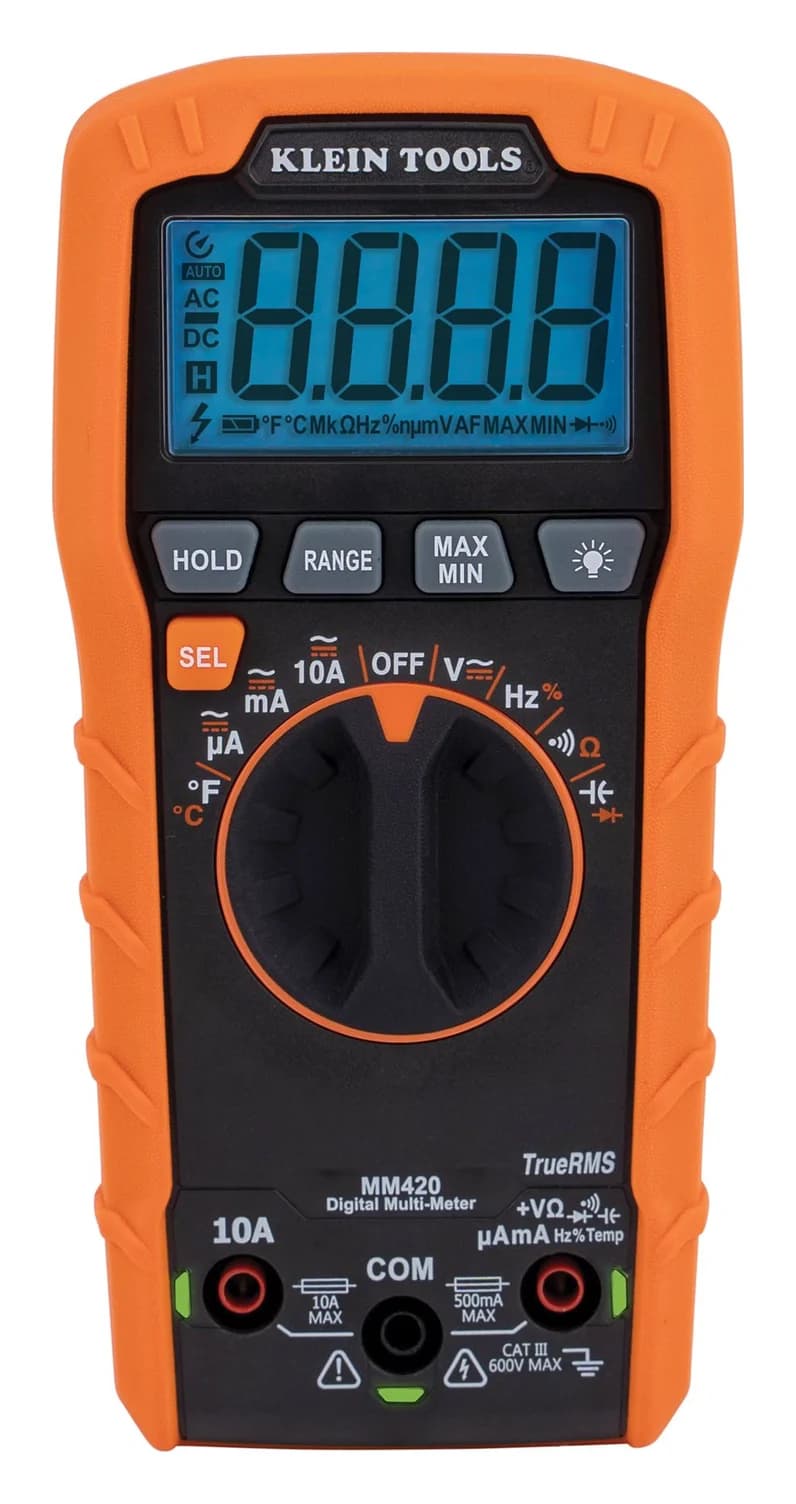
Choose for: Voltage, resistance and continuity, with movable test leads
Check before buying: Rated CAT III 600V: not for service-entrance (CAT IV) work
Buy the Klein Tools MM420 first if you need to find electrical faults; choose the Blue Sea Systems 1733 yellow voltmeter if you specifically want DC voltage visible at an installed location. A voltmeter measures voltage; a multimeter combines that function with other electrical tests. The practical choice here is a permanent display versus a portable diagnostic tool, based on the Blue Sea instructions and Klein specifications.
Quick picks: choose the job before the format
Compare specifications and all conditions
See DC voltage at a fixed location
- Our pick
- Blue Sea 1733, yellow
- Why
- Panel-mounted, daylight-readable OLED voltage display
- What remains missing
- Portable fault finding and measurements beyond DC voltage
Investigate a dead accessory, fuse or wiring fault
- Our pick
- Klein MM420
- Why
- Voltage, resistance and continuity, with movable test leads
- What remains missing
- A dedicated installed display
Both routine indication and diagnosis
- Our pick
- Both, if each job matters
- Why
- The display and diagnostic functions complement each other
- What remains missing
- Battery charge tracking still requires a different measurement approach
Full comparison table
Swipe to compare. Row labels stay visible.
| What you want | Our pick | Why | What remains missing |
|---|---|---|---|
| See DC voltage at a fixed location | Blue Sea 1733, yellow | Panel-mounted, daylight-readable OLED voltage display | Portable fault finding and measurements beyond DC voltage |
| Investigate a dead accessory, fuse or wiring fault | Klein MM420 | Voltage, resistance and continuity, with movable test leads | A dedicated installed display |
| Both routine indication and diagnosis | Both, if each job matters | The display and diagnostic functions complement each other | Battery charge tracking still requires a different measurement approach |
Scroll horizontally to see every column
| What you want | Our pick | Why | What remains missing |
|---|---|---|---|
| See DC voltage at a fixed location | Blue Sea 1733, yellow | Panel-mounted, daylight-readable OLED voltage display | Portable fault finding and measurements beyond DC voltage |
| Investigate a dead accessory, fuse or wiring fault | Klein MM420 | Voltage, resistance and continuity, with movable test leads | A dedicated installed display |
| Both routine indication and diagnosis | Both, if each job matters | The display and diagnostic functions complement each other | Battery charge tracking still requires a different measurement approach |
For broader handheld choices, use our best multimeters guide. This comparison keeps the installed-display decision separate from choosing among handhelds.
What the voltmeter measures and the multimeter adds
The 1733 measures DC voltage. The MM420 measures AC/DC voltage and current, plus resistance, continuity, capacitance, temperature, frequency, duty cycle and diodes. These are the manufacturers' specifications, not our readings. Sources: Blue Sea instructions, MM420 page.
Where is the display?
- Blue Sea Systems 1733
- Installed in a panel cutout
- Klein Tools MM420
- On the handheld instrument
Voltage support
- Blue Sea Systems 1733
- Nominal 12V / 24V DC; input range 8–36V DC
- Klein Tools MM420
- Up to 600V AC/DC; CAT III 600V
What powers it?
- Blue Sea Systems 1733
- The connected DC source, as drawn in the instructions
- Klein Tools MM420
- Two AAA batteries
Display detail
- Blue Sea Systems 1733
- 0.01V resolution; stated accuracy ±1%
- Klein Tools MM420
- 4,000 counts; 10mV resolution on its 40.00V DC range, accuracy ±(0.5% + 5 digits)
Current measurement
- Blue Sea Systems 1733
- No current function or shunt in its specification
- Klein Tools MM420
- Up to 10A AC/DC through test leads
Resistance and continuity
- Blue Sea Systems 1733
- Not listed for this voltage-only meter
- Klein Tools MM420
- Both included
Location limits
- Blue Sea Systems 1733
- Meter face rated IP66 against powerful water jets
- Klein Tools MM420
- Indoor use; manual says not to expose it to moisture, rain or snow
Installation burden
- Blue Sea Systems 1733
- Cutout, wiring and circuit protection
- Klein Tools MM420
- Supplied leads and batteries; no panel cutout
Full comparison table
Swipe to compare. Row labels stay visible.
| Buying question | Blue Sea Systems 1733 | Klein Tools MM420 |
|---|---|---|
| Where is the display? | Installed in a panel cutout | On the handheld instrument |
| Voltage support | Nominal 12V / 24V DC; input range 8–36V DC | Up to 600V AC/DC; CAT III 600V |
| What powers it? | The connected DC source, as drawn in the instructions | Two AAA batteries |
| Display detail | 0.01V resolution; stated accuracy ±1% | 4,000 counts; 10mV resolution on its 40.00V DC range, accuracy ±(0.5% + 5 digits) |
| Current measurement | No current function or shunt in its specification | Up to 10A AC/DC through test leads |
| Resistance and continuity | Not listed for this voltage-only meter | Both included |
| Location limits | Meter face rated IP66 against powerful water jets | Indoor use; manual says not to expose it to moisture, rain or snow |
| Installation burden | Cutout, wiring and circuit protection | Supplied leads and batteries; no panel cutout |
Scroll horizontally to see every column
| Buying question | Blue Sea Systems 1733 | Klein Tools MM420 |
|---|---|---|
| Where is the display? | Installed in a panel cutout | On the handheld instrument |
| Voltage support | Nominal 12V / 24V DC; input range 8–36V DC | Up to 600V AC/DC; CAT III 600V |
| What powers it? | The connected DC source, as drawn in the instructions | Two AAA batteries |
| Display detail | 0.01V resolution; stated accuracy ±1% | 4,000 counts; 10mV resolution on its 40.00V DC range, accuracy ±(0.5% + 5 digits) |
| Current measurement | No current function or shunt in its specification | Up to 10A AC/DC through test leads |
| Resistance and continuity | Not listed for this voltage-only meter | Both included |
| Location limits | Meter face rated IP66 against powerful water jets | Indoor use; manual says not to expose it to moisture, rain or snow |
| Installation burden | Cutout, wiring and circuit protection | Supplied leads and batteries; no panel cutout |
Sources: 1733 instructions, dimensioned drawing, MM420 page and manual.
Resolution is the display step, not the error limit. Blue Sea's decimal places do not establish better accuracy than the handheld's. Klein specifies accuracy by range and includes a digits term; compare that full specification, not just the number of displayed decimals. The figures above describe different specifications and should not become a single accuracy ranking.
Best permanent DC display: Blue Sea Systems 1733, yellow
Choose the 1733 when the purchase is specifically about seeing voltage without retrieving a handheld. Blue Sea documents a daylight-readable OLED, reverse-polarity protection, nominal 12V / 24V DC operation and an 8–36V DC input range. Its stated maximum operating current is 15mA. Read the model instructions.
The format is its advantage; DC voltage is its limit. Do not buy it to measure AC, check resistance or test continuity. A supply below its specified input range is also outside its documented operating envelope, so do not rely on this display alone to investigate a deeply depleted or disconnected source.
Order by full part number and display color. The maker's current Mini OLED sheet shows 1733 in yellow and 1733200 in blue. It lists OLED lifecycles of 100,000 hours for yellow and 10,000 hours for blue. Those are the maker's lifecycle figures, not our durability findings; yellow is our default for a display intended to stay installed. The nearby 1732 / 1732200 models are ammeters, not alternative voltmeter packages.
- Yes: Choose this format for an installed DC voltage indication.
- No: Choose the handheld for AC, resistance or continuity checks.
- Partly: Specify the mounting and protected wiring before ordering the bare display.
See the yellow 1733 on Blue Sea's site.
Best first troubleshooting purchase: Klein Tools MM420
The MM420 is our first purchase recommendation when the symptom matters more than display location. Its official page specifies automatic ranging, True RMS, 600V AC/DC, 10A AC/DC, resistance and continuity. It also includes temperature, capacitance, frequency, duty cycle and diode tests.
Klein Tools
A 4,000-count auto-ranging True RMS multimeter rated CAT III 600V that measures up to 600 V and 10 A, plus temperature, capacitance, frequency and duty cycle.
Check package and model options
- 600 V max
- 10 A max
- 4,000 counts
- CAT III 600V
Klein supplies test leads with CAT III/CAT IV safety caps, a thermocouple and two AAA batteries. This recommendation covers MM420 with its standard accessories; confirm the model and contents instead of assuming a larger tool bundle contains the same meter. The supplied lead kit makes the portable package easier to define than a panel installation. Package contents.
Its portability matters for voltage-drop diagnosis. Fluke explains that voltage drop occurs across wiring and connections under load, and that current must flow for the check. Our inference: a fixed voltage reading may reveal a symptom, but movable probes let you investigate the affected connection or cable. Follow the equipment's service procedure; this is a buying distinction, not a repair diagnosis. Fluke's explanation.
Dead accessory
- Installed voltmeter's contribution
- Voltage indication at its installed connection
- What the handheld adds
- Voltage checks at other points; continuity checks with power removed
Suspect cable or connection
- Installed voltmeter's contribution
- A fixed reading cannot isolate the voltage lost along a particular cable
- What the handheld adds
- Voltage-drop investigation across the affected path under load
Battery voltage has changed
- Installed voltmeter's contribution
- An indication to investigate
- What the handheld adds
- Spot checks elsewhere; voltage alone still supplies no continuous current history
Full comparison table
Swipe to compare. Row labels stay visible.
| Symptom | Installed voltmeter's contribution | What the handheld adds |
|---|---|---|
| Dead accessory | Voltage indication at its installed connection | Voltage checks at other points; continuity checks with power removed |
| Suspect cable or connection | A fixed reading cannot isolate the voltage lost along a particular cable | Voltage-drop investigation across the affected path under load |
| Battery voltage has changed | An indication to investigate | Spot checks elsewhere; voltage alone still supplies no continuous current history |
Scroll horizontally to see every column
| Symptom | Installed voltmeter's contribution | What the handheld adds |
|---|---|---|
| Dead accessory | Voltage indication at its installed connection | Voltage checks at other points; continuity checks with power removed |
| Suspect cable or connection | A fixed reading cannot isolate the voltage lost along a particular cable | Voltage-drop investigation across the affected path under load |
| Battery voltage has changed | An indication to investigate | Spot checks elsewhere; voltage alone still supplies no continuous current history |
These are our capability-based buying interpretations of the linked manuals and Fluke's explanation, not fault diagnoses.
Two limitations matter. Klein's manual defaults to power-off after 15 minutes of inactivity, although it can be disabled. Also, the 10A input is not an unlimited-duration battery-bank monitor: above 6A, Klein recommends 30-second measurements followed by 10-minute recovery periods. Current measurement requires a different connection from voltage measurement; follow the manual rather than moving a current input across a battery. MM420 instructions.
Check price on Amazon. For help choosing the appropriate instrument functions, read how to use a multimeter.
Buying guide: specify the complete panel installation
Check voltage, fit and connections
For the 1733, check the supply's full operating range against 8–36V DC, rather than using nominal battery voltage alone. Blue Sea specifies a 1-1/8-inch hole, nominally 29mm. Its drawing shows a 1.575-inch / 40mm face, 1.296-inch / 32.91mm maximum mounting thickness, and .250-inch quick-connect input terminals. Check face clearance, access behind the panel and matching insulated connectors before committing to the cutout.
The drawing's metric annotation beside the .250-inch terminals is .009mm, an apparent conversion error. Confirm connector fit with Blue Sea; do not order from that metric annotation. Likewise, the instruction sheet specifically assigns IP66 to the meter face: plan protection for the rear connections separately.
Include protection and a way to isolate the installation
The currently linked model instructions, 980021880 Rev. 008, draw a 2A fuse. The newer family sheet, 980022460 Rev. 004, instead directs fuse sizing to Circuit Wizard and an ABYC-certified marine electrical professional. Keep this documentation difference visible: have the installer reconcile the model instructions with the actual circuit, wiring and available fault current before buying protection. Model instructions, family sheet.
For an installer-approved 2A circuit operating within 32V DC, separately specified examples are the Eaton Bussmann BP/ATC-2-RP fuse and BP/HHG-RP in-line ATC holder. Eaton lists the ATC fuse family at 32V DC, with 1kA interrupting rating; it lists that holder at 32V / 30A, with 12 AWG leads and a cover. The holder's maximum current does not select the fuse size. This is a conditional component pairing, not a complete Blue Sea installation kit. Eaton's catalog: ATC ratings and holder tables.
Those examples do not cover the voltmeter's entire input range: their 32V rating is below the display's 36V upper limit. Have the installer confirm voltage and interrupting ratings, wire sizing, terminals, protection location and isolation. Ask whether existing switching covers the display or whether the installation needs a separate DC-rated switch; include that decision in the quote.
Specify the source
Have the installer confirm the supply range, circuit protection and isolation arrangement.
Specify the mounting
Check the cutout, face clearance, panel thickness and rear connector access.
Specify the whole order
List the display, protection, wiring, connectors, any switch and installation labor separately.
Compare whole-kit cost, without a misleading bare-meter comparison
Request a panel total covering the display, any required fuse and holder, wire, connectors, mounting consumables, switching and labor. Credit suitable parts already present. Request a portable total for the MM420 standard package plus only the accessories your work requires; Klein already lists leads and batteries in that package. Compare those totals before deciding. We do not infer which route costs less from the bare instruments.
Voltage indication versus battery charge and condition
Treat an installed voltage reading as information about the connected source, not an automatic battery replacement decision. For its lead-acid open-circuit checks, Trojan requires no charging or discharging for at least 6 hrs, preferably 24 hrs. A display observed while equipment operates is not that same test condition. Match the battery maker's procedure and chemistry instead of applying a universal voltage-to-percentage chart.
Only move to a shunt monitor when you actually want continuous charge/discharge current and charge tracking. Victron's SmartShunt manual explains that it integrates current over time to calculate charge added or removed, and that reliable state-of-charge readings require synchronization. A spot voltage reading does not provide that current history. Our DC clamp-meter guide covers the separate portable-current buying decision; a clamp reading is not a substitute for that ongoing integration.
How we choose
We compared official model instructions, electrical specifications, drawings and component ratings. Recommendations are research-based; we have not physically tested these products. We retain the fuse-documentation difference and the drawing annotation issue instead of silently resolving them. See how we choose.
Verdict
Choose MM420 first for portable voltage checks and fault finding. Choose the yellow Blue Sea 1733 for an installed DC voltage display, after specifying its complete protected installation. Buy both only when both jobs matter; choose a configured shunt monitor when the missing requirement is continuous current integration and charge tracking.
Frequently asked questions
What is the difference between a voltmeter and a multimeter?
A voltmeter measures voltage; a multimeter combines voltage measurement with other electrical tests. Here, the Blue Sea 1733 is a fixed DC voltage display, while the Klein MM420 adds AC/DC current, resistance, continuity, temperature and other functions. Choose the panel for a reading at an installed location, or the handheld for investigating different circuits. Check the actual model's AC/DC support rather than buying by the word voltmeter alone.
Can a multimeter be used as a voltmeter?
Yes. Klein specifies AC and DC voltage measurement on the MM420, so you do not need a separate voltage-only instrument for portable checks within its ratings. That does not make it a ready-made panel display: the MM420 uses its own AAA batteries and normally powers off after inactivity. Follow its manual for function selection, lead placement and the measurement category appropriate to the work.
Does a panel voltmeter need its own battery or a shunt?
The 1733 wiring diagram connects the meter to the DC source through circuit protection; it does not show a separate instrument battery or a current shunt. Its specified input range is 8–36V DC. Blue Sea lists a shunt with the adjacent ammeter model, not this voltmeter. A monitor that calculates battery charge from current over time is a different purchase and installation.
Will a voltmeter tell me whether a battery is good?
Use voltage as evidence, not a replacement verdict. Trojan's open-circuit guidance requires an idle battery, without charging or discharging, and refers suspect batteries for further evaluation. An installed reading while equipment operates is a different condition. For charge tracking, a configured shunt monitor integrates current over time; neither the voltage-only panel nor a handheld voltage check supplies that continuous current history.
Related guides
Comparison · Multimeters
Fluke 287 vs 289: Which Logging Multimeter Should You Buy?
Choose the Fluke 287 or 289 for your logging work. Compare LoZ, motor-drive filtering, low-ohms accuracy, kit contents and the software needed to export data.
Comparison · Multimeters
FLIR CM276 vs DM286: Thermal Clamp Meter or Imaging Multimeter?
Choose between FLIR CM276 and DM286 by current path, ranges, thermal records and kit contents. Compare jaw access, lead inputs and Meterlink requirements.
Comparison · Multimeters
Fluke 87V vs 88V: Which Multimeter for a Mixed Workshop?
Choose the Fluke 87V or 88V for a mixed workshop. Compare True RMS, drive filtering, automotive signals, small-current accuracy and the US accessory kit.