

Buying guide
How to Read a Multimeter
Units, Ranges, Counts and OL
Read multimeter displays with clear examples of units, decimal places, negative readings, HOLD and OL, plus analog scales and a worked accuracy calculation.
By thisMETER EditorialUpdated November 3, 20268 min read2 picks
On this page · Quick picks and comparison
To read a multimeter, read the number, unit and mode together, then check the selected range and whether HOLD or REL is active. For a first meter, our pick is the Klein Tools MM420 for automatic ranging and illuminated jack guidance; choose the Fluke 117 when you need its electrician features, including low input impedance. The examples below explain the display you already have before you decide whether to replace it.
Quick picks and comparison
Compare specifications and all conditions
Klein MM420
- Why choose it
- First meter; Lead-Alert jack illumination
- Display
- 4,000 counts
- Ordinary DC voltage accuracy
- ±(0.5% + 5 digits), 400 mV through 40 V ranges
All specifications
- Current resolution to notice
- 0.1 µA on its 400 µA range
Fluke 117
- Why choose it
- VoltAlert, AutoVolt and low-impedance voltage mode
- Display
- 6,000 counts
- Ordinary DC voltage accuracy
- ±(0.5% + 2 counts), 600 mV through 600 V ranges
All specifications
- Current resolution to notice
- 1 mA on its 6 A range; no dedicated µA range
Full comparison table
Swipe to compare. Row labels stay visible.
| Pick | Why choose it | Display | Ordinary DC voltage accuracy | Current resolution to notice |
|---|---|---|---|---|
| Klein MM420 | First meter; Lead-Alert jack illumination | 4,000 counts | ±(0.5% + 5 digits), 400 mV through 40 V ranges | 0.1 µA on its 400 µA range |
| Fluke 117 | VoltAlert, AutoVolt and low-impedance voltage mode | 6,000 counts | ±(0.5% + 2 counts), 600 mV through 600 V ranges | 1 mA on its 6 A range; no dedicated µA range |
Scroll horizontally to see every column
| Pick | Why choose it | Display | Ordinary DC voltage accuracy | Current resolution to notice |
|---|---|---|---|---|
| Klein MM420 | First meter; Lead-Alert jack illumination | 4,000 counts | ±(0.5% + 5 digits), 400 mV through 40 V ranges | 0.1 µA on its 400 µA range |
| Fluke 117 | VoltAlert, AutoVolt and low-impedance voltage mode | 6,000 counts | ±(0.5% + 2 counts), 600 mV through 600 V ranges | 1 mA on its 6 A range; no dedicated µA range |
These are manufacturer specifications, not results from our own measurements. See the MM420 instructions and 117 specifications. The DC accuracy figures do not apply to every mode: the 117's Auto-V/LoZ setting has its own specification.
Best first meter for learning: Klein Tools MM420
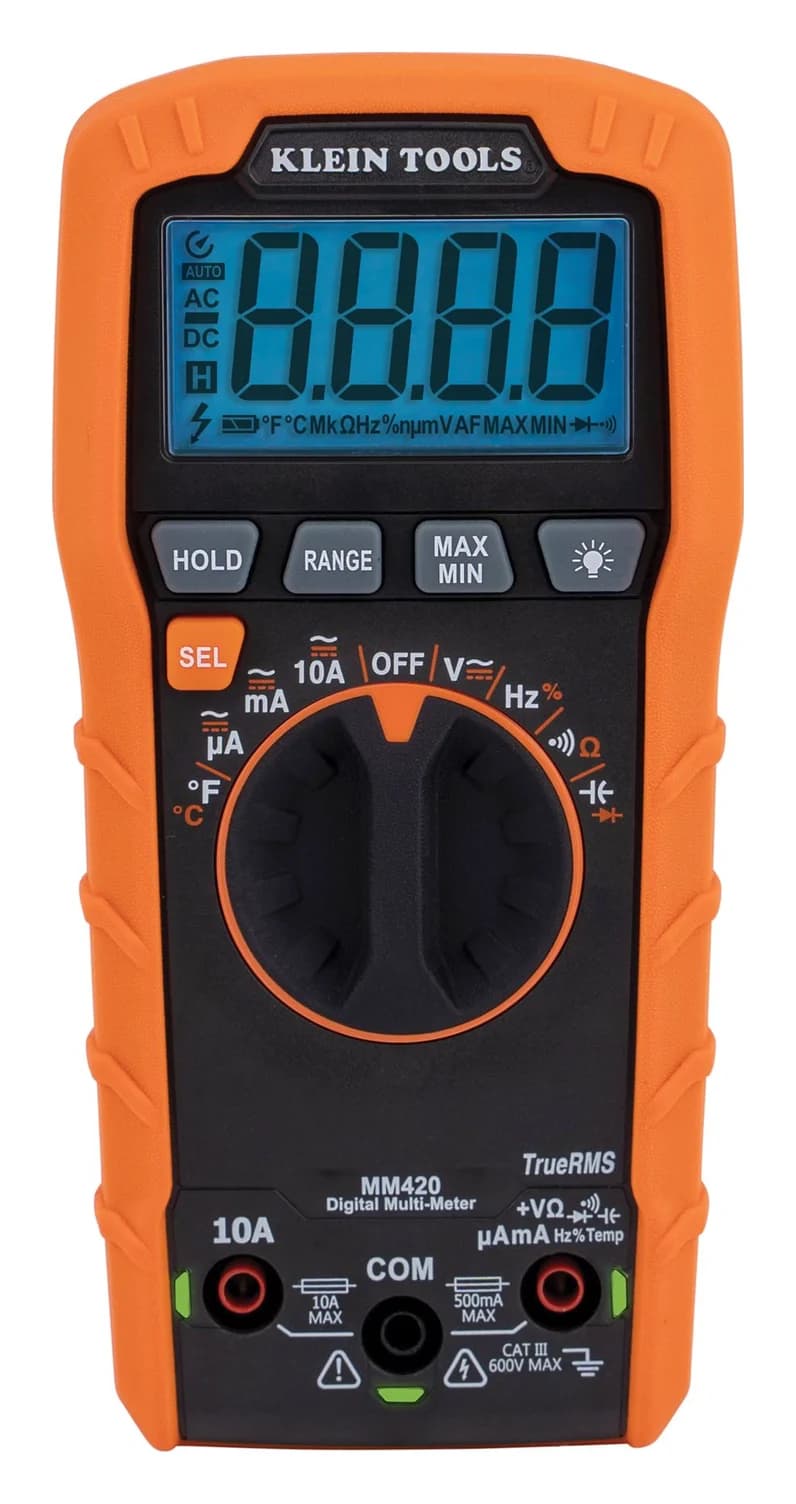
Klein Tools
A 4,000-count auto-ranging True RMS multimeter rated CAT III 600V that measures up to 600 V and 10 A, plus temperature, capacitance, frequency and duty cycle.
Check package and model options
- 600 V max
- 10 A max
- 4,000 counts
- CAT III 600V
Choose the MM420 for automatic ranging, temperature measurement and small-current ranges. Its manual documents both HOLD and manual range selection, so you can learn what changes when you override automatic ranging. The trade-off is its lower display count compared with the 117.
Version check: Klein lists the older MM400 as no longer in production and identifies the MM420 as its newer model. The standard MM420 package includes leads, a thermocouple and batteries; check the model on the meter when comparing bundles.
Best for electrician features: Fluke 117
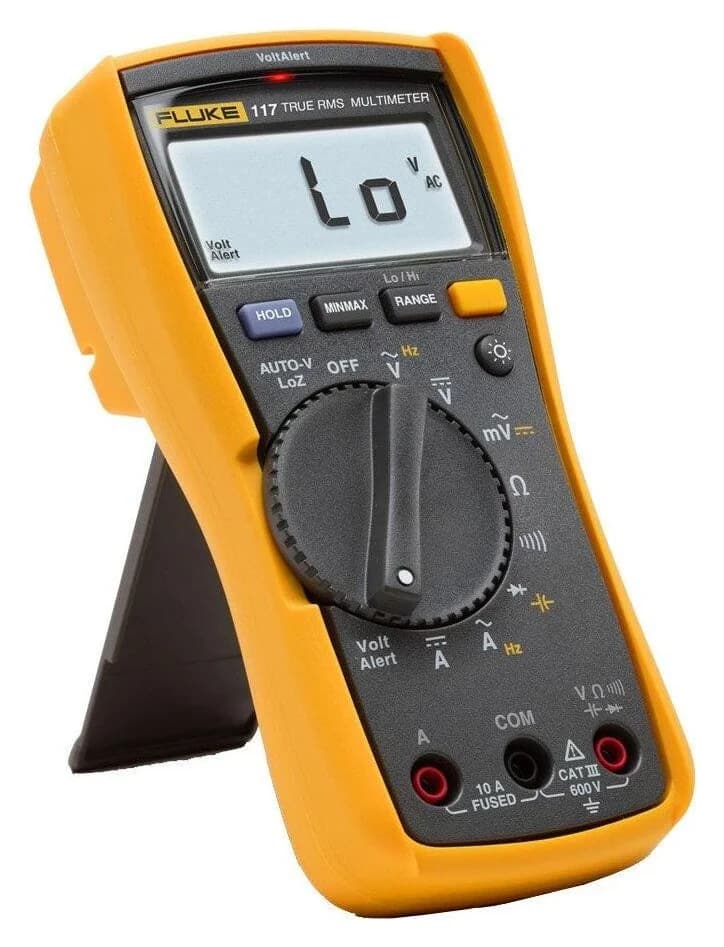
Fluke
A compact 6,000-count True RMS multimeter for electricians, rated CAT III 600V, with built-in VoltAlert non-contact voltage detection, automatic AC/DC selection and a low-impedance mode.
Check package and model options
- 600 V max
- 10 A max
- 6,000 counts
- CAT III 600V
Choose the 117 for its low-impedance mode, automatic AC/DC voltage selection and built-in non-contact detection. Its current ranges resolve milliamps, but it lacks a dedicated microamp range; those electrician features do not make it the automatic choice for small-current electronics.
Version check: The standard 117 includes leads and a holster. The 117/323 kit adds a separate clamp meter. Fluke's 117 page also contains temperature text in its comparison material; its model-specific manual lists no temperature measurement function. Do not buy it expecting that function.
Read the value, unit and mode together
A voltage number with V is in volts; mV changes its scale. A, mA and µA indicate current; Ω, kΩ and MΩ indicate resistance. A V∿ or AC indicator means AC voltage; V⎓ or DC means DC voltage. Fluke's display and dial guide illustrates these symbols.
Read the LCD mode indicator as well as the dial. The MM420 defaults to AC on its voltage position; its SEL button switches between AC and DC. Automatic ranging chooses a range within a function; it does not mean every meter automatically chooses AC versus DC. The 117's AutoVolt selection is a separate feature.
Function and mode
Identify voltage, current or resistance, then the AC/DC indicator where applicable.
Number and prefix
Keep the decimal point and the unit prefix together when recording the value.
Range and status
Check AUTO or manual range, plus HOLD, REL and any MIN/MAX indication, before interpreting the number.
For connections and low-voltage procedures, use how to use a multimeter. This page focuses on interpreting the result.
Convert milli, micro and base units
The NIST prefix table defines milli as a thousandth, micro as a millionth, kilo as a thousand and mega as a million. Uppercase M and lowercase m have different meanings.
Calculated illustrations, not instrument readings:
2.000 V DC
- Equivalent value
- 2,000 mV DC
- How to read it
- Two volts, written in different units
1 mA DC
- Equivalent value
- 1,000 µA DC = 0.001 A DC
- How to read it
- One milliamp, not one amp
1 kΩ
- Equivalent value
- 1,000 Ω
- How to read it
- One kilohm
1 MΩ
- Equivalent value
- One million ohms
- How to read it
- A capital M means mega
Full comparison table
Swipe to compare. Row labels stay visible.
| Display example | Equivalent value | How to read it |
|---|---|---|
| 2.000 V DC | 2,000 mV DC | Two volts, written in different units |
| 1 mA DC | 1,000 µA DC = 0.001 A DC | One milliamp, not one amp |
| 1 kΩ | 1,000 Ω | One kilohm |
| 1 MΩ | One million ohms | A capital M means mega |
Scroll horizontally to see every column
| Display example | Equivalent value | How to read it |
|---|---|---|
| 2.000 V DC | 2,000 mV DC | Two volts, written in different units |
| 1 mA DC | 1,000 µA DC = 0.001 A DC | One milliamp, not one amp |
| 1 kΩ | 1,000 Ω | One kilohm |
| 1 MΩ | One million ohms | A capital M means mega |
To turn millivolts into volts, divide by a thousand. To turn milliamps into microamps, multiply by a thousand. Convert both readings to the same unit before comparing them; a change in prefix alone need not mean the signal changed.
Range changes the last digit
The range is the span the meter can display on that setting. Resolution is its smallest displayed increment. The Fluke 117 voltage table supplies the ranges and resolutions below; the displayed values are calculated illustrations of the same input.
6.000 V
- Illustrative display
- 2.000 V
- Smallest displayed increment
- 0.001 V
60.00 V
- Illustrative display
- 2.00 V
- Smallest displayed increment
- 0.01 V
600.0 V
- Illustrative display
- 2.0 V
- Smallest displayed increment
- 0.1 V
Full comparison table
Swipe to compare. Row labels stay visible.
| Selected ordinary DC range | Illustrative display | Smallest displayed increment |
|---|---|---|
| 6.000 V | 2.000 V | 0.001 V |
| 60.00 V | 2.00 V | 0.01 V |
| 600.0 V | 2.0 V | 0.1 V |
Scroll horizontally to see every column
| Selected ordinary DC range | Illustrative display | Smallest displayed increment |
|---|---|---|
| 6.000 V | 2.000 V | 0.001 V |
| 60.00 V | 2.00 V | 0.01 V |
| 600.0 V | 2.0 V | 0.1 V |
The trailing zeros describe finer display increments. They do not guarantee accuracy to the last decimal. If AUTO changes range, check the decimal and unit again before comparing the new display with your notes. For a stable input within range, selecting a lower range can reveal smaller changes; it cannot improve the meter beyond its stated accuracy.
Negative, zero, HOLD and OL: read the context
−2.00 V DC, ordinary mode
- Interpretation
- Illustrative polarity example: the red probe is two volts below the black COM probe
Zero volts
- Interpretation
- A displayed value at that resolution; check function, HOLD and any relative reference before drawing a conclusion
H or HOLD
- Interpretation
- A frozen value, which can remain even after the input changes
MIN, MAX or AVG
- Interpretation
- A recorded extreme or average rather than necessarily the present value
REL
- Interpretation
- A difference from a stored reference, so a negative number can mean below that reference
OL in resistance/continuity
- Interpretation
- Open probes or an open path can cause it; resistance beyond the selected range can also be too large to display
OL in voltage
- Interpretation
- Input too large for the selected range; stop and consult the range and instrument limits
OL in diode mode
- Interpretation
- Function-specific: the 117 manual says it displays OL above 2.0 V
Full comparison table
Swipe to compare. Row labels stay visible.
| Display or indicator | Interpretation |
|---|---|
| −2.00 V DC, ordinary mode | Illustrative polarity example: the red probe is two volts below the black COM probe |
| Zero volts | A displayed value at that resolution; check function, HOLD and any relative reference before drawing a conclusion |
| H or HOLD | A frozen value, which can remain even after the input changes |
| MIN, MAX or AVG | A recorded extreme or average rather than necessarily the present value |
| REL | A difference from a stored reference, so a negative number can mean below that reference |
| OL in resistance/continuity | Open probes or an open path can cause it; resistance beyond the selected range can also be too large to display |
| OL in voltage | Input too large for the selected range; stop and consult the range and instrument limits |
| OL in diode mode | Function-specific: the 117 manual says it displays OL above 2.0 V |
Scroll horizontally to see every column
| Display or indicator | Interpretation |
|---|---|
| −2.00 V DC, ordinary mode | Illustrative polarity example: the red probe is two volts below the black COM probe |
| Zero volts | A displayed value at that resolution; check function, HOLD and any relative reference before drawing a conclusion |
| H or HOLD | A frozen value, which can remain even after the input changes |
| MIN, MAX or AVG | A recorded extreme or average rather than necessarily the present value |
| REL | A difference from a stored reference, so a negative number can mean below that reference |
| OL in resistance/continuity | Open probes or an open path can cause it; resistance beyond the selected range can also be too large to display |
| OL in voltage | Input too large for the selected range; stop and consult the range and instrument limits |
| OL in diode mode | Function-specific: the 117 manual says it displays OL above 2.0 V |
These meanings come from the 117 manual, MM420 manual and Fluke's display guide. They are not universal fault diagnoses. Klein specifically documents small millivolt readings with open voltage leads as normal noise. A near-zero resistance value or a continuity beep also needs context: the MM420 beeps below 50 Ω, so a beep does not mean exactly zero resistance.
How to read an analog multimeter scale
Use the exact model's scale and selected range. This example is an editorial reference to the Simpson 260-8, not an additional product recommendation. Its 260-8 manual, section 4.8, specifies the black DC scale and the following conversions.
Calculated illustration: imagine the pointer aligned with 50 on the 0–250 DC scale:
250 V
- Calculation
- Read that scale directly
- Interpreted value
- 50 V
25 V
- Calculation
- Divide the scale reading by 10
- Interpreted value
- 5 V
2.5 V
- Calculation
- Divide the scale reading by 100
- Interpreted value
- 0.5 V
Full comparison table
Swipe to compare. Row labels stay visible.
| Selected DC range | Calculation | Interpreted value |
|---|---|---|
| 250 V | Read that scale directly | 50 V |
| 25 V | Divide the scale reading by 10 | 5 V |
| 2.5 V | Divide the scale reading by 100 | 0.5 V |
Scroll horizontally to see every column
| Selected DC range | Calculation | Interpreted value |
|---|---|---|
| 250 V | Read that scale directly | 50 V |
| 25 V | Divide the scale reading by 10 | 5 V |
| 2.5 V | Divide the scale reading by 100 | 0.5 V |
The pointer position alone is insufficient. This is a scale-reading illustration, not an instruction to connect to those voltages. Simpson provides a mirrored dial to address parallax.
Ohms use a different rule. The 260-8's top OHMS scale increases from right to left. Its section 4.21 says to multiply by the selected resistance factor and adjust ZERO OHMS for each resistance range. An illustrative scale reading of 20 on R × 100 means 2,000 Ω. Read the marked divisions rather than treating that scale like a voltage scale.
Analog accuracy can use a different basis, too: Simpson specifies DC voltage accuracy as 2% of full scale. Its own example gives ±0.20 V anywhere on the 10 V range. That is not the same as a percentage of the pointer's reading.
Multimeter accuracy, counts and repeatability
Counts describe display capacity. Fluke explains that a 6,000-count display can show up to 5999 before accounting for the decimal position. Use the actual range table to determine the voltage or resistance step; the count label alone is insufficient.
Accuracy describes the specified error allowance. Repeatability concerns agreement between repeated measurements under the same conditions, as distinguished in the international metrology vocabulary. A steady display can still be offset from the correct value. Fluke's accuracy and precision explainer distinguishes these from resolution.
For specifications written ±(percentage of reading + counts), Fluke's specification application note explains the two terms. Calculate:
Error allowance = reading × percentage / 100 + counts × selected-range resolution.
Worked calculation using Fluke's generic example: assume a display of 100.0 V, an applicable specification of ±(2% + 2 counts) and 0.1 V resolution. The percentage term contributes 2 V; add 2 × 0.1 V for the counts term. The resulting interval is 97.8–102.2 V, as in Fluke's example. This is an arithmetic illustration, not a measurement or either pick's specification.
For the actual picks, use their table above and the applicable range. Klein states accuracy at 18–28 °C and calibration accuracy for one year. Fluke specifies the 117 for one year after calibration, at 18–28 °C and 0–90% relative humidity. Outside the applicable conditions, that simple calculation is insufficient.
- Yes: Resolution tells you the size of the displayed increments.
- Yes: The full accuracy formula includes the percentage and counts terms.
- No: More counts alone prove better accuracy.
- No: Repeatable readings alone prove the correct value.
How we choose
Our recommendations use official model pages and manuals, not physical testing. All display examples are labelled illustrations or calculations. We use model-specific function and accuracy rows rather than transferring specifications from adjacent comparison columns. Our measurement policy explains the evidence required for future original readings.
Buying guide: replace the limitation that matters
Keep your current meter if its functions, ranges and resolution cover your job. For a first purchase, the MM420 is our learner choice; for the 117's electrician functions, compare the complete feature trade-offs in Fluke vs Klein.
For small-current electronics, check the current range and resolution separately from voltage counts. If you need finer increments, write down the required function, range and accuracy before shopping; our multimeter buying guide is the next stop. Do not infer precision from a bench enclosure or an analog needle alone.
Verdict
Read mode, number, prefix, range and status before judging the circuit. The MM420 is our first-meter pick; the 117 fits buyers who need its electrician features. A different meter helps when it supplies a missing function or suitable range and resolution; extra digits alone do not settle the question.
Our picks at a glance
- 1
Choose for: First meter; Lead-Alert jack illumination
Check before buying: Rated CAT III 600V: not for service-entrance (CAT IV) work
- 2
Choose for: Electrical troubleshooting with True RMS and a low-impedance mode for ghost voltage.
Limit: CAT III 600 V, not CAT IV; no mA/µA current ranges (the 6 A range resolves 1 mA).
Frequently asked questions
What does OL mean on a multimeter?
OL means the input exceeds the selected range or display capability. In resistance or continuity, open probes can produce OL; it does not mean zero ohms. A resistance above the meter's range can also exceed its display capability. On voltage, stop and check the function, range and instrument limits. Never treat OL as evidence that a circuit is safe.
What does a negative multimeter reading mean?
On a normal DC voltage measurement, a minus sign means the red probe is at a lower potential than the black COM probe. The magnitude is still the displayed number in its stated unit. Check for REL mode, too: a relative reading is a difference from a stored reference. Neither case by itself establishes that a battery or component has failed.
Does a 6,000-count multimeter have better accuracy than a 4,000-count meter?
Counts describe display capacity, while accuracy describes the permitted error under stated conditions. More counts can preserve finer resolution before a range change, but they do not establish a smaller error. Compare the actual function, selected range, resolution and complete percentage-plus-counts specification. A steady final digit also does not prove accuracy: repeatability is a separate property.
What does the +2 mean in a multimeter accuracy specification?
In a specification expressed as a percentage of reading plus counts, +2 adds an allowance of two increments of the least significant displayed digit. Multiply two by the resolution of the selected range, then add the percentage allowance. The same +2 contributes a larger voltage allowance on a coarser range; it does not mean two percent or two volts.
Related guides
Best picks · Multimeters
Best Multimeters for Beginners: Choose a First Meter You Can Learn On
Choose a first multimeter by its controls, current ranges, jack reminders and included leads. Compare Klein MM420, MM325 and Fluke 107 for learning and gifts.
Best picks · Multimeters
Best Multimeters for HVAC: Microamps, Temperature and Complete Kits
Choose an HVAC multimeter by job: compare Fluke 116, Fieldpiece SC260 and Klein alternatives for flame sensors, clamp current, probe limits and kit contents.
Comparison · Multimeters
Fluke 101 vs 107: Current Ranges, Backlight and Regional Support
Compare the Fluke 101 and 107 by current inputs, backlight, accuracy and kit contents, with manual references and regional warranty checks before you buy.