

Comparison
Klein LAN Scout Jr. 2 vs Scout Pro Max
Which LAN Cable Tester?
Choose the right Klein LAN cable tester: compare Jr. 2 wiremap with Pro Max length, PoE and reports, plus the remotes, probes and exact kit contents you need.
By thisMETER EditorialUpdated November 3, 20267 min read2 picks
Our recommendation: Klein Tools VDV526-200
Best first tester
Limit: RJ45 only: no coax or phone jacks
On this page · Our picks at a glance
Our picks at a glance
- 1
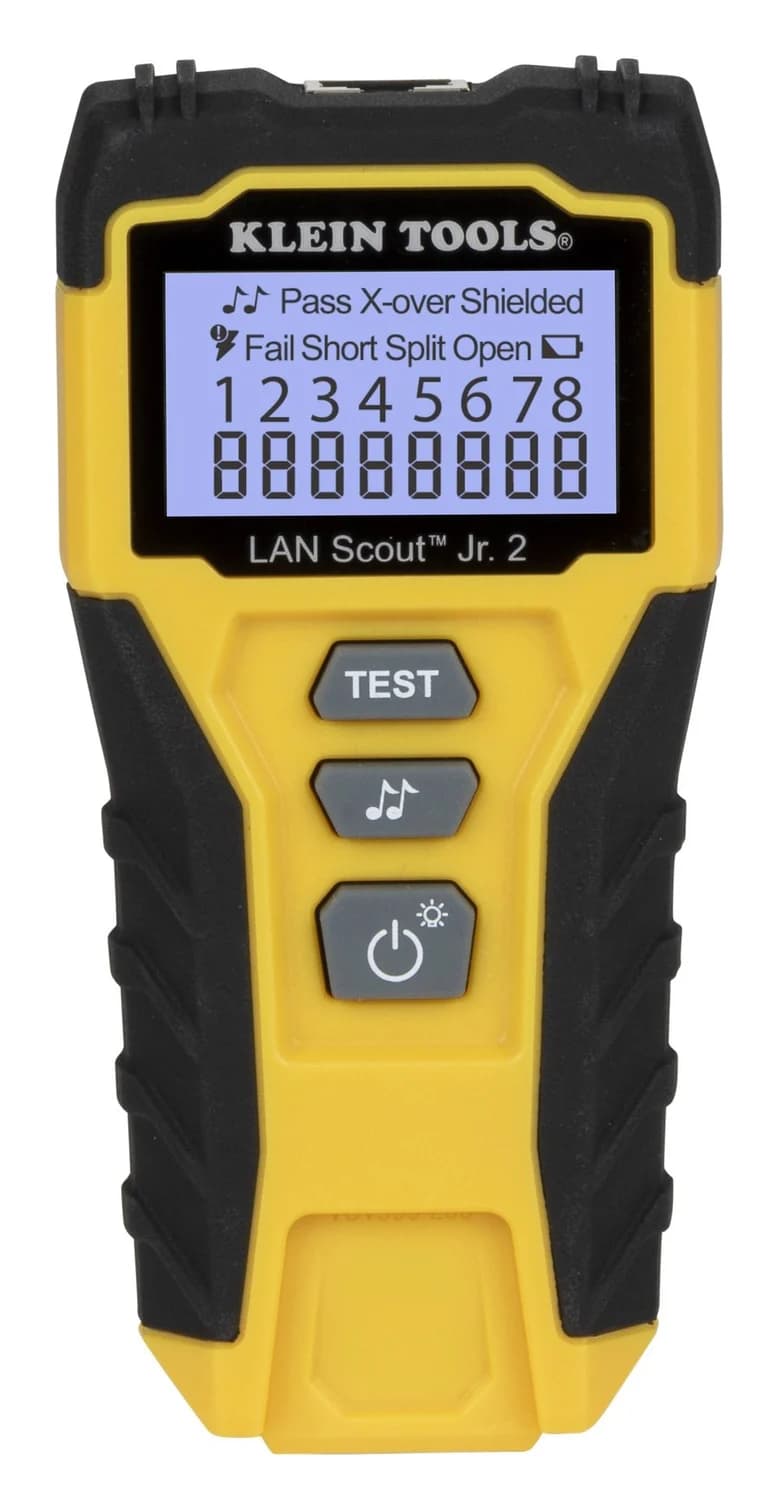
Choose for: Best first tester
Check before buying: RJ45 only: no coax or phone jacks
- 2
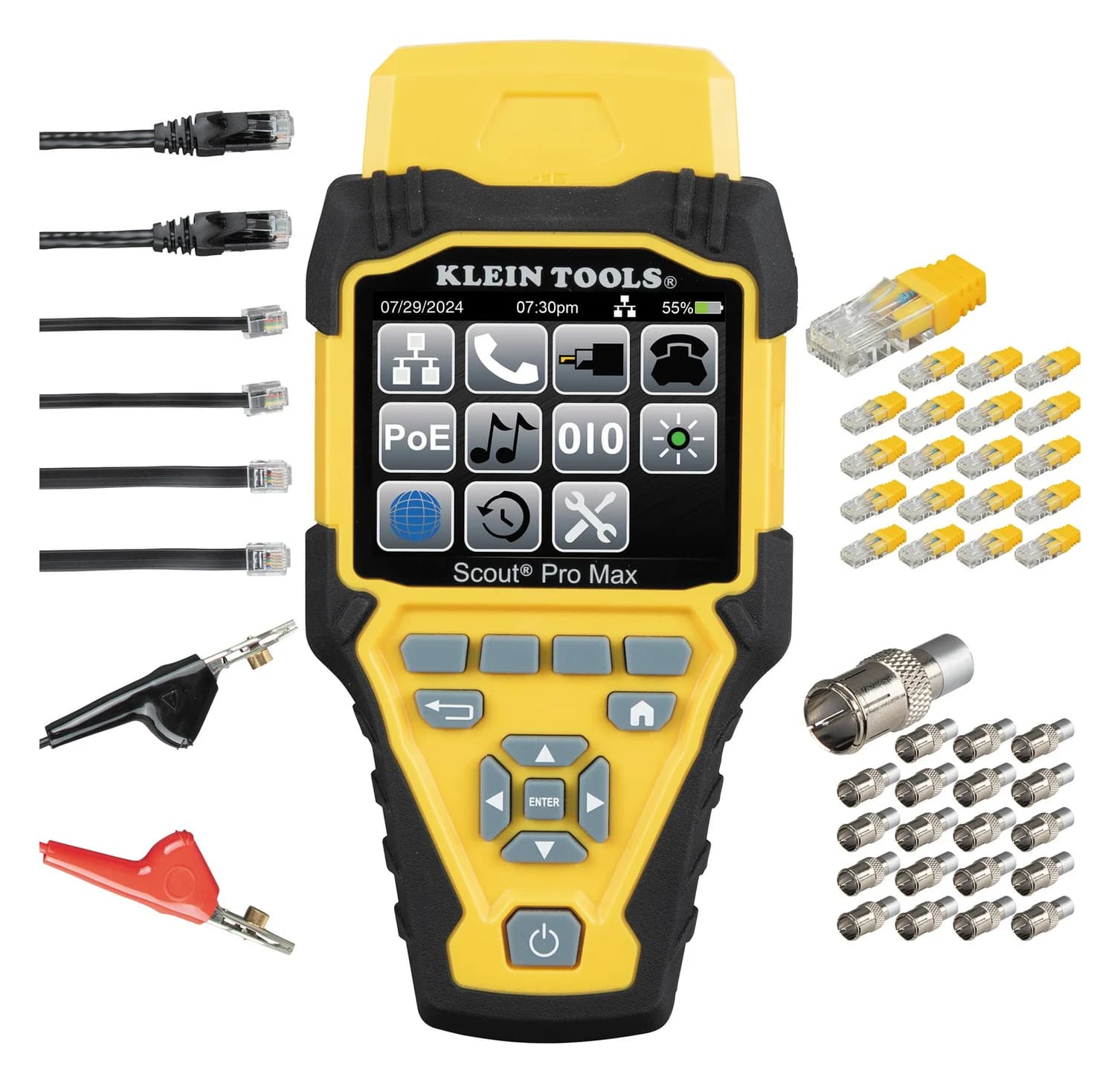
Choose for: Best for installed-run work
Check before buying: A verification tool, not a certifier: it can't certify Cat 6 or 6A performance to TIA limits
Choose the Klein LAN Scout Jr. 2 (VDV526-200) for checking the wiring of an unpowered RJ45 cable; choose the Scout Pro Max (VDV501-770) for identifying installed runs and adding TDR fault distances, PoE observations and saved results. Our first-tester pick is the Jr. 2; our installer pick is the Pro Max remote set. Neither replaces cabling certification.
Quick picks
- Checking a patch lead or a newly terminated home run: get the Jr. 2 for its pin-to-pin wiremap and explicit split-pair detection.
- Labelling an installation or documenting troubleshooting: get the Pro Max for its location remotes, length measurements and saved results.
- Proving category performance for a customer: arrange certification; the extra Pro Max functions do not establish standards compliance.
Compare the exact models
These are the VDV526-200 Jr. 2 and VDV501-770 Pro Max remote set, not interchangeable Scout-family bundles. Sources: Klein's Jr. 2 manual, Pro Max manual and product pages linked above.
Which connectors?
- LAN Scout Jr. 2 — VDV526-200
- RJ45 data cabling
- Scout Pro Max — VDV501-770
- RJ45 data, RJ11/RJ12 voice, F-connector coax
Wiring checks?
- LAN Scout Jr. 2 — VDV526-200
- Open, short, miswire, split pair, crossover and shield
- Scout Pro Max — VDV501-770
- Data/voice wiremap, open/short faults, miswire/crossover examples and shield indication
Length and fault distance?
- LAN Scout Jr. 2 — VDV526-200
- No length-reading mode described
- Scout Pro Max — VDV501-770
- TDR length and approximate fault distances; range conflict explained below
Installed-run identification?
- LAN Scout Jr. 2 — VDV526-200
- One self-storing test remote; no location-ID function listed
- Scout Pro Max — VDV501-770
- Self-storing Test + Map remote, plus 20 LanMap and 20 CoaxMap location-ID remotes
PoE?
- LAN Scout Jr. 2 — VDV526-200
- Voltage warning; designed for unenergized cables
- Scout Pro Max — VDV501-770
- Active/passive PoE type, mode and voltage observations
Toning?
- LAN Scout Jr. 2 — VDV526-200
- Analog; receiving probe separate
- Scout Pro Max — VDV501-770
- Analog and digital; receiving probe separate
Saved results?
- LAN Scout Jr. 2 — VDV526-200
- No storage/export function described
- Scout Pro Max — VDV501-770
- Up to 200 results; CSV export over USB
Power?
- LAN Scout Jr. 2 — VDV526-200
- Two AAA batteries included
- Scout Pro Max — VDV501-770
- Three AA batteries plus a CR2032 clock battery included
Full comparison table
Swipe to compare. Row labels stay visible.
| Buying question | LAN Scout Jr. 2 — VDV526-200 | Scout Pro Max — VDV501-770 |
|---|---|---|
| Which connectors? | RJ45 data cabling | RJ45 data, RJ11/RJ12 voice, F-connector coax |
| Wiring checks? | Open, short, miswire, split pair, crossover and shield | Data/voice wiremap, open/short faults, miswire/crossover examples and shield indication |
| Length and fault distance? | No length-reading mode described | TDR length and approximate fault distances; range conflict explained below |
| Installed-run identification? | One self-storing test remote; no location-ID function listed | Self-storing Test + Map remote, plus 20 LanMap and 20 CoaxMap location-ID remotes |
| PoE? | Voltage warning; designed for unenergized cables | Active/passive PoE type, mode and voltage observations |
| Toning? | Analog; receiving probe separate | Analog and digital; receiving probe separate |
| Saved results? | No storage/export function described | Up to 200 results; CSV export over USB |
| Power? | Two AAA batteries included | Three AA batteries plus a CR2032 clock battery included |
Scroll horizontally to see every column
| Buying question | LAN Scout Jr. 2 — VDV526-200 | Scout Pro Max — VDV501-770 |
|---|---|---|
| Which connectors? | RJ45 data cabling | RJ45 data, RJ11/RJ12 voice, F-connector coax |
| Wiring checks? | Open, short, miswire, split pair, crossover and shield | Data/voice wiremap, open/short faults, miswire/crossover examples and shield indication |
| Length and fault distance? | No length-reading mode described | TDR length and approximate fault distances; range conflict explained below |
| Installed-run identification? | One self-storing test remote; no location-ID function listed | Self-storing Test + Map remote, plus 20 LanMap and 20 CoaxMap location-ID remotes |
| PoE? | Voltage warning; designed for unenergized cables | Active/passive PoE type, mode and voltage observations |
| Toning? | Analog; receiving probe separate | Analog and digital; receiving probe separate |
| Saved results? | No storage/export function described | Up to 200 results; CSV export over USB |
| Power? | Two AAA batteries included | Three AA batteries plus a CR2032 clock battery included |
The Jr. 2 explicitly claims split-pair detection. We found no explicit split-pair claim in the checked Pro Max product page, manual or sell sheet, so do not assume every Jr. 2 feature carries across.
Best first tester: Klein LAN Scout Jr. 2
Klein Tools
A pocket tester for unenergized RJ45 cabling with a backlit LCD wiremap and a self-storing remote that finds opens, shorts, miswires, split pairs and shield faults, with a tone generator for tracing.
Check package and model options
The Jr. 2 is our choice when the question is whether an RJ45 cable is wired correctly. Its backlit display shows tester-end pins against remote-end pins, and the included remote detaches for testing installed cables. For wall jacks, the manual calls for known-good patch leads at both ends; Klein lists the box as the tester, remote and batteries, so plan for those leads separately.
It has more diagnostic value than a simple continuity light: Klein explicitly lists split-pair detection, with a minimum cable length of 1.5 ft (0.5 m) for that check. Its default loop mode repeats a test every two seconds, which the manual describes as useful for intermittent problems.
Choose it for checking your terminations rather than managing a collection of unidentified outlets. Length readings, result storage and PoE characterization are not documented functions of this model. A voltage alert is a reason to disconnect, not a PoE test result.
Best for installed-run work: Klein Scout Pro Max
Klein Tools
A color-screen voice, data and video cable tester that maps RJ45, RJ11/12 and coax wiring, measures cable length with TDR, identifies up to 20 locations, tests PoE and reports advertised link speed.
Check package and model options
- IEEE 802.3af/at/bt PoE (Types 1-4); 10/100/1G/10GBASE-T link speeds
The Pro Max earns our recommendation when finding the run, locating a fault and keeping a record matter alongside wiremap. Klein documents data and voice wiremap, coax testing, TDR length and fault distances, numbered location identification, PoE testing, hub blink and result recall/export. Those capabilities are useful for repeated installation work even when certification is handled separately.
Its connections are RJ45, RJ11/RJ12 and coax F, with a self-storing VDV770-770 Test + Map remote. That remote supports testing, mapping and identification; the small numbered location plugs have a different job.
Remotes and variants: what the package actually buys
VDV526-200 means LAN Scout Jr. 2, even though Klein's product-page heading shortens the name to LAN Scout Jr. Its manual identifies the version, and its replacement remote is VDV999-200.
For VDV501-770, Klein lists 20 RJ45 LanMap location-ID remotes and 20 CoaxMap location-ID remotes with F connectors, alongside the self-storing Test + Map remote. The manual explicitly says the location-ID remotes cannot perform wiremap or cable-length tests. Buying this set does not give you twenty remote wiremap stations.
For example, leave numbered LanMap plugs at room outlets, record the room-to-number list, then identify the corresponding unknown cables at the wiring closet. After identification, use the Test + Map remote to check wiring. This separates locating an endpoint from verifying its termination.
Record the destination
Put a numbered LanMap location remote at an outlet and note its room.
Label the matching run
Read the remote ID at the wiring closet and label that cable.
Verify the termination
Replace the location remote with the Test + Map remote for a wiremap test.
The Max package also lists a USB-C-to-USB-A cable, a female coax-F-to-angled-bed-of-nails lead, two each of RJ11, RJ12 and RJ45 patch leads, an F-barrel connector, and batteries. A tracing probe is sold separately.
Expansion-kit trap: the Max page lists VDV770-850 Test+Map remotes #2–#6 as an accessory, but that accessory's own specification page names Scout Pro 3 under “For Use With.” Confirm the intended Max configuration with Klein before adding that expansion; we are not recommending it on the strength of a family name. The supplied Max remote is documented directly for this model.
Length, PoE and saved results: read the limits
Length: a test limit is not a length reading
The Jr. 2 manual's 2,000 ft (610 m) maximum cable length is a supported test length. Its controls describe wiremap and analog tone generation, not a displayed length measurement.
The Pro Max uses TDR (time-domain reflectometry) and requires the correct velocity of propagation, or VoP, for accurate readings. Klein specifies ±(2% + 3 ft or 1 m) with known VoP and consistent cable parameters. With multiple faults, the manual says its approximate distance is to the first fault encountered.
Klein's published range figures conflict: the Max product page says up to 2,000 ft (610 m), while the manual lists data: 3,000 ft (914 m) and coax: 2,000 ft (610 m). Confirm your cable type and required range with Klein if those ceilings affect the purchase; we would not promise the higher figure from the headline alone.
PoE and network speed: useful observations, bounded conclusions
The Max manual documents IEEE 802.3af, 802.3at and 802.3bt, Types 1–4, plus passive PoE up to 60 V. Its screen identifies the detected type, wiring mode and voltage, and labels a field “Maximum wattage for detected PoE.” The manual does not document a sustained load test; do not treat that field as proof of usable power at your camera or access point.
For network detection, the manual specifies advertised 10/100/1G/10GBASE-T speeds. Reading a switch's advertised capability is not a cable-bandwidth qualification result. Fluke Networks explains the distinction: verification checks connections, qualification assesses application support, and certification compares link performance with cabling standards.
- Yes: Wiremap answers whether the checked connections are correct
- Partly: Pro Max network detection reports advertised capability
- No: Neither pick establishes category certification
Saved results: the Max can keep a job record
Klein specifies storage for up to 200 results on the Max. Its manual describes naming and recalling tests, then exporting SPM_EXPORT in CSV format through the included USB cable using the computer's file explorer. That supports keeping a troubleshooting record; saving a result does not turn it into certification. The Jr. 2 manual describes no comparable result-storage or export workflow.
Buying guide: budget for the receiving probe
Tone generation does not include the listening tool. For Jr. 2 analog tracing, Klein specifies the separately sold VDV500-123 Probe-PRO. The tester already generates the tone; you are adding the receiver. Choose this accessory if locating unenergized cables is part of your Jr. 2 job.
For Max digital tracing, choose the separately sold VDV500-223 Digital Tracing Probe: the Max manual says other probes are incompatible with its digital function. For Max analog tracing, the same manual recommends either VDV500-123 or VDV500-223. Buy the digital probe if you want both Max tone modes; the analog probe is sufficient for its documented analog mode.
Before ordering, match the model number, remote type and probe to the work. Use the method in our Ethernet cable tester guide for the cable-checking workflow and wider choices. For a present, start with the recipient's existing kit; our gifts for electricians guide provides more options.
How we choose
This comparison is based on manufacturer documentation, not physical testing. We checked Klein's exact-model pages, manuals, Max sell sheet, remote and probe pages, and Fluke Networks' explanation of testing levels on November 2, 2026. We distinguish documented functions from omissions, name conflicts between official pages and reuse the site's existing records for these exact tester models. See How we choose and How we measure.
Verdict
Get the LAN Scout Jr. 2 VDV526-200 for straightforward RJ45 wiremap, including documented split-pair detection. Get the Scout Pro Max VDV501-770 when location IDs, TDR fault distances, PoE observations and saved results will serve your work. The key package distinction is that location-ID plugs identify endpoints; the Test + Map remote checks their wiring.
Frequently asked questions
Does the Klein LAN Scout Jr. 2 measure cable length?
Its manual specifies a maximum cable length of 2,000 ft (610 m), but describes wiremap and tone controls rather than a length-reading function. That number is a supported test length, not a measured distance. Choose the Scout Pro Max if you need TDR length readings or approximate distance to an open or short. Its readings depend on the cable's velocity of propagation.
Can the LAN Scout Jr. 2 test PoE?
It is designed for unenergized cabling. Its voltage warning stops a wiremap test and tells you to disconnect; it does not characterize PoE. The Scout Pro Max documents active and passive PoE testing, including detected type, wiring mode and voltage. Only its RJ45 port is designed for PoE-energized cables. Follow the manual for the selected function.
Are the Scout Pro Max's LanMap remotes full cable testers?
No. The numbered LanMap and CoaxMap location remotes identify runs; the manual explicitly excludes wiremap and cable-length tests with those remotes. Use the included self-storing Test + Map remote for wiremap testing. The standard VDV501-770 package lists 20 LanMap and 20 CoaxMap location remotes, so a large remote count does not mean an equivalent number of wiremap-capable remotes.
Will either tester certify Cat6 or prove a cable can run at 10G?
Neither should be bought for category certification. The Jr. 2 checks wiring, while the Pro Max manual describes advertised network speeds, not a cable-bandwidth qualification test. Fluke Networks distinguishes verification, qualification of application support and certification against cabling standards. If you need evidence that an installed link meets its specified category, arrange certification with the appropriate instrument.
Klein Tools VDV526-200
AmazonRelated guides
Buying guide · Cable Testers
How to Test Ethernet Cable: Wiremap, Split Pairs and Speed Checks
Test Ethernet cables and wall jacks, find opens, shorts and split pairs, isolate patch leads, and check link speed before replacing cable or buying a tester.
Comparison · Cable Testers
Klein Scout Pro 3 vs Scout Pro Max: Upgrade or Keep Your Tester?
Keep your Klein Scout Pro 3 or upgrade? Compare kits, PoE, fault distance, switch-port information, reports and remote compatibility before buying a tester.
Buying guide · Cable Testers
HDMI Cable Testers: Continuity, Certification and What to Buy
Choose HDMI cable testers for wiring faults, compare Jonard HDMI-100 and Goobay 31961, check certification labels, and know when replacing a cable makes sense.