

Comparison
Klein Scout Pro 3 vs Scout Pro Max
Upgrade or Keep Your Tester?
Keep your Klein Scout Pro 3 or upgrade? Compare kits, PoE, fault distance, switch-port information, reports and remote compatibility before buying a tester.
By thisMETER EditorialUpdated November 3, 20268 min read2 picks
On this page · Our picks at a glance
Our picks at a glance
- 1
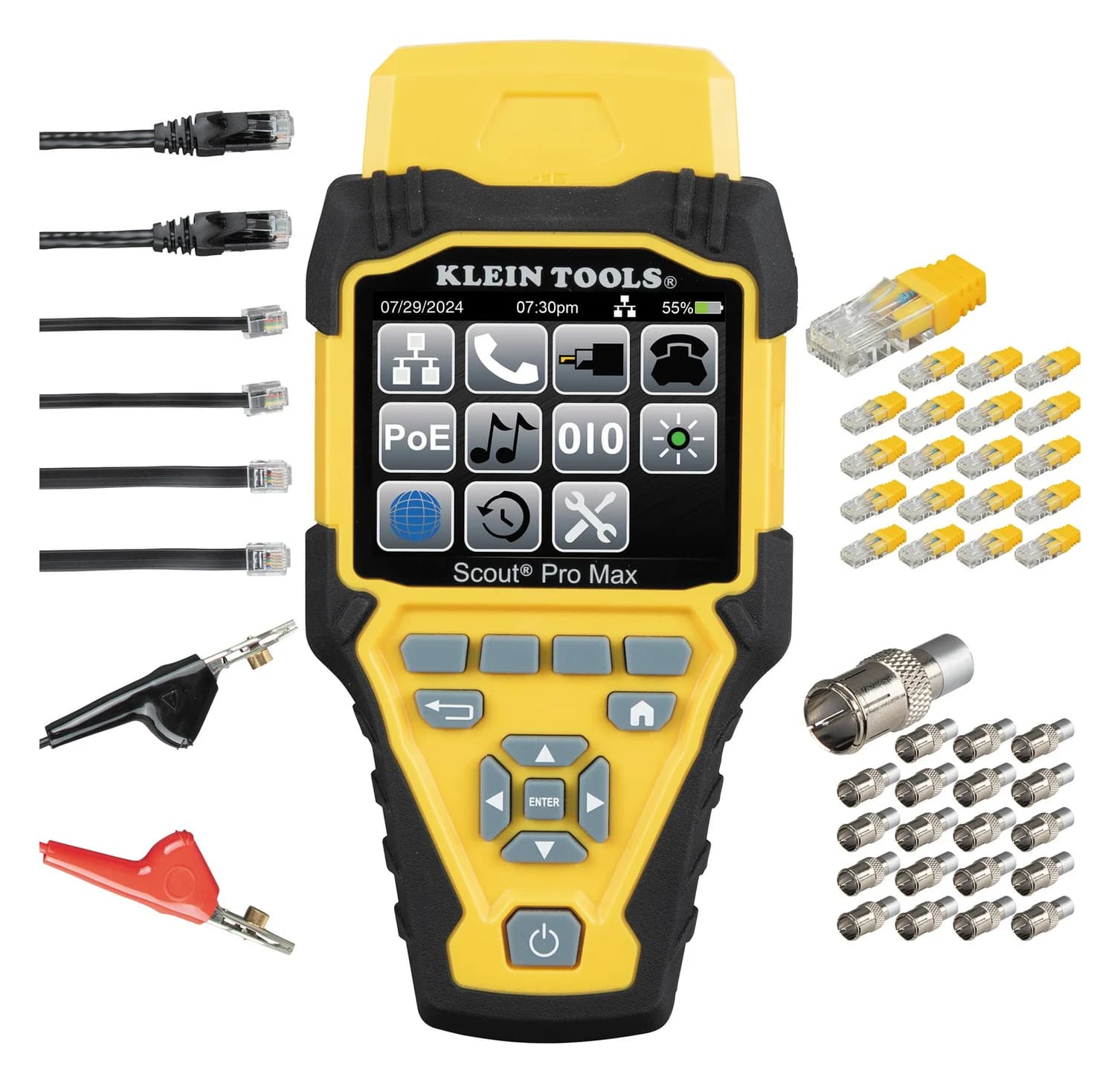
Choose for: You need fault location or exportable job records
Check before buying: A verification tool, not a certifier: it can't certify Cat 6 or 6A performance to TIA limits
- 2
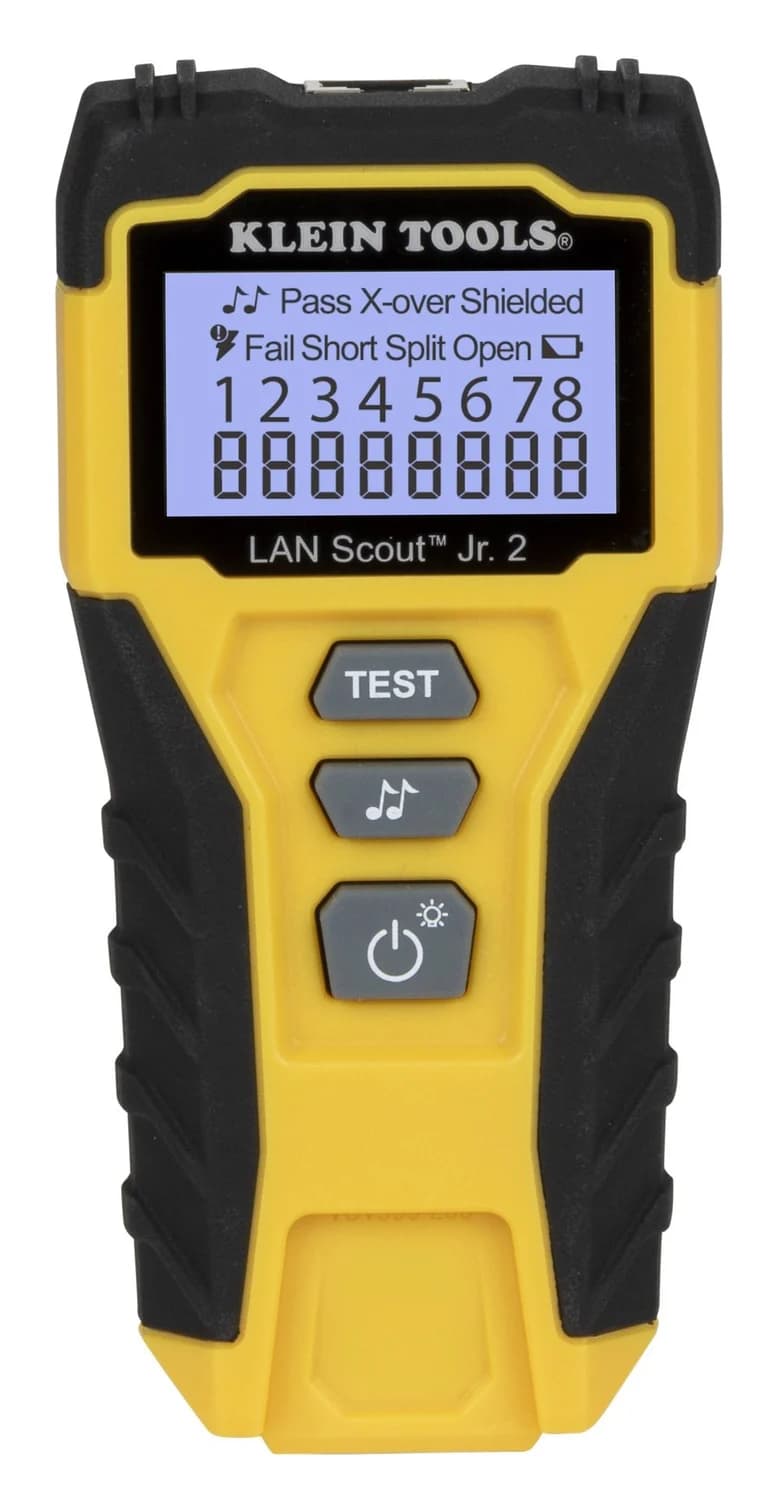
Choose for: You are buying for basic Ethernet wiring checks
Check before buying: RJ45 only: no coax or phone jacks
Keep a working Klein Scout Pro 3 if wiremap, cable identification and basic length checks cover your work. Choose the Scout Pro Max VDV501-770 when you need approximate distance to a break or short, saved results or advertised switch-port speeds. Before upgrading for PoE, check your kit number: VDV501-851 lacks it; VDV501-852 and VDV501-853 already test PoE/PoE+, as Klein's kit comparison explains.
Quick picks
Compare specifications and all conditions
You already own a working Pro 3
- Our pick
- Keep it for the documented tests you use
- Why
- Wiremap, length, identification and hub blink remain useful
You need fault location or exportable job records
- Our pick
- Scout Pro Max VDV501-770
- Why
- TDR fault distance and saved results with CSV export
You are buying for basic Ethernet wiring checks
- Our pick
- LAN Scout Jr. 2 VDV526-200
- Why
- RJ45 wiremap with split-pair detection and a self-storing remote
Full comparison table
Swipe to compare. Row labels stay visible.
| Your situation | Our pick | Why |
|---|---|---|
| You already own a working Pro 3 | Keep it for the documented tests you use | Wiremap, length, identification and hub blink remain useful |
| You need fault location or exportable job records | Scout Pro Max VDV501-770 | TDR fault distance and saved results with CSV export |
| You are buying for basic Ethernet wiring checks | LAN Scout Jr. 2 VDV526-200 | RJ45 wiremap with split-pair detection and a self-storing remote |
Scroll horizontally to see every column
| Your situation | Our pick | Why |
|---|---|---|
| You already own a working Pro 3 | Keep it for the documented tests you use | Wiremap, length, identification and hub blink remain useful |
| You need fault location or exportable job records | Scout Pro Max VDV501-770 | TDR fault distance and saved results with CSV export |
| You are buying for basic Ethernet wiring checks | LAN Scout Jr. 2 VDV526-200 | RJ45 wiremap with split-pair detection and a self-storing remote |
For the wider choice of tester classes, see our Ethernet cable tester guide.
Identify your Scout Pro 3 kit first
The suffix changes both capability and contents. Use the kit number on your packaging or paperwork, then match the remote part numbers. The VDV501-851 below is a legacy reference, not a claim of confirmed current stock.
Pro 3 VDV501-851
- PoE testing
- No
- Included location-only IDs
- 5 RJ45 + 5 coax
- Included test remotes
- Self-storing VDV501-210
Pro 3 VDV501-852
- PoE testing
- PoE/PoE+
- Included location-only IDs
- 18 RJ45 + 18 coax
- Included test remotes
- Self-storing VDV501-210
Pro 3 VDV501-853
- PoE testing
- PoE/PoE+
- Included location-only IDs
- None in the listed package
- Included test remotes
- Self-storing VDV501-210 plus Test + Map #2–6
Max VDV501-770
- PoE testing
- 802.3af/at/bt; passive PoE
- Included location-only IDs
- 20 RJ45 + 20 coax
- Included test remotes
- Self-storing VDV770-770
Full comparison table
Swipe to compare. Row labels stay visible.
| Exact kit | PoE testing | Included location-only IDs | Included test remotes |
|---|---|---|---|
| Pro 3 VDV501-851 | No | 5 RJ45 + 5 coax | Self-storing VDV501-210 |
| Pro 3 VDV501-852 | PoE/PoE+ | 18 RJ45 + 18 coax | Self-storing VDV501-210 |
| Pro 3 VDV501-853 | PoE/PoE+ | None in the listed package | Self-storing VDV501-210 plus Test + Map #2–6 |
| Max VDV501-770 | 802.3af/at/bt; passive PoE | 20 RJ45 + 20 coax | Self-storing VDV770-770 |
Scroll horizontally to see every column
| Exact kit | PoE testing | Included location-only IDs | Included test remotes |
|---|---|---|---|
| Pro 3 VDV501-851 | No | 5 RJ45 + 5 coax | Self-storing VDV501-210 |
| Pro 3 VDV501-852 | PoE/PoE+ | 18 RJ45 + 18 coax | Self-storing VDV501-210 |
| Pro 3 VDV501-853 | PoE/PoE+ | None in the listed package | Self-storing VDV501-210 plus Test + Map #2–6 |
| Max VDV501-770 | 802.3af/at/bt; passive PoE | 20 RJ45 + 20 coax | Self-storing VDV770-770 |
Contents come from Klein's 851, 852, 853 and Max manual. More location IDs do not mean more full wiremap tests at once.
Klein's shared PoE-model manual repeats a generic “up to 5 locations with included remotes” statement, while its VDV501-852 product page specifies 18 RJ45 and 18 coax IDs. The table uses the kit-specific contents; do not use that generic manual sentence as a packing list.
Scout Pro 3 vs Scout Pro Max: capability table
These are documented functions, not results from our own measurements. The Pro 3 columns come from its 851 manual and 852/853 manual; Max functions come from its manual above.
Connections
- Scout Pro 3
- RJ45, RJ11/RJ12, coax F
- Scout Pro Max
- RJ45, RJ11/RJ12, coax F
Wiremap/faults
- Scout Pro 3
- Opens, shorts, miswires, split pairs
- Scout Pro Max
- Opens, shorts, miswires and crossovers illustrated; split-pair detection not explicitly specified in retrieved documents
Length method
- Scout Pro 3
- Capacitance; adjustable length constant
- Scout Pro Max
- TDR; adjustable velocity of propagation (VoP)
Distance to fault
- Scout Pro 3
- No dedicated fault-distance mode documented
- Scout Pro Max
- Approximate distance to opens and shorts; first fault if multiple
PoE
- Scout Pro 3
- None on 851; 802.3af/at on 852/853
- Scout Pro Max
- 802.3af/at/bt, Types 1–4; passive up to 60 V
Switch-port information
- Scout Pro 3
- Hub blink; speed readout not documented
- Scout Pro Max
- Hub blink; advertised 10/100/1G/10GBASE-T, half/full duplex
Result records
- Scout Pro 3
- Saved-result export not documented
- Scout Pro Max
- Up to 200 results; CSV export over USB-C
Toning
- Scout Pro 3
- Analog; separate probe
- Scout Pro Max
- Analog and digital; digital requires VDV500-223
Full comparison table
Swipe to compare. Row labels stay visible.
| Function | Scout Pro 3 | Scout Pro Max |
|---|---|---|
| Connections | RJ45, RJ11/RJ12, coax F | RJ45, RJ11/RJ12, coax F |
| Wiremap/faults | Opens, shorts, miswires, split pairs | Opens, shorts, miswires and crossovers illustrated; split-pair detection not explicitly specified in retrieved documents |
| Length method | Capacitance; adjustable length constant | TDR; adjustable velocity of propagation (VoP) |
| Distance to fault | No dedicated fault-distance mode documented | Approximate distance to opens and shorts; first fault if multiple |
| PoE | None on 851; 802.3af/at on 852/853 | 802.3af/at/bt, Types 1–4; passive up to 60 V |
| Switch-port information | Hub blink; speed readout not documented | Hub blink; advertised 10/100/1G/10GBASE-T, half/full duplex |
| Result records | Saved-result export not documented | Up to 200 results; CSV export over USB-C |
| Toning | Analog; separate probe | Analog and digital; digital requires VDV500-223 |
Scroll horizontally to see every column
| Function | Scout Pro 3 | Scout Pro Max |
|---|---|---|
| Connections | RJ45, RJ11/RJ12, coax F | RJ45, RJ11/RJ12, coax F |
| Wiremap/faults | Opens, shorts, miswires, split pairs | Opens, shorts, miswires and crossovers illustrated; split-pair detection not explicitly specified in retrieved documents |
| Length method | Capacitance; adjustable length constant | TDR; adjustable velocity of propagation (VoP) |
| Distance to fault | No dedicated fault-distance mode documented | Approximate distance to opens and shorts; first fault if multiple |
| PoE | None on 851; 802.3af/at on 852/853 | 802.3af/at/bt, Types 1–4; passive up to 60 V |
| Switch-port information | Hub blink; speed readout not documented | Hub blink; advertised 10/100/1G/10GBASE-T, half/full duplex |
| Result records | Saved-result export not documented | Up to 200 results; CSV export over USB-C |
| Toning | Analog; separate probe | Analog and digital; digital requires VDV500-223 |
“Not documented” marks an evidence limit; it is not a promise that an undocumented function exists.
Best for existing owners: keep Scout Pro 3 when it covers the job
For “is this termination wired correctly?” work, Pro 3 still supplies a wiremap and identifies opens, shorts, miswires and split pairs. It also offers hub blink and analog toning with a separate probe. Those are reasons to keep a functioning tool when they cover your jobs, rather than replace it solely for the newer name.
Length is already present. Pro 3 measures capacitance and uses a cable-specific length constant. Its manual specifies 1.5–1,999 ft (0.5–610 m), with 15 pF/ft, while the product page rounds the headline to 2,000 ft. Set the constant for the cable: Klein says accuracy depends on that setting and cable consistency. Do not mistake this length function for Max's documented TDR fault-location mode.
A useful troubleshooting detail: the Pro 3 manual warns that leaving a LanMap ID on the far end can produce an incorrect length on pair 3–6. Disconnect that location ID for this measurement before concluding the tester needs replacement.
If the frustration is repeated walking between outlets, consider the supported Test + Map expansion kits below before changing the tester. If you already own an 852 or 853, basic PoE/PoE+ identification alone is also a weak upgrade reason.
Identify the VDV501-851 at Klein Tools
Best upgrade for fault location and records: Scout Pro Max
Klein Tools
A color-screen voice, data and video cable tester that maps RJ45, RJ11/12 and coax wiring, measures cable length with TDR, identifies up to 20 locations, tests PoE and reports advertised link speed.
Check package and model options
- IEEE 802.3af/at/bt PoE (Types 1-4); 10/100/1G/10GBASE-T link speeds
Max earns its place when you need to know where to look along a failed run. For opens and shorts it gives an approximate fault distance; with multiple faults, its manual says it reports the distance to the first encountered. Repair and retest rather than assuming that first location describes every fault.
Read the range conflict before buying for long runs. Klein's Max page headlines 2,000 ft (610 m), but its manual lists 0–3,000 ft (914 m) for data and 0–2,000 ft (610 m) for coax. We retain both statements instead of presenting the larger figure as an unconditional improvement. The specified accuracy is ±(2% + 3 ft or 1 m) with known VoP and consistent cable parameters; enter the appropriate VoP before relying on a distance.
Reports are a practical upgrade. Klein specifies storage for up to 200 results. The manual describes saving Data, Voice, Coax, POTS, PoE and Active Network results, editing the filename and recalling saved tests. Over USB-C, the tester appears as a VDV501-770 folder containing SPM_EXPORT.CSV; copy the file to your computer. That is a documented wired record workflow, not a certification report.
Port information has limits. The active-network function shows advertised 10/100/1G/10GBASE-T capabilities and duplex. It does not establish that the installed cable carries those speeds. The PoE screen's wattage field is described as the maximum wattage for detected PoE; do not present it as a measured sustained-load result. Max documents 802.3af/at/bt Types 1–4, passive PoE up to 60 V, and Mode A, B and four-pair identification.
Klein also documents analog and digital toning. Digital tracing needs the separately sold VDV500-223; the Max manual recommends VDV500-123 or VDV500-223 for analog tracing. An existing analog probe need not automatically be replaced if analog toning is all you require.
Remotes: what transfers, and what has not been confirmed
Location-only remotes identify a run; Test + Map remotes enable continuity/wiremap testing as well. Both generations' manuals say location IDs cannot perform wiremap or cable-length tests. Max's included 20 RJ45 and 20 coax IDs therefore do not represent forty full test remotes.
VDV501-210 self-storing Test + Map
- Officially documented fit
- Pro 3
- Upgrade implication
- Max interchangeability not explicitly confirmed
VDV770-770 self-storing Test + Map
- Officially documented fit
- Max
- Upgrade implication
- Pro 3 interchangeability not explicitly confirmed
VDV770-850, Test + Map #2–6
- Officially documented fit
- Pro 3; also listed as a Max accessory
- Upgrade implication
- A documented expansion route for either tester
VDV770-851, Test + Map #7–12
- Officially documented fit
- Pro 3; also listed as a Max accessory
- Upgrade implication
- Check the ID numbers you already own before adding duplicates
VDV526-055 LanMap / VDV512-056 CoaxMap
- Officially documented fit
- Their fit lists explicitly include Pro 3 kits
- Upgrade implication
- Transfer to Max not explicitly confirmed; use Max's supplied IDs
Full comparison table
Swipe to compare. Row labels stay visible.
| Accessory | Officially documented fit | Upgrade implication |
|---|---|---|
| VDV501-210 self-storing Test + Map | Pro 3 | Max interchangeability not explicitly confirmed |
| VDV770-770 self-storing Test + Map | Max | Pro 3 interchangeability not explicitly confirmed |
| VDV770-850, Test + Map #2–6 | Pro 3; also listed as a Max accessory | A documented expansion route for either tester |
| VDV770-851, Test + Map #7–12 | Pro 3; also listed as a Max accessory | Check the ID numbers you already own before adding duplicates |
| VDV526-055 LanMap / VDV512-056 CoaxMap | Their fit lists explicitly include Pro 3 kits | Transfer to Max not explicitly confirmed; use Max's supplied IDs |
Scroll horizontally to see every column
| Accessory | Officially documented fit | Upgrade implication |
|---|---|---|
| VDV501-210 self-storing Test + Map | Pro 3 | Max interchangeability not explicitly confirmed |
| VDV770-770 self-storing Test + Map | Max | Pro 3 interchangeability not explicitly confirmed |
| VDV770-850, Test + Map #2–6 | Pro 3; also listed as a Max accessory | A documented expansion route for either tester |
| VDV770-851, Test + Map #7–12 | Pro 3; also listed as a Max accessory | Check the ID numbers you already own before adding duplicates |
| VDV526-055 LanMap / VDV512-056 CoaxMap | Their fit lists explicitly include Pro 3 kits | Transfer to Max not explicitly confirmed; use Max's supplied IDs |
Klein's 850 and 851 expansion-kit pages specify Pro 3; the Max product page lists both under Accessories. Its separate Max replacement remote has its own part number. Do not extend that evidence to every Scout-branded remote or assume the older remote docks in Max.
See the individual Pro 3 remote, LanMap and CoaxMap fit lists for those limits.
Simpler choice for RJ45 wiremap: LAN Scout Jr. 2
Klein Tools
A pocket tester for unenergized RJ45 cabling with a backlit LCD wiremap and a self-storing remote that finds opens, shorts, miswires, split pairs and shield faults, with a tone generator for tracing.
Check package and model options
For a first tester used only on unenergized Ethernet cabling, choose VDV526-200 if you need wiremap rather than length or PoE information. Klein's product page specifies a backlit pin-to-pin map, opens, shorts, miswires, split pairs, crossover and shield checks, plus a self-storing remote.
Its manual's 2,000 ft (610 m) figure is maximum cable length under test, not a length readout. Split-pair detection requires at least 1.5 ft (0.5 m). It supplies no documented length, PoE, switch-speed or report-export function, so replacing a working Pro 3 with it would give up capability. Buy it for a simpler initial requirement.
Buying guide: match the upgrade to the missing answer
Identify the exact kit
Match the Pro 3 suffix and remote part numbers to the tables above.
Name the missing answer
Keep Pro 3 for its existing tests; choose Max for fault distance, port information or saved records.
Check the required proof
Use qualification for supported cable applications and certification for compliance with cabling standards.
That last distinction matters: Fluke Networks explains that wiremap and even TDR can be verification functions. Qualification determines whether cabling supports a network technology; certification compares measurements with cabling standards. Our interpretation of Klein's documented functions places these Scout tools in the verification role. Neither a Max speed indication nor its CSV export replaces required cable certification.
Buying for someone else? Use the exact kit numbers here alongside our gifts for electricians guide.
How we choose
This is a document-based comparison, with no physical product testing or independent accuracy measurements. Sources are Klein's official kit pages, manuals and accessory fit lists, and Fluke Networks' testing definitions. We separated package contents from supported accessories, retained conflicting maker statements and marked missing compatibility evidence. Existing-owner advice takes priority over recommending an unnecessary purchase. See How we choose.
Verdict
Keep Scout Pro 3 when its documented tests answer your questions. Upgrade to Scout Pro Max for approximate fault distance, advertised switch-port information or exportable records. Choose LAN Scout Jr. 2 for a first, simpler RJ45 wiremap requirement. Check the suffix and remote type before spending: those distinctions matter more than the Scout name.
Frequently asked questions
Does the Klein Scout Pro 3 test PoE?
It depends on the kit. VDV501-851 has no PoE test function. VDV501-852 and VDV501-853 have a dedicated side PoE jack and display PoE/PoE+, voltage and wiring configuration. Their manual covers 802.3af and 802.3at; the Max adds documented 802.3bt Types 1–4 coverage and passive PoE detection up to 60 V.
Will Scout Pro 3 remotes work with Scout Pro Max?
Check the part number. Klein lists VDV770-850 and VDV770-851 Test + Map expansion kits as Max accessories. The self-storing remotes have different part numbers: VDV501-210 for Pro 3 and VDV770-770 for Max. The retrieved documents do not explicitly confirm swapping those self-storing remotes or transferring the older LanMap and CoaxMap sets to Max.
Can Scout Pro Max certify Cat 6 or measure actual 10 Gbps throughput?
No certification or throughput test is documented. Klein describes the active-network function as detecting advertised speeds, including 10GBASE-T. That is information about the connected port. Fluke Networks distinguishes cable qualification, which determines supported network technology, from certification against cabling standards. Choose the required class of tester if the job calls for either kind of proof.
Is the Klein Scout Pro 3 discontinued?
We could not confirm current production or seller stock from the documents used here. Official kit pages and manuals were available for this comparison; that alone does not prove current availability. We therefore treat Scout Pro 3 as an existing-owner reference and recommend Max when its additional functions justify an upgrade.
Related guides
Buying guide · Cable Testers
How to Test Ethernet Cable: Wiremap, Split Pairs and Speed Checks
Test Ethernet cables and wall jacks, find opens, shorts and split pairs, isolate patch leads, and check link speed before replacing cable or buying a tester.
Buying guide · Cable Testers
HDMI Cable Testers: Continuity, Certification and What to Buy
Choose HDMI cable testers for wiring faults, compare Jonard HDMI-100 and Goobay 31961, check certification labels, and know when replacing a cable makes sense.
Best picks · Cable Testers
USB Cable Testers: E-Markers, Wiremaps and Real Speed Checks
Choose a USB cable tester for continuity, e-markers or resistance. Compare Treedix models, reuse a KM003C, and check real transfer speed with your computer.