

Explainer
Multimeter Symbols: MM420, Fluke 107, 115 and 117 Reference
Decode multimeter dial symbols, shared functions, units and display warnings on the Klein MM420 and Fluke 107, 115 and 117, with model-specific symbol tables.
By thisMETER EditorialUpdated November 3, 20269 min read3 picks
On this page · Find your model and symbol
V~ means AC voltage, V⎓ means DC voltage, Ω means resistance, and the sound-wave icon means continuity. For a first meter with temperature and small-current functions, our pick here is the Klein MM420; the Fluke 107 is the pocket choice and the 117 adds AutoVolt and VoltAlert. Find your exact model below before interpreting a shared switch position: the buttons and defaults differ.
Find your model and symbol
Klein MM420
- Choose it when…
- You need temperature, µA or mA
- Jump to its dial map
- MM420 symbols
Fluke 107
- Choose it when…
- You want a pocket meter with Hz and %
- Jump to its dial map
- 107 symbols
Fluke 115
- Choose it when…
- You want the standard True RMS service functions
- Jump to its dial map
- 115 reference
Fluke 117
- Choose it when…
- You specifically need AutoVolt/LoZ or VoltAlert
- Jump to its dial map
- 117 symbols
Full comparison table
Swipe to compare. Row labels stay visible.
| Quick pick or reference | Choose it when… | Jump to its dial map |
|---|---|---|
| Klein MM420 | You need temperature, µA or mA | MM420 symbols |
| Fluke 107 | You want a pocket meter with Hz and % | 107 symbols |
| Fluke 115 | You want the standard True RMS service functions | 115 reference |
| Fluke 117 | You specifically need AutoVolt/LoZ or VoltAlert | 117 symbols |
Scroll horizontally to see every column
| Quick pick or reference | Choose it when… | Jump to its dial map |
|---|---|---|
| Klein MM420 | You need temperature, µA or mA | MM420 symbols |
| Fluke 107 | You want a pocket meter with Hz and % | 107 symbols |
| Fluke 115 | You want the standard True RMS service functions | 115 reference |
| Fluke 117 | You specifically need AutoVolt/LoZ or VoltAlert | 117 symbols |
These are symbol reference maps, not connection instructions. For low-voltage procedures, use how to use a multimeter alongside your manual. Leave exposed mains and panel work to a licensed electrician.
Read the dial, active LCD function and terminal label together. The dial names the available measurement; the display identifies the selected mode and units; the red-lead terminal must match that function. Fluke's symbol explainer explicitly warns that its composite dial combines several meters' functions.
Dial
Find the function, including any secondary marking at that position.
Display
Confirm the active function, AC/DC indicator and unit prefix.
Terminal
Match the red-lead input to the selected measurement in the exact model's manual.
Common dial symbols, translated
Shapes below are text approximations. Use the linked model manuals to match the printed artwork.
V~ or ∿ V
- Meaning
- AC voltage
- What distinguishes it
- Wavy line; AC is a mode, not a True RMS claim
V⎓
- Meaning
- DC voltage
- What distinguishes it
- Solid line above a broken line
mV
- Meaning
- Millivolts
- What distinguishes it
- Read AC/DC as well as the prefix
A, mA, µA
- Meaning
- Amps, milliamps, microamps
- What distinguishes it
- Current functions; availability depends on model
Ω
- Meaning
- Resistance in ohms
- What distinguishes it
- Different from the audible continuity function
Sound waves / beeper
- Meaning
- Continuity
- What distinguishes it
- Read the model map for how it is selected
→│
- Meaning
- Diode test
- What distinguishes it
- A different function from the beeper
Capacitor-plate icon; F on LCD
- Meaning
- Capacitance in farads
- What distinguishes it
°Finstead means degrees Fahrenheit
Hz / %
- Meaning
- Frequency / duty cycle
- What distinguishes it
%is a function on the MM420 and 107
°C / °F
- Meaning
- Temperature
- What distinguishes it
- A function on the MM420
Full comparison table
Swipe to compare. Row labels stay visible.
| Symbol or marking | Meaning | What distinguishes it |
|---|---|---|
V~ or ∿ V | AC voltage | Wavy line; AC is a mode, not a True RMS claim |
V⎓ | DC voltage | Solid line above a broken line |
mV | Millivolts | Read AC/DC as well as the prefix |
A, mA, µA | Amps, milliamps, microamps | Current functions; availability depends on model |
Ω | Resistance in ohms | Different from the audible continuity function |
| Sound waves / beeper | Continuity | Read the model map for how it is selected |
→│ | Diode test | A different function from the beeper |
Capacitor-plate icon; F on LCD | Capacitance in farads | °F instead means degrees Fahrenheit |
Hz / % | Frequency / duty cycle | % is a function on the MM420 and 107 |
°C / °F | Temperature | A function on the MM420 |
Scroll horizontally to see every column
| Symbol or marking | Meaning | What distinguishes it |
|---|---|---|
V~ or ∿ V | AC voltage | Wavy line; AC is a mode, not a True RMS claim |
V⎓ | DC voltage | Solid line above a broken line |
mV | Millivolts | Read AC/DC as well as the prefix |
A, mA, µA | Amps, milliamps, microamps | Current functions; availability depends on model |
Ω | Resistance in ohms | Different from the audible continuity function |
| Sound waves / beeper | Continuity | Read the model map for how it is selected |
→│ | Diode test | A different function from the beeper |
Capacitor-plate icon; F on LCD | Capacitance in farads | °F instead means degrees Fahrenheit |
Hz / % | Frequency / duty cycle | % is a function on the MM420 and 107 |
°C / °F | Temperature | A function on the MM420 |
Source: Fluke's symbol key and Klein's LCD and meter legends, printed page 6.
Compare the functions behind the symbols
Current selector markings
- Klein MM420
- 10A, mA, µA
- Fluke 107
- A
- Fluke 115
- Separate AC A / DC A
All specifications
- Fluke 117
- Separate AC A / DC A
Temperature function
- Klein MM420
- °F / °C
- Fluke 107
- Not listed
- Fluke 115
- Not listed
All specifications
- Fluke 117
- Not listed
Frequency / duty cycle
- Klein MM420
- Hz / %
- Fluke 107
- Hz / %
- Fluke 115
- Hz; no % function listed
All specifications
- Fluke 117
- Hz; no % function listed
Auto AC/DC selection with low-impedance voltage input
- Klein MM420
- Not listed
- Fluke 107
- Not listed
- Fluke 115
- No AutoVolt position
All specifications
- Fluke 117
- Auto-V/LoZ
Built-in non-contact AC detection
- Klein MM420
- Not listed
- Fluke 107
- Not listed
- Fluke 115
- Not listed
All specifications
- Fluke 117
- VoltAlert
True RMS
- Klein MM420
- Yes
- Fluke 107
- No
- Fluke 115
- Yes
All specifications
- Fluke 117
- Yes
Safety category as marked
- Klein MM420
- CAT III 600V
- Fluke 107
- CAT III 600V
- Fluke 115
- CAT III 600V
All specifications
- Fluke 117
- CAT III 600V
Full comparison table
Swipe to compare. Row labels stay visible.
| Function | Klein MM420 | Fluke 107 | Fluke 115 | Fluke 117 |
|---|---|---|---|---|
| Current selector markings | 10A, mA, µA | A | Separate AC A / DC A | Separate AC A / DC A |
| Temperature function | °F / °C | Not listed | Not listed | Not listed |
| Frequency / duty cycle | Hz / % | Hz / % | Hz; no % function listed | Hz; no % function listed |
| Auto AC/DC selection with low-impedance voltage input | Not listed | Not listed | No AutoVolt position | Auto-V/LoZ |
| Built-in non-contact AC detection | Not listed | Not listed | Not listed | VoltAlert |
| True RMS | Yes | No | Yes | Yes |
| Safety category as marked | CAT III 600V | CAT III 600V | CAT III 600V | CAT III 600V |
Scroll horizontally to see every column
| Function | Klein MM420 | Fluke 107 | Fluke 115 | Fluke 117 |
|---|---|---|---|---|
| Current selector markings | 10A, mA, µA | A | Separate AC A / DC A | Separate AC A / DC A |
| Temperature function | °F / °C | Not listed | Not listed | Not listed |
| Frequency / duty cycle | Hz / % | Hz / % | Hz; no % function listed | Hz; no % function listed |
| Auto AC/DC selection with low-impedance voltage input | Not listed | Not listed | No AutoVolt position | Auto-V/LoZ |
| Built-in non-contact AC detection | Not listed | Not listed | Not listed | VoltAlert |
| True RMS | Yes | No | Yes | Yes |
| Safety category as marked | CAT III 600V | CAT III 600V | CAT III 600V | CAT III 600V |
Sources: MM420 manual, 107 manual, 115/117 model-specific tables and Fluke's 107 specification/Q&A. “Not listed” refers to these models' function lists, not operating-temperature specifications or optional accessories.
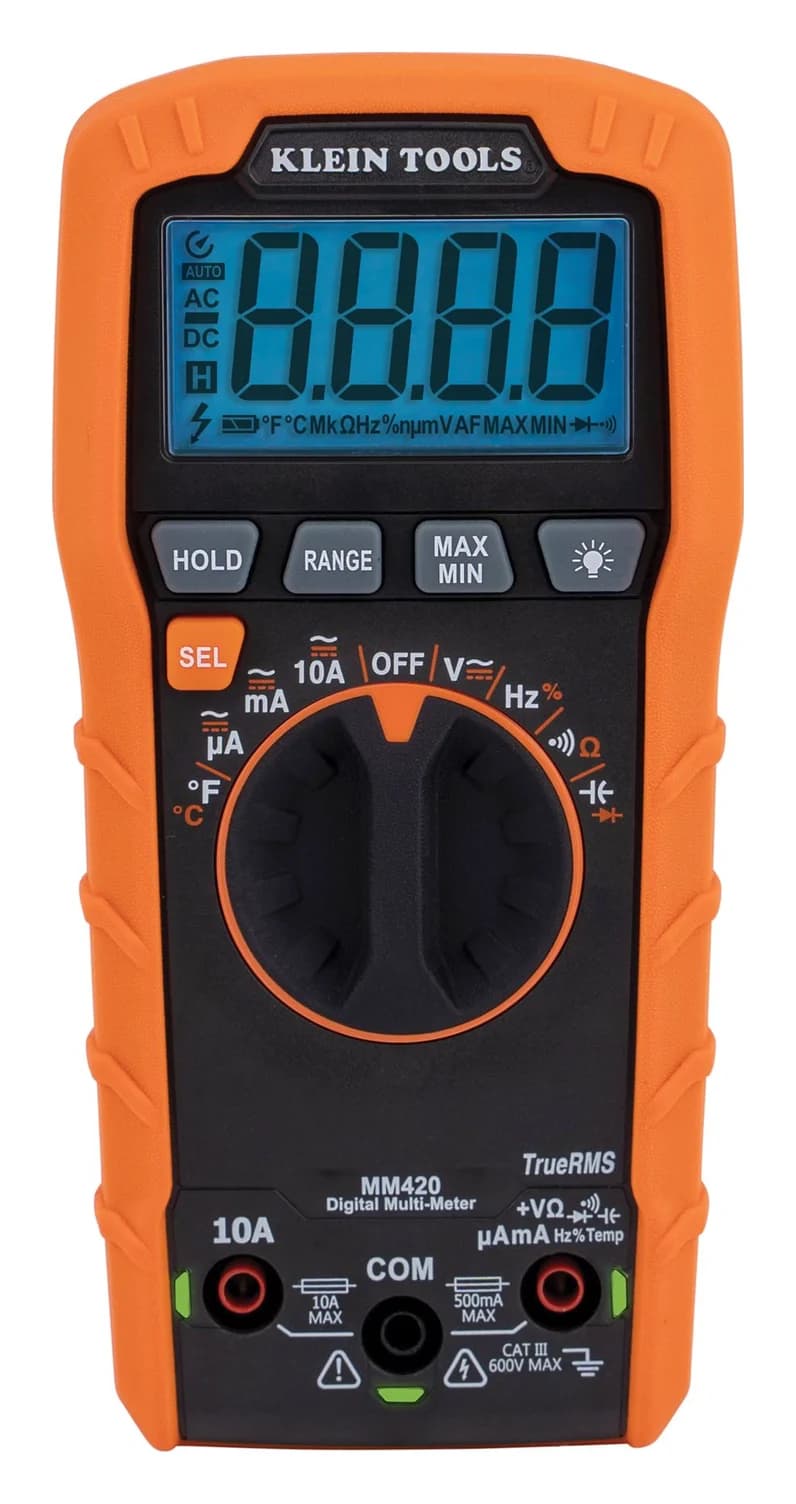
Klein MM420: temperature and small-current pick
Klein Tools
A 4,000-count auto-ranging True RMS multimeter rated CAT III 600V that measures up to 600 V and 10 A, plus temperature, capacitance, frequency and duty cycle.
Check package and model options
- 600 V max
- 10 A max
- 4,000 counts
- CAT III 600V
The MM420's white markings are defaults; orange markings are secondary functions selected with SEL. Its manual, printed pages 8–14, gives this map:
V with AC/DC marking
- Default → SEL alternative
- AC volts → DC volts
10A, mA or µA
- Default → SEL alternative
- AC current → DC current at that position
Sound waves / Ω
- Default → SEL alternative
- Continuity → resistance
Capacitor / diode
- Default → SEL alternative
- Capacitance → diode test
Hz / %
- Default → SEL alternative
- Frequency → duty cycle
°F / °C
- Default → SEL alternative
- Fahrenheit → Celsius
Full comparison table
Swipe to compare. Row labels stay visible.
| Dial position | Default → SEL alternative |
|---|---|
| V with AC/DC marking | AC volts → DC volts |
| 10A, mA or µA | AC current → DC current at that position |
| Sound waves / Ω | Continuity → resistance |
| Capacitor / diode | Capacitance → diode test |
| Hz / % | Frequency → duty cycle |
| °F / °C | Fahrenheit → Celsius |
Scroll horizontally to see every column
| Dial position | Default → SEL alternative |
|---|---|
| V with AC/DC marking | AC volts → DC volts |
| 10A, mA or µA | AC current → DC current at that position |
| Sound waves / Ω | Continuity → resistance |
| Capacitor / diode | Capacitance → diode test |
| Hz / % | Frequency → duty cycle |
| °F / °C | Fahrenheit → Celsius |
The easy mistake is assuming Ω is active because it shares the beeper position. Check the LCD icon. H means data hold, AC/DC identifies the active electrical mode, and MAX/MIN identifies a stored maximum or minimum. Lead Alert LEDs indicate the appropriate jacks; they do not replace checking the function and terminal labels.
Temperature is a reason to choose this model, but the supplied thermocouple is suitable only below 356°F / 180°C, despite the meter's wider temperature specification. See Klein's temperature instructions.
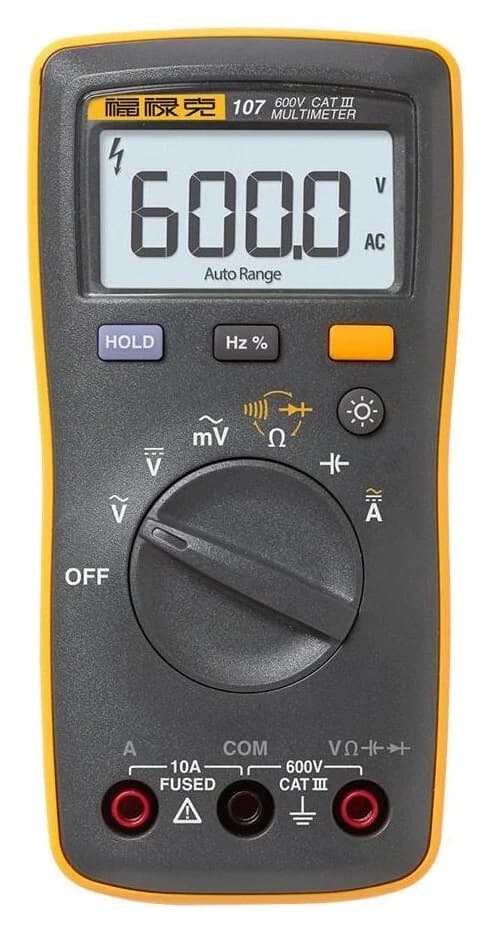
Fluke 107: pocket pick
Fluke
A palm-size 6,000-count multimeter rated CAT III 600V that measures AC and DC voltage and current to 600 V and 10 A, plus resistance, capacitance, frequency and duty cycle; it is not True RMS.
Check package and model options
- 600 V max
- 10 A max
- 6,000 counts
- CAT III 600V
The 107 has separate AC and DC voltage positions. Its 106/107 manual, printed pages 12–19, identifies the 107-only functions:
V~ / V⎓
- Function map
- Separate AC-voltage / DC-voltage positions
mV~
- Function map
- AC millivolts
Ω with beeper and diode markings
- Function map
- Resistance; yellow once selects continuity, twice selects diode
Capacitor icon
- Function map
- Capacitance
A with AC/DC markings
- Function map
- Yellow button toggles AC/DC current
Hz/% button
- Function map
- From AC voltage or AC current: frequency, then duty cycle
Full comparison table
Swipe to compare. Row labels stay visible.
| Dial position or button | Function map |
|---|---|
| V~ / V⎓ | Separate AC-voltage / DC-voltage positions |
| mV~ | AC millivolts |
| Ω with beeper and diode markings | Resistance; yellow once selects continuity, twice selects diode |
| Capacitor icon | Capacitance |
| A with AC/DC markings | Yellow button toggles AC/DC current |
| Hz/% button | From AC voltage or AC current: frequency, then duty cycle |
Scroll horizontally to see every column
| Dial position or button | Function map |
|---|---|
| V~ / V⎓ | Separate AC-voltage / DC-voltage positions |
| mV~ | AC millivolts |
| Ω with beeper and diode markings | Resistance; yellow once selects continuity, twice selects diode |
| Capacitor icon | Capacitance |
| A with AC/DC markings | Yellow button toggles AC/DC current |
| Hz/% button | From AC voltage or AC current: frequency, then duty cycle |
This reverses the MM420's resistance/continuity default: the 107 starts at resistance. HOLD freezes the reading; the LCD's AUTO indicator means automatic ranging. Do not borrow the 115/117 RANGE-button instructions for this control layout. The 107 product page confirms it is not True RMS.
Fluke 115: standard service reference
The 115 is the reference for the shared service functions below; the 117 adds the positions in the next section. Use the 115 product page and shared manual's feature table and illustrations.
V~ with yellow Hz
- Function map
- AC volts; yellow selects frequency
V⎓
- Function map
- DC volts
Shared AC/DC mV
- Function map
- AC millivolts; yellow selects DC millivolts
Ω
- Function map
- Resistance
Sound-wave icon
- Function map
- Dedicated continuity position
Diode / capacitor
- Function map
- Diode test; yellow selects capacitance
A~ with yellow Hz
- Function map
- AC amps; yellow selects frequency
A⎓
- Function map
- DC amps
Full comparison table
Swipe to compare. Row labels stay visible.
| Position on both 115 and 117 | Function map |
|---|---|
| V~ with yellow Hz | AC volts; yellow selects frequency |
| V⎓ | DC volts |
| Shared AC/DC mV | AC millivolts; yellow selects DC millivolts |
| Ω | Resistance |
| Sound-wave icon | Dedicated continuity position |
| Diode / capacitor | Diode test; yellow selects capacitance |
| A~ with yellow Hz | AC amps; yellow selects frequency |
| A⎓ | DC amps |
Scroll horizontally to see every column
| Position on both 115 and 117 | Function map |
|---|---|
| V~ with yellow Hz | AC volts; yellow selects frequency |
| V⎓ | DC volts |
| Shared AC/DC mV | AC millivolts; yellow selects DC millivolts |
| Ω | Resistance |
| Sound-wave icon | Dedicated continuity position |
| Diode / capacitor | Diode test; yellow selects capacitance |
| A~ with yellow Hz | AC amps; yellow selects frequency |
| A⎓ | DC amps |
LoZ on a 115 does not mean AutoVolt. The manual documents a low-impedance capacitance option, identified by LCAP at startup, for both 115 and 117. Its accuracy and dynamic range are reduced. Auto-V/LoZ voltage selection belongs to the 117 here.
Also check the version: Fluke lists FLUKE-115 and FLUKE-115 CAL; CAL adds a traceable calibration certificate with data. The 115/117 product-page comparison widgets show a temperature row, but their model-specific manual lists no temperature function. We use that function table rather than treating the widget as proof of a temperature mode.
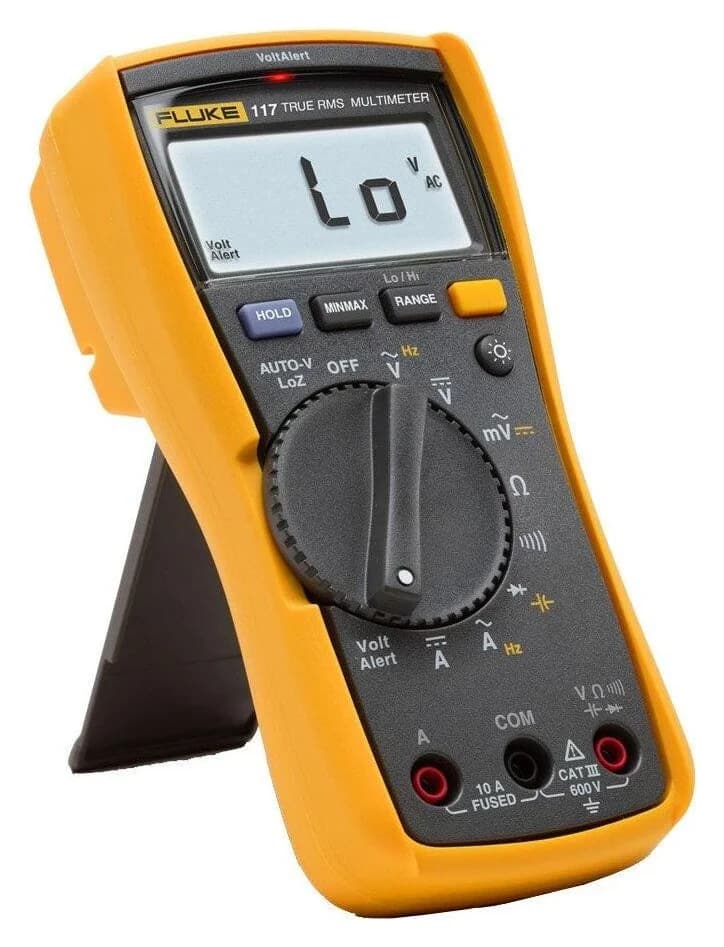
Fluke 117: AutoVolt and VoltAlert pick
Fluke
A compact 6,000-count True RMS multimeter for electricians, rated CAT III 600V, with built-in VoltAlert non-contact voltage detection, automatic AC/DC selection and a low-impedance mode.
Check package and model options
- 600 V max
- 10 A max
- 6,000 counts
- CAT III 600V
The 117 manual adds these functions to the shared map:
AUTO-V LoZ
- Dial → display meaning
- Automatically selects AC or DC volts with a low-impedance input; Auto Volts identifies this function
VoltAlert
- Dial → display meaning
- Non-contact AC detection; VoltAlert mode indicator and a red detection LED
Full comparison table
Swipe to compare. Row labels stay visible.
| Extra marking | Dial → display meaning |
|---|---|
| AUTO-V LoZ | Automatically selects AC or DC volts with a low-impedance input; Auto Volts identifies this function |
| VoltAlert | Non-contact AC detection; VoltAlert mode indicator and a red detection LED |
Scroll horizontally to see every column
| Extra marking | Dial → display meaning |
|---|---|
| AUTO-V LoZ | Automatically selects AC or DC volts with a low-impedance input; Auto Volts identifies this function |
| VoltAlert | Non-contact AC detection; VoltAlert mode indicator and a red detection LED |
Auto Volts and Auto are different: Auto Volts means automatic AC/DC voltage selection; Auto means automatic range selection. The 117 product page identifies its low-impedance voltage mode as a way to prevent ghost-voltage readings.
VoltAlert has sensitivity indications Hi / Lo, not measured voltage values. Fluke warns that voltage can still be present without a detection indication and that shielded wire can defeat detection. The 117/323 combo kit is a package containing the 117 plus a separate clamp meter, rather than another 117 dial layout.
Read unit prefixes before the number
The MM420 LCD legend includes M, k, m, µ and n. Prefixes scale the unit; case matters. Using NIST's SI prefix table:
M — mega
- Multiply the unit by
- One million
- Illustrative conversion, not a measured result
- 1 MΩ = 1,000 kΩ
k — kilo
- Multiply the unit by
- One thousand
- Illustrative conversion, not a measured result
- 6 kΩ = 6,000 Ω
m — milli
- Multiply the unit by
- One thousandth
- Illustrative conversion, not a measured result
- 100 mV = 0.1 V
µ — micro
- Multiply the unit by
- One millionth
- Illustrative conversion, not a measured result
- 1 mA = 1,000 µA
n — nano
- Multiply the unit by
- One billionth
- Illustrative conversion, not a measured result
- 1 µF = 1,000 nF
Full comparison table
Swipe to compare. Row labels stay visible.
| Prefix | Multiply the unit by | Illustrative conversion, not a measured result |
|---|---|---|
| M — mega | One million | 1 MΩ = 1,000 kΩ |
| k — kilo | One thousand | 6 kΩ = 6,000 Ω |
| m — milli | One thousandth | 100 mV = 0.1 V |
| µ — micro | One millionth | 1 mA = 1,000 µA |
| n — nano | One billionth | 1 µF = 1,000 nF |
Scroll horizontally to see every column
| Prefix | Multiply the unit by | Illustrative conversion, not a measured result |
|---|---|---|
| M — mega | One million | 1 MΩ = 1,000 kΩ |
| k — kilo | One thousand | 6 kΩ = 6,000 Ω |
| m — milli | One thousandth | 100 mV = 0.1 V |
| µ — micro | One millionth | 1 mA = 1,000 µA |
| n — nano | One billionth | 1 µF = 1,000 nF |
The prefix changes magnitude, not the measurement type: mV is voltage; mA is current. A unit shown in a shared display drawing does not establish a usable range on every model.
COM and current jacks: the model exception
COM means common/return. The other input labels need the exact manual:
MM420
- Current-terminal reference
- 10A jack for its high-current function; the VΩ-labelled jack also serves µA/mA
Fluke 107
- Current-terminal reference
- A jack for current; separate multifunction input for voltage, resistance, continuity, diode and capacitance
Fluke 115 / 117
- Current-terminal reference
- A jack for current; separate multifunction input for voltage, resistance, continuity, diode and capacitance
Full comparison table
Swipe to compare. Row labels stay visible.
| Meter | Current-terminal reference |
|---|---|
| MM420 | 10A jack for its high-current function; the VΩ-labelled jack also serves µA/mA |
| Fluke 107 | A jack for current; separate multifunction input for voltage, resistance, continuity, diode and capacitance |
| Fluke 115 / 117 | A jack for current; separate multifunction input for voltage, resistance, continuity, diode and capacitance |
Scroll horizontally to see every column
| Meter | Current-terminal reference |
|---|---|
| MM420 | 10A jack for its high-current function; the VΩ-labelled jack also serves µA/mA |
| Fluke 107 | A jack for current; separate multifunction input for voltage, resistance, continuity, diode and capacitance |
| Fluke 115 / 117 | A jack for current; separate multifunction input for voltage, resistance, continuity, diode and capacitance |
Sources: Klein, printed pages 10–11, 107 terminal table and 115/117 terminal table. A generic diagram showing a separate mA socket would mislead an MM420 owner.
OL, HOLD and other display indicators
OL / O.L.
- Interpretation
- Overrange, not zero; an open continuity circuit can also produce it, as Klein documents
H / HOLD
- Interpretation
- A frozen reading; MM420 uses H, while the Flukes identify display hold
Minus sign
- Interpretation
- Negative polarity/value, not a low-battery indication
Battery icon
- Interpretation
- Low battery; replace batteries as the maker directs to avoid incorrect readings
Auto / AUTO
- Interpretation
- Automatic ranging, not automatic AC/DC selection
MIN / MAX; AVG on 115/117
- Interpretation
- Minimum, maximum or average capture/display mode, rather than an ordinary live reading
LEAd on 115/117
- Interpretation
- Reminder to check terminals when entering or leaving an amp position; it does not confirm correct lead placement
Lightning/unsafe-voltage icon
- Interpretation
- A hazardous-voltage warning; absence alone is not proof of safety
Full comparison table
Swipe to compare. Row labels stay visible.
| Display | Interpretation |
|---|---|
| OL / O.L. | Overrange, not zero; an open continuity circuit can also produce it, as Klein documents |
| H / HOLD | A frozen reading; MM420 uses H, while the Flukes identify display hold |
| Minus sign | Negative polarity/value, not a low-battery indication |
| Battery icon | Low battery; replace batteries as the maker directs to avoid incorrect readings |
| Auto / AUTO | Automatic ranging, not automatic AC/DC selection |
| MIN / MAX; AVG on 115/117 | Minimum, maximum or average capture/display mode, rather than an ordinary live reading |
| LEAd on 115/117 | Reminder to check terminals when entering or leaving an amp position; it does not confirm correct lead placement |
| Lightning/unsafe-voltage icon | A hazardous-voltage warning; absence alone is not proof of safety |
Scroll horizontally to see every column
| Display | Interpretation |
|---|---|
| OL / O.L. | Overrange, not zero; an open continuity circuit can also produce it, as Klein documents |
| H / HOLD | A frozen reading; MM420 uses H, while the Flukes identify display hold |
| Minus sign | Negative polarity/value, not a low-battery indication |
| Battery icon | Low battery; replace batteries as the maker directs to avoid incorrect readings |
| Auto / AUTO | Automatic ranging, not automatic AC/DC selection |
| MIN / MAX; AVG on 115/117 | Minimum, maximum or average capture/display mode, rather than an ordinary live reading |
| LEAd on 115/117 | Reminder to check terminals when entering or leaving an amp position; it does not confirm correct lead placement |
| Lightning/unsafe-voltage icon | A hazardous-voltage warning; absence alone is not proof of safety |
Sources: MM420 LCD legend and instructions, 107 display and HOLD warnings, and 115/117 display tables.
How we choose
This is manufacturer-document research, with no physical testing claimed. We compared dial illustrations, button descriptions, terminal tables and model-specific function lists, including the shared-manual exceptions. Source snapshots support the reference; our broader method is at How we choose.
Buying advice: replace a missing function, not an unfamiliar symbol
The 115/117 have amp ranges without dedicated µA/mA positions; the MM420 supplies those functions. The 115 has low-impedance capacitance but lacks the 117's AutoVolt position. Temperature is listed for the MM420, rather than the other reference models.
- Yes: MM420: dedicated µA/mA functions and temperature
- Partly: Fluke 115: LoZ capacitance, without AutoVolt voltage selection
- Yes: Fluke 117: AutoVolt/LoZ voltage and VoltAlert
Choose an upgrade only when its documented function fills your gap. For the broader shortlist, see best multimeters; for operating procedures, return to how to use a multimeter.
Verdict
Start with the exact model map, then read the LCD mode and unit prefix. Choose MM420 for temperature and small-current ranges, 107 for the pocket format, or 117 for AutoVolt and VoltAlert. The 115 is the standard service reference, with its own important LoZ-capacitance exception.
Our picks at a glance
- 1
Choose for: temperature and small-current pick
Check before buying: Rated CAT III 600V: not for service-entrance (CAT IV) work
- 2
Choose for: pocket pick
Check before buying: Not True RMS: Fluke positions it for jobs where True RMS accuracy isn't needed
- 3
Choose for: Electrical troubleshooting with True RMS and a low-impedance mode for ghost voltage.
Limit: CAT III 600 V, not CAT IV; no mA/µA current ranges (the 6 A range resolves 1 mA).
Frequently asked questions
What does OL mean on a multimeter?
OL means the input exceeds the selected range; it is not a numerical reading of zero. Context matters: the MM420 manual also shows OL for an open continuity circuit, and Fluke's 115/117 manual shows OL above the diode-test range. Read the selected function and units before interpreting it. OL alone cannot establish that a circuit is safe.
Which multimeter symbol means continuity?
Look for the sound-wave or beeper icon. On the Klein MM420, continuity is the default at the shared continuity/resistance position; SEL selects resistance. On the Fluke 107, start at the resistance position and the yellow button selects continuity. The Fluke 115 and 117 have a dedicated continuity position. The nearby diode symbol identifies a different test.
Does the µA symbol in the Fluke 117 manual mean it measures microamps?
No. The shared display illustration includes µA among its unit markings, but the model-specific function and terminal tables govern what the meter measures. The 117 and 115 have amp inputs without dedicated microamp or milliamp ranges. The MM420 has separate µA and mA selector positions. Choose by the function table, rather than a shared LCD illustration.
Does the AC wave symbol mean a meter is True RMS?
No. The wave identifies AC voltage or current; True RMS is a separate specification. Klein specifies the MM420 as True RMS, and Fluke specifies the 115 and 117 that way. Fluke explicitly says the 107 is not True RMS, even though its dial includes AC functions. Look for the maker's specification as well as the wave.
Related guides
Best picks · Multimeters
Best Multimeters for Beginners: Choose a First Meter You Can Learn On
Choose a first multimeter by its controls, current ranges, jack reminders and included leads. Compare Klein MM420, MM325 and Fluke 107 for learning and gifts.
Best picks · Multimeters
Best Multimeters for HVAC: Microamps, Temperature and Complete Kits
Choose an HVAC multimeter by job: compare Fluke 116, Fieldpiece SC260 and Klein alternatives for flame sensors, clamp current, probe limits and kit contents.
Comparison · Multimeters
Fluke 101 vs 107: Current Ranges, Backlight and Regional Support
Compare the Fluke 101 and 107 by current inputs, backlight, accuracy and kit contents, with manual references and regional warranty checks before you buy.